
What is WAN 2.2?
Released in mid-2025, WAN 2.2 family of models represents Alibaba's latest breakthrough in open-source AI-powered video generation. Built on a Mixture-of-Experts (MoE) architecture with 28 billion parameters, activating only 14 billion per inference step.
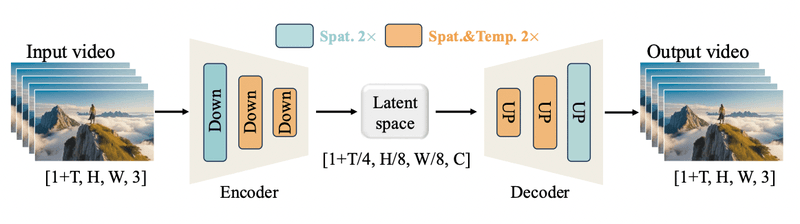
WAN 2.2 T2V-A14B (Text-to-Video)
Transform text descriptions into cinematic video sequences. Simply describe what you want to see, and the model generates high-quality video content from scratch.
- Model: Wan-AI/Wan2.2-T2V-A14B
- Use Cases: Marketing videos, concept visualization, creative content generation, storyboarding
WAN 2.2 I2V-A14B (Image-to-Video)
Bring static images to life by generating realistic video animations. Perfect for animating product photos, portraits, or any still imagery.
- Model: Wan-AI/Wan2.2-I2V-A14B
- Use Cases: Product demos, photo animation, social media content, e-commerce applications
Key Features of WAN models
- Hyper-realistic output: 720p resolution at FPS with cinematic quality
- Advanced aesthetic controls: Lighting, color grading, and camera language customization
- LoRA fine-tuning: Custom style adaptation for personalized content
- Apache 2.0 license: Freely available for commercial and academic use
Note on Frame Support: WAN 2.2 supports 81 frames by default (out of the box), which is the baseline capability provided by the model. At Simplismart, we've extended this to support up to 113 frames, enabling longer and more complex video sequences while maintaining quality and performance.
The model's MoE design already achieves a significant reduction in inference costs compared to dense models of similar quality. However, generating even a 5-second video still takes approximately 17 minutes on a single H100 GPUs, which is far too slow for production environments.
The Performance Challenge
When you deploy WAN 2.2, the model's impressive capabilities come with significant computational overhead:
- Memory bottleneck: The 28B Mixture-of-Experts (MoE) architecture demands significant GPU memory, requiring ~80 GB VRAM for inference and ~50 GB even when idle.
- Attention complexity: Self-attention operations scale quadratically with sequence length
- Redundant computation: Video frames share temporal features, but standard inference recomputes everything
- Data movement: Constant tensor transfers between CPU and GPU create latency
For enterprises processing hundreds or thousands of video generation requests, these constraints translate to:
- High infrastructure costs
- Poor user experience due to long wait times
- Limited scalability
Simplismart's Optimization Stack
At Simplismart, we've engineered a comprehensive optimization pipeline that tackles each performance bottleneck while maintaining WAN 2.2's output quality. Our approach makes it significantly easier to deploy WAN 2.2 for production use cases. Here's how:
1. Hybrid Parallelism
WAN 2.2's 14B active parameters and 81-frame video sequences demand efficient multi-GPU distribution. Our hybrid parallelism strategy combines tensor parallelism (sharding model weights across GPUs), sequence parallelism (distributing the 113 video frames across devices), and intelligent pipeline parallelism (splitting the transformer layers across GPU stages). Unlike naive parallelization approaches that suffer from 25-40% communication overhead, we implement tensor localization techniques that analyze computational graphs to keep interdependent operations on the same device. This is critical for WAN 2.2's MoE architecture, where the two expert models must coordinate efficiently during the denoising process. For WAN 2.2's video generation workload,processing 113 frames through 27-40 denoising steps; hybrid parallelism enables near-linear scaling across 2-8 GPUs, making it possible to generate videos in under 50 seconds on multi-GPU setups while maintaining cost-efficiency.
Impact: Near-linear multi-GPU scaling with reduction in communication overhead, enabling sub-50-second generation on multi-GPU configurations.
2. FP8 Quantization
We apply torch.float8 quantization to WAN 2.2's weights and activations. FP8 (8-bit floating point) provides:
- 2x memory reduction compared to FP16
- 2x faster inference using quantized attention kernels
- Torch AO FP8 quantization to reduce memory footprint
Impact: 40% memory reduction, 2x throughput improvement.
3. Quantized Attention
Standard self-attention in transformers computes attention scores for all token pairs, resulting in O(n²) complexity. We apply quantized attention mechanisms that significantly reduce computational overhead while maintaining output quality:
- Implements low-bit quantization for attention matrices (4-8 bits)
- Uses fused flash attention kernels to minimize latency
- Applies optimized attention patterns for video frame sequences
- Maintains temporal coherence for long context sequence length
By quantizing attention computations to lower precision formats, we achieve substantial speedups over standard attention implementations while preserving the visual quality critical for professional video generation.
Impact: 30-40% faster attention operations, essential for processing long video sequence tokens efficiently.
4. Intelligent Caching
Video generation involves processing similar features across frames, creating opportunities for smart computation reuse. We implement advanced caching strategies inspired by recent breakthroughs in diffusion model optimization:
Early-Layer Feature Caching: The initial transformer blocks extract low-level features (edges, textures, basic structures) that remain relatively stable across frames. By caching these activations and reusing them for subsequent frames with similar content, we eliminate redundant computation in the early layers. This technique is particularly effective for video generation where temporal consistency means adjacent frames share significant structural similarities.
Temporal Activation Caching: We implement a training-free caching method specifically designed for video diffusion models. Instead of recomputing features for every frame, we maintain a temporal cache of intermediate activations from recently processed frames. When generating frame N, we can reuse cached features from frame N-1 if motion is minimal. The key insight is that diffusion models exhibit high feature reusability across both timesteps and frames, allowing us to cache and reuse up to 80% of computations without quality loss.
Impact: 25-35% reduction in redundant computation for video sequences, enabling up to 2.2x speedup while maintaining visual quality comparable to the baseline.
5. Context Parallelism
We implement context parallelism, a technique that distributes attention computation across multiple GPU Streaming Multiprocessors (SMs) by partitioning the sequence dimension. For video generation with 113 frames, this approach:
- Distributes attention head computation across parallel GPU resources
- Optimizes kernel launch configurations for maximum GPU occupancy
- Minimizes synchronization overhead through efficient ring-based communication
- Enables efficient processing of long video sequences by splitting context across devices
This hybrid parallelism strategy is particularly effective for transformer-based models where the sequence length (video frames) becomes a bottleneck during attention computation.
Impact: 15-20% speedup in multi-head attention operations through optimized parallel execution.
How to Deploy WAN 2.2 on Simplismart
WAN 2.2 models (both Text to Video as well as Image to Video) are available as a dedicated deployment on Simplismart's platform. You can reach out to us to get access to this model.
Here is an example of how you can use it to create videos from your prompt:
# text2video.py
import requests
import os
import time
from pathlib import Path
from dotenv import load_dotenv

load_dotenv()


def download_video(url: str, output_path: str = None) -> str:
    """Download video from URL to local file."""
    if output_path is None:
        # Create output directory if it doesn't exist
        output_dir = Path("output")
        output_dir.mkdir(exist_ok=True)

        # Generate filename with timestamp
        timestamp = int(time.time())
        output_path = output_dir / f"wan2_video_{timestamp}.mp4"
    else:
        output_path = Path(output_path)
        output_path.parent.mkdir(parents=True, exist_ok=True)

    print("📥 Downloading video...")

    response = requests.get(url, stream=True)
    response.raise_for_status()

    with open(output_path, "wb") as f:
        for chunk in response.iter_content(chunk_size=8192):
            if chunk:
                f.write(chunk)

    print(f"✅ Video downloaded: {output_path}")
    return str(output_path)


def generate_video(prompt: str) -> str:
    """
    Generate a video using Wan2.2 Text-to-Video API and download it locally.

    Args:
        prompt: Text description of the video to generate

    Returns:
        Local file path to the downloaded video
    """
    # Get API token from environment
    api_token = os.getenv("SIMPLISMART_API_TOKEN")

    # API endpoint
    url = "https://rst3oi67th-proxy.ss-in.s9t.link/subscribe"

    # Headers
    headers = {
        "Content-Type": "application/json",
        "Authorization": f"Bearer {api_token}",
    }

    # Request payload
    payload = {
        "name": "wan2-2-t2v-1f28f1d0-52f6-406a-ae28-b5fa309c5239",
        "input_data": {
            "prompt": prompt,
            "negative_prompt": "overexposed, low quality, worst quality",
            "num_frames": 81,
            "frames_per_second": 16,
            "resolution": "720p",
            "aspect_ratio": "16:9",
            "num_inference_steps": 27,
            "enable_safety_checker": True,
            "enable_output_safety_checker": False,
            "enable_prompt_expansion": False,
            "acceleration": "regular",
            "guidance_scale": 3.5,
            "guidance_scale_2": 4.0,
            "shift": 5,
            "interpolator_model": "film",
            "num_interpolated_frames": 1,
            "adjust_fps_for_interpolation": True,
            "video_quality": "high",
            "video_write_mode": "balanced",
        },
    }

    # Make the request
    print("🎬 Generating video...")
    response = requests.post(url, headers=headers, json=payload)
    result = response.json()

    # Check if video generation was successful
    if result.get("status") == "SUCCESS" and result.get("result", {}).get("output_url"):
        video_url = result["result"]["output_url"]
        print("✅ Video generated successfully!")

        # Download the video
        video_path = download_video(video_url)
        return video_path
    elif result.get("status") == "PENDING":
        raise Exception(
            f"⏳ Video generation is pending. Request ID: {result.get('request_id')}"
        )
    else:
        raise Exception(f"❌ Video generation failed: {result}")


if __name__ == "__main__":
    prompt = (
        "Close-up shot, edge lighting, daylight, soft lighting, desaturated colors, center composition, daylight.In an eye-level shot, three figures compose the frame. In the center is a foreign boy in a red school uniform, around fifteen or sixteen years old, with slightly curly blond hair, defined features, and a focused expression. He first looks to the left, then quickly turns his head to look right, before looking back to the left, his lips moving as if in conversation. His movements are natural and fluid, and his gaze shifts with the turn of his head. On the right is the blurred face of a foreign woman, with only half her face visible. She is around her thirties, and her expression is indistinct. The background is a classroom setting, with the wall covered in black-and-white framed photos. The figures of several students in red uniforms are faintly visible. In the foreground, a blurry figure quickly passes in front of the frame, creating a sense of motion. The lighting is soft and even, and the overall color tone is neutral, emphasizing the depth and detail of the shot.",
    )

    video_path = generate_video(prompt)
    print(f"\n🎥 Video saved to: {video_path}")
Complete Code Examples: Find the full working code and additional examples in our GitHub Cookbook repository.
Parameter Breakdown
Below is a breakdown of what each parameter controls in the code snippet above:
Core Generation Parameters
- prompt: Text description of the video you want to generate.
- negative_prompt: Describes what you want to avoid in the generated video (e.g., "low quality, blurry, overexposed").
- num_frames: Number of frames to generate (default: 81, up to 113 with Simplismart's optimizations).
- frames_per_second: Video playback speed in FPS (default: 16).
- resolution: Output video quality. Options include "720p", "580p", or "480p".
- aspect_ratio: Video dimensions format (e.g., "16:9" for widescreen, "9:16" for vertical/mobile, "1:1" for square).
Quality & Control Parameters
- num_inference_steps: Number of denoising iterations (default: 27-40). More steps = higher quality but slower generation. The model iteratively refines the video through this many steps.
- guidance_scale: Controls how closely the model follows your prompt (default: 3.5). Higher values (5-7) = stronger adherence to prompt, lower values = more creative freedom.
- guidance_scale_2: Secondary guidance parameter for fine-tuning prompt adherence (default: 4.0). Works in conjunction with guidance_scale for nuanced control.
- shift: Temporal shift parameter for motion dynamics (default: 5). Adjusts how motion evolves across frames.
Safety & Enhancement Parameters
- enable_safety_checker: Filters input prompts for inappropriate content (default: True). Recommended for production deployments.
- enable_output_safety_checker: Scans generated videos for inappropriate content (default: False). Enable for additional content moderation.
- enable_prompt_expansion: Automatically enhances your prompt with additional details (default: False). Useful for simple prompts but may alter intent for detailed descriptions.
- acceleration: Generation speed mode. Options: "regular" (balanced), "fast" (optimized but may sacrifice quality).
Frame Interpolation Parameters
- interpolator_model: Algorithm for generating intermediate frames between keyframes (default: "film"). FILM (Frame Interpolation for Large Motion) creates smoother transitions.
- num_interpolated_frames: Number of additional frames to generate between each pair of base frames (default: 1). Increases smoothness without full regeneration.
- adjust_fps_for_interpolation: Automatically adjusts FPS to account for interpolated frames (default: True). Maintains consistent playback speed.
Output Quality Parameters
- video_quality: Encoding quality preset. Options: "high", "medium", "low". Affects compression and file size.
- video_write_mode: Encoding optimization strategy. Options: "balanced" (quality/size tradeoff), "fast" (speed priority), "best" (quality priority).
Pro Tip: Start with default parameters and adjust guidance_scale (creativity vs. adherence) and num_frames (video length) based on your use case. For faster iterations, use lower num_inference_steps (15-20) during testing, then increase to 27-40 for final output.
Example Output
Real-World Performance Benchmarks
When you deploy WAN 2.2 with our optimizations on 8× NVIDIA H100 GPUs, you get transformative performance improvements across both WAN 2.2 model variants:
WAN 2.2 Text-to-Video (T2V-A14B)
WAN 2.2 Image-to-Video (I2V-A14B)
What This Means for Your Business
- Faster time-to-market: Generate 3x more videos in the same timeframe
- Lower infrastructure costs: Run on smaller GPU instances or serve 3x more users on the same hardware
- Better user experience: Near-instant video generation for interactive applications
- Production-ready: Consistent sub-60-second generation times enable real-time workflows
Technical Deep Dives
Interested in learning more about the optimizations behind our platform? Check out these resources:
- Hybrid Parallelism Explained: How we minimize communication overhead in distributed inference
- Quantization Explained: Learn how quantization works under the hood
Conclusion
WAN 2.2 represents a significant leap forward in open-source video generation, but to deploy WAN 2.2 efficiently requires specialized expertise and infrastructure. At Simplismart, we've built a comprehensive optimization stack that makes enterprise-grade video generation:
- Fast: 3.2x faster inference with intelligent caching and attention optimization
- Affordable: 70% cost reduction through memory optimization and higher throughput
- Scalable: Efficient multi-GPU distribution and batching for production workloads
- Accessible: Simple APIs and self-hosted options for any deployment scenario
Whether you're building a content creation platform, enhancing video editing workflows, or exploring creative AI applications, Simplismart provides the infrastructure and optimizations you need to ship products faster.
Ready to get started? Book a call with us to solve your GenAI inference challenges.