
Key Takeaways
- Workload matching: GPUs dominate deep learning training and real-time LLM inference due to massive parallelism and high memory bandwidth, while CPUs remain the most cost-effective choice for classical ML, small quantized models, and latency-tolerant batch tasks.
- The memory bandwidth bottleneck: LLM generation speed is fundamentally limited by memory bandwidth during the decode phase at low batch sizes, making GPU High-Bandwidth Memory (HBM) essential for serving concurrent users at scale.
- ROI measurement: Hardware cost should always be evaluated by cost per output (such as cost per one million tokens) under real-world batch sizes, rather than relying on flat hourly cloud instance rates.
- Cost optimization: Advanced serving techniques like model quantization, continuous batching, and intelligent scale-to-zero autoscaling maximize GPU utilization and eliminate the financial drain of idle compute.
When moving a machine learning model from a development notebook to production, the most critical hardware decision you will face is choosing between a CPU and a GPU. Choose wrong, and you risk either bleeding budget on idle AI accelerators or deploying a product with unacceptable user latency.
The short answer? GPUs dominate for the heavy parallel math required for deep learning training and real-time AI inference. However, CPUs remain the most cost-effective choice for specific inference workloads, such as classical ML algorithms, smaller models, and batch jobs where latency isn't a priority. Plus, every GPU server still relies on a CPU to orchestrate the workload.
This guide breaks down the CPU vs GPU debate for AI workloads. We will explore their architectural differences, explain why you must evaluate training and inference requirements separately, and show you how to accurately measure hardware ROI by calculating cost per output (like cost per token) rather than simply looking at hourly compute rates.
What are Central Processing Unit (CPU) and Graphics Processing Unit (GPU)?
A CPU is the main brain of a computer designed for fast, sequential, general-purpose tasks, while a GPU is a specialized processor built to handle thousands of calculations at the same time.
Core Differences:
- Primary Role: CPUs serve as general-purpose system orchestrators, whereas GPUs function as specialized parallel accelerators.
- Core Design: CPUs utilize a small count of highly powerful cores with high clock speeds and deep caches. GPUs deploy thousands of smaller, simpler cores built to process massive batches of matrix operations simultaneously.
- Processing Style: CPUs excel at low-latency sequential tasks and complex logic branch predictions, while GPUs deliver ultra-high throughput for parallel data streams and matrix math.
Typical Use Cases:
- CPU: General OS tasks, classical machine learning algorithms, small model deployments, pipeline orchestration, and low-concurrency batch jobs.
- GPU: Deep learning model training, large-scale LLM real-time inference, high-throughput continuous batching, and computer vision/media processing pipelines.
The Kitchen Analogy: Think of a CPU as a small team of master chefs who can individually cook any complex dish from scratch. A GPU, on the other hand, is an assembly line where thousands of cooks perform one simple chopping step at the same time. For a single, intricate meal, the master chefs (CPU) win. For ten thousand identical plates served at once, the assembly line (GPU) wins.
CPU vs. GPU Comparison Table
Why Are GPUs Used for AI?
While CPUs handle general-purpose orchestration, GPUs have become the default hardware for training deep learning models and running real-time AI inference. Four core advantages make GPUs well suited for modern artificial intelligence:
1. Parallelism for Matrix Multiplication: Neural networks, especially modern Transformer architectures, rely heavily on multiplying matrices of weights by activations. These calculations break down into millions of independent multiply-add operations. While a CPU processes these sequentially or across a limited number of threads, a GPU deploys thousands of cores to execute them at the same time.
2. Hardware Acceleration via Tensor/Matrix Cores: Modern AI GPUs feature dedicated matrix units—Tensor Cores (NVIDIA) or Matrix Cores (AMD)—designed specifically for deep learning. These specialized units execute complex matrix multiply-accumulate operations in a single hardware step. Crucially, they natively support lower-precision mathematical formats (like BF16, FP8, INT8, and FP4 on Blackwell). Operating at a lower precision significantly shrinks the data footprint, vastly accelerating throughput with virtually no drop in model accuracy.
3. Extreme Memory Bandwidth (HBM): AI workloads are often bottlenecked by data movement rather than sheer compute power. High-end enterprise GPUs solve this by utilizing High-Bandwidth Memory (HBM) that delivers multi-terabyte-per-second speeds. Even top-tier server CPUs packed with multiple DDR5 channels offer only a fraction of that bandwidth, making GPUs indispensable for memory-bound tasks like Large Language Model (LLM) inference. (Smaller GPUs utilizing GDDR memory offer lower bandwidth but still excel via dedicated Tensor Cores and continuous batching.)
4. A Mature Software Ecosystem: Hardware is only as powerful as the software that runs it. Ecosystems like NVIDIA CUDA and AMD ROCm provide optimized compute libraries, underpinning modern frameworks like PyTorch, TensorFlow, vLLM, and TensorRT-LLM.
Does PyTorch use a GPU or a CPU? PyTorch supports both. By default, PyTorch tensors live on the CPU, and developers must explicitly move them to the accelerator (using commands like model.to("cuda")). However, in production, almost all deep learning in PyTorch runs on GPUs because that is where the required performance is.
CPU vs. GPU for Training: Why Deep Learning Relies on Accelerated Hardware
When training machine learning models, hardware selection directly dictates experiment velocity, development cycles, and infrastructure spend. While modern CPUs handle traditional statistical algorithms with ease, deep neural network training runs almost exclusively on dedicated GPUs.
Why Model Training Almost Always Runs on GPUs
The computational profile of deep learning training aligns directly with the architectural strengths of modern GPUs:
- Forward and Backward Passes: Every training step requires computing activations during the forward pass and gradients across layers during backpropagation. This back-and-forth execution roughly triples the mathematical workload compared to forward-only inference.
- Large Batch Processing: Training routines feed data in large batches (e.g., 32, 64, or higher), saturating thousands of GPU cores simultaneously and maintaining peak compute efficiency.
- High Arithmetic Intensity: Deep learning layers demand a high ratio of floating-point operations relative to memory transactions (FLOPs per byte transferred). GPUs are built to sustain this arithmetic density.
- Efficient Multi-GPU Scaling: Distributed training techniques, such as Data Parallelism (DDP), Fully Sharded Data Parallel (FSDP), and Tensor Parallelism, leverage high-speed interconnects like NVIDIA NVLink and InfiniBand to achieve near-linear scaling at best. CPU clusters face steep networking and latency overheads that degrade multi-node scaling efficiency.
Key Takeaway: Training a multi-billion-parameter foundation model or deep vision architecture purely on CPUs is technically possible, but commercially impractical due to prolonged training times and ballooning cloud costs.
Pro Tip: Distributed Training Acceleration
When training models across multi-GPU nodes, leverage high-speed inter-GPU interconnects like NVIDIA NVLink and InfiniBand. This minimizes networking overhead during gradient exchange and enables near-linear scaling performance at best.
Where CPUs Still Fit in the Training Pipeline
CPUs remain central to enterprise machine learning stacks across three distinct functions:
- Classical Machine Learning: Traditional tabular workflows, statistical models, and foundational machine learning algorithms run natively and cost-effectively on modern multicore CPUs without requiring GPU acceleration.
- Small Networks & Prototyping: Lightweight custom models, initial unit testing, and architecture sanity checks execute seamlessly on local CPU threads prior to cluster submission.
- Data Ingestion and Preprocessing Pipelines: ETL operations, decoding images, tokenizing text, applying audio transforms, data augmentation, and PyTorch DataLoader batching rely heavily on CPU execution. Balancing CPU core allocations ensures data loaders do not starve upstream GPUs of input tensors.
A Note on Parameter-Efficient Fine-Tuning (PEFT)
Techniques such as LoRA (Low-Rank Adaptation) and QLoRA (Quantized LoRA) drastically cut down GPU memory overhead by freezing base model weights and training only low-rank adapter matrices. QLoRA pushes efficiency further by storing the base model weights in a 4-bit format (NormalFloat 4 or NF4) while executing the actual computations in 16-bit Brain Float (BF16) to prevent performance degradation.
However, while PEFT makes model adaptation significantly cheaper and accessible on single enterprise GPUs, the underlying matrix operations and gradient updates still require GPU acceleration.
CPU vs. GPU for AI Inference
Inference is where hardware selection becomes nuanced. While model training almost exclusively demands GPUs, GPUs are not always the definitive answer for inference. Choosing the right hardware depends on your latency targets, traffic concurrency, and model architecture.
Prefill vs. Decode: Why Memory Bandwidth Matters More Than Core Count
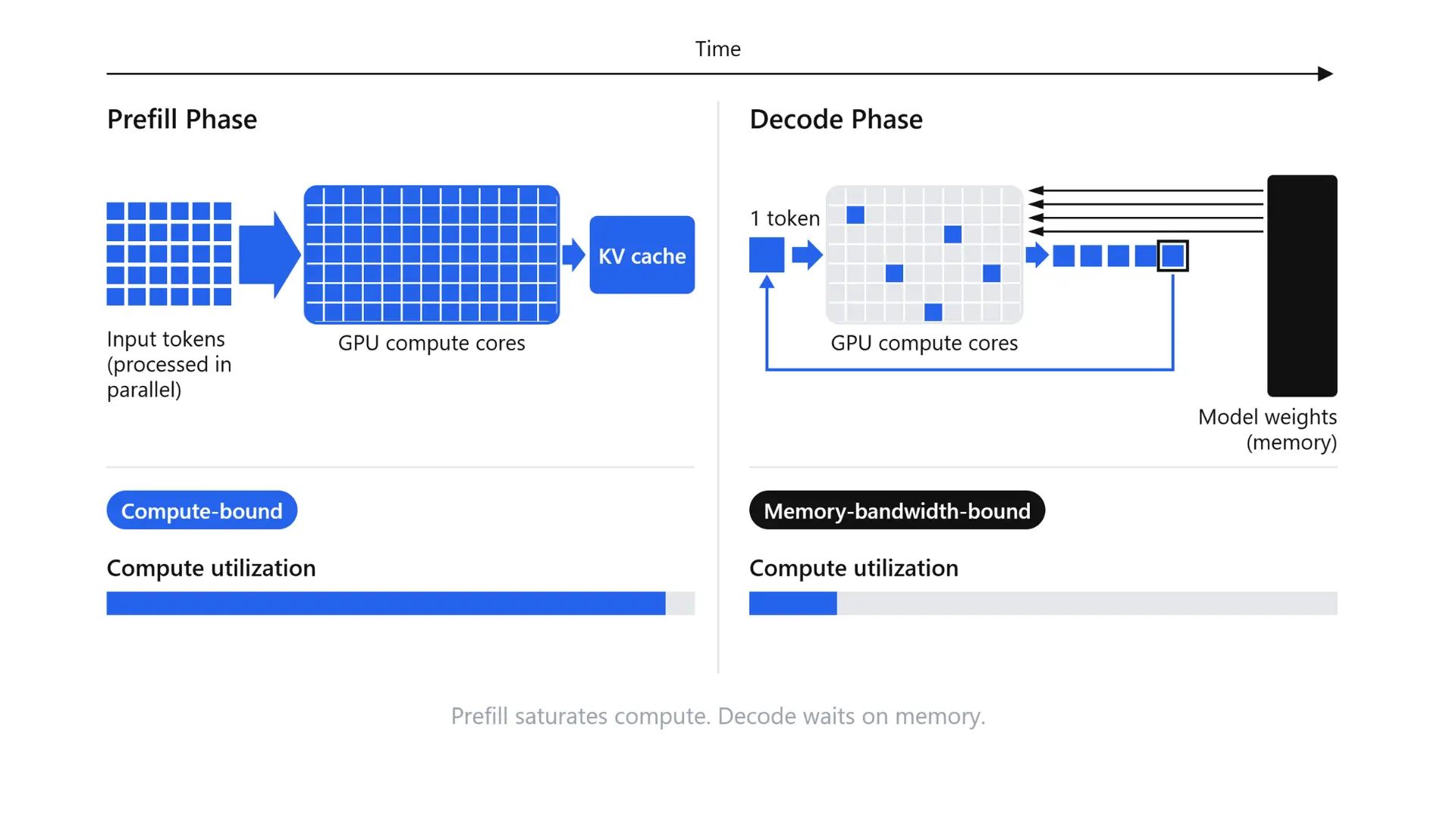
To understand inference hardware, you must understand how Large Language Models (LLMs) generate text. LLM inference operates in two distinct phases:
- Prefill Phase: The model processes the entire input prompt simultaneously. This phase is heavily compute-bound, executing massive matrix multiplications across many tokens in parallel. GPUs naturally excel here.
- Decode Phase: The model generates the output one token at a time. For every single new token, the system must read the full set of model weights from memory. At small batch sizes, the processor spends the vast majority of its time waiting for data to arrive, making the decode phase memory-bound at low batch sizes.
Because of this bottleneck, memory bandwidth, not raw core count, dictates your maximum generation speed during the decode phase at low batch sizes.
The Math: A Memory Bandwidth Calculation
To illustrate this, consider serving an 8-billion parameter model (like Llama 3.1 8B) in BF16 precision. At 2 bytes per parameter, the model weights total approximately 16 GB. At a batch size of 1, generating every single token requires reading all 16 GB of data. The theoretical ceiling is calculated simply:
Theoretical tokens/s ≈ Memory bandwidth ÷ Model size
(Note: The CPU figure is derived from 12 channels × 6,400 MT/s × 8 bytes ≈ 614 GB/s).
Important Caveat: These are theoretical upper limits that ignore KV cache overhead, software latency, compute limits, and batching. Real-world throughput will be lower on both platforms. However, the ratio remains clear: a high-end HBM GPU starts with a roughly 5x bandwidth advantage right out of the gate. (Smaller GDDR-based GPUs win instead via dedicated Tensor Cores and continuous batching rather than raw bandwidth.)
KV Cache: The Hidden Memory Capacity Driver
During the decode phase, the model avoids recomputing attention states by storing the key and value vectors of every preceding token in memory—a structure known as the KV cache. For a model like Llama 3.1 8B (32 layers, 8 KV heads, head dimension 128, in BF16 precision), each token requires: 2 × 32 × 8 × 128 × 2 bytes = 128 KB of memory. At an 8K context length, a single request consumes roughly 1 GB just for its KV cache. Serving 32 concurrent 8K context requests requires 32 GB of RAM for the cache alone—double the 16 GB needed for the base model weights. This makes GPU memory capacity, not just bandwidth, a hard limit on request concurrency.
Key Concept: Memory-Bound Generation
During LLM inference, the decode phase must fetch all model weights from memory for every generated token. Memory bandwidth (GB/s or TB/s), not core processing power, is the primary bottleneck determining token generation speed at low batch sizes.
How Batching Changes the Equation
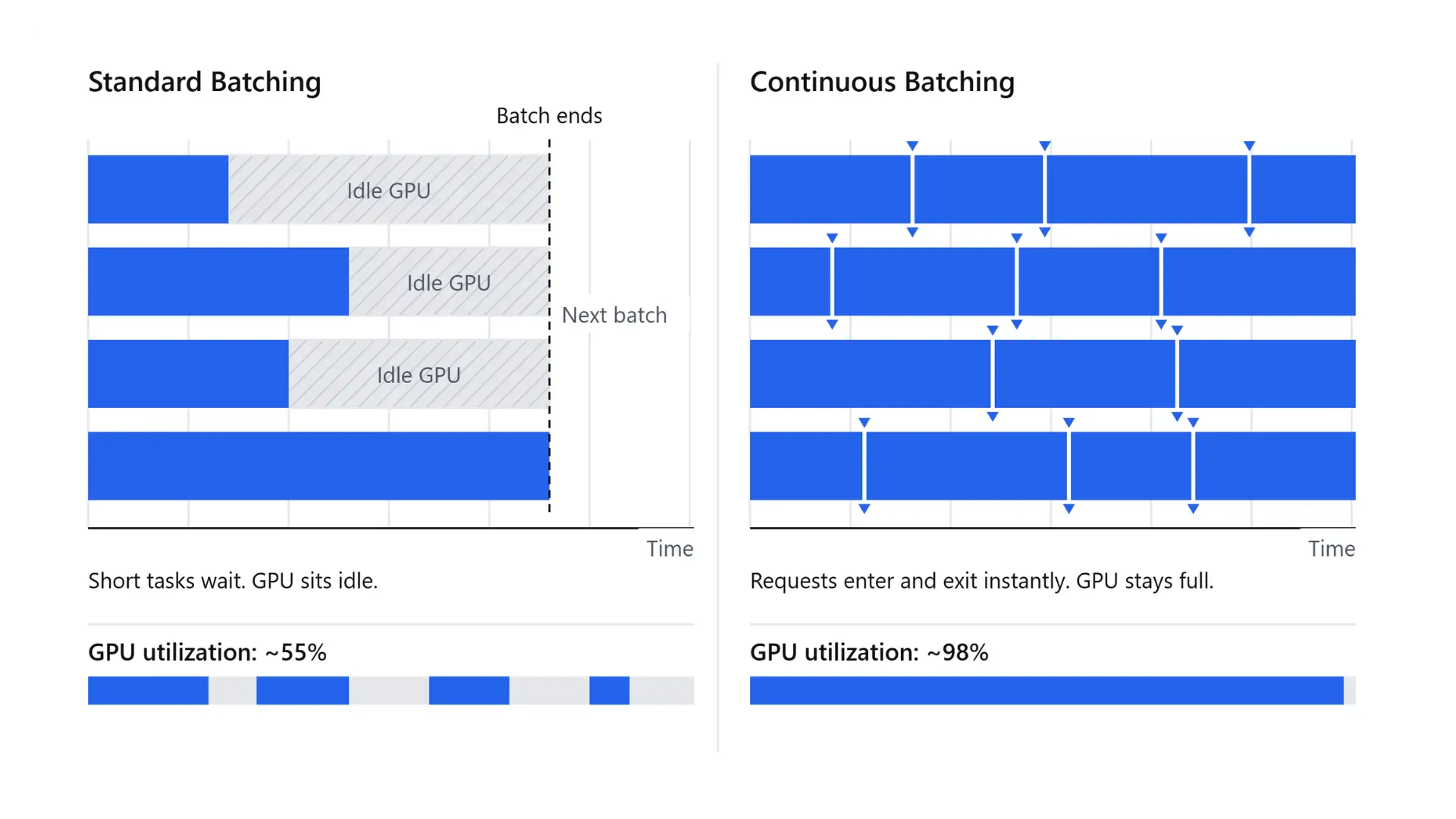
At a batch size of 1, a single user absorbs the full computational cost of reading the model weights for every token. However, GPUs allow you to serve multiple users concurrently. By grouping requests together (batching), a single read of the model weights generates a token for every prompt in the batch simultaneously. As concurrency increases, your cost per token drops dramatically.
CPUs, constrained by lower memory bandwidth and compute, hit a ceiling much faster. Once you batch enough requests, decode shifts from being memory-bound to compute-bound, and a CPU simply lacks the arithmetic density to keep up. This is why a CPU might deliver perfectly acceptable latency for a single local user, but fall behind quickly under real-world, concurrent web traffic.
When CPU Inference Makes Sense
CPUs remain a highly cost-effective and practical choice for specific workloads:
- Classical ML models: Gradient boosting (XGBoost), linear regressions, and scikit-learn tree models.
- Embeddings and small models: Processing at low Queries Per Second (QPS).
- Quantized small and mid-size LLMs: Scenarios where throughput requirements are modest, and models are compressed into CPU-friendly formats like GGUF using frameworks like llama.cpp.
- Latency-tolerant batch jobs: Offline data processing that can run overnight or in the background.
- Edge deployments: On-device applications (phones, laptops, IoT) where a discrete GPU is unavailable.
- Maximizing existing infrastructure: Utilizing spare CPU capacity you already own and pay for.
Note on hardware advancements: Intel’s Advanced Matrix Extensions (AMX), available on Xeon processors since the 4th generation (Sapphire Rapids), add on-chip matrix units for BF16 and INT8 math. They can speed up small-model inference, but published results are vendor benchmarks run at specific batch sizes and precisions, so test your own model against your latency target.
When GPUs Are Worth the Investment
GPUs are the required engine for heavy, latency-sensitive production environments:
- Real-time LLM inference: Where low Time to First Token (TTFT)—the latency required to process the prompt and start generating text—and fast inter-token latency (the time between subsequent output tokens) are required.
- Voice AI agents: Where conversational delays instantly degrade the user experience.
- Massive foundation models: Serving models larger than 70B parameters that require enormous memory capacity and distributed GPU setups (Tensor Parallelism).
- High-concurrency platforms: Where advanced continuous batching drives the cost per token down to profitable levels.
- Compute-heavy generation: Image diffusion models and video generation frameworks.
- At-scale speech processing: Transcribing audio at scale. For example, ed-tech platform Physics Wallah reported ~900 RTF throughput using Whisper Large v3 on GPUs. Real-Time Factor (RTF) throughput is a metric that indicates how many times faster than real-time a system processes audio. With this batch throughput, they met a <15-minute turnaround even for 10–12-hour lectures.
The CPU's Role in a GPU Inference Stack
Investing in high-end GPUs does not remove the CPU from the equation. In fact, every GPU-accelerated serving stack relies heavily on a robust CPU to act as the master orchestrator.
While the GPU handles the massive matrix math, the CPU is responsible for feeding it data. Specifically, the CPU handles:
- Tokenization and Detokenization: Converting human-readable text into mathematical tokens before processing, and translating the generated tokens back into text.
- Pre- and Post-Processing: Handling tasks like resizing images, decoding audio files, or formatting JSON outputs before and after the GPU does its work.
- Scheduling and Batching: Running the logic for continuous batching and deciding which incoming API requests get grouped and sent to the accelerator next.
- Data Movement: Managing the transfer of data back and forth between the system's host memory and the GPU's device memory over the PCIe bus.
The Bottleneck Risk: Why CPU Sizing Matters
If any of these CPU-bound steps are slow, the GPU sits idle waiting for work. You can easily bottleneck an incredibly expensive AI accelerator simply by pairing it with a weak or overloaded CPU. Therefore, right-sizing your CPU is a critical part of deploying a GPU-first infrastructure.
The Solution: Asynchronous Overlap
To maximize hardware utilization, production engineering teams design their systems so the CPU and GPU work simultaneously rather than waiting in a sequential line.
By intelligently overlapping CPU preprocessing, GPU compute execution, and host-to-device data transfers, you create a continuous pipeline where no component ever sits idle. For example, enterprise AI company Ema self-reported cutting its p50 end-to-end latency from 10 seconds to 0.9 seconds by optimizing pipelines, including implementing asynchronous overlap.
CPU vs. GPU vs. TPU vs. NPU: Understanding AI Accelerators
Beyond standard processors and graphics cards, the AI hardware landscape includes specialized chips like Tensor Processing Units (TPUs) and Neural Processing Units (NPUs) designed for specific deployment environments. Here is how the four major processors compare:
The Reality for Enterprise AI Teams
While TPUs deliver exceptional performance for matrix multiplication, they are Application-Specific Integrated Circuits (ASICs) tightly tied to Google's proprietary ecosystem and mostly accessed via Google Cloud. NPUs, conversely, prioritize battery efficiency and low heat generation over raw computational speed, making them perfect for running small, localized models directly on edge devices like phones and laptops.
How to Choose: A Hardware Decision Framework
Selecting the right hardware for your AI inference workload comes down to balancing four primary factors: the specific workload type, your latency targets, the size of the model, and the expected concurrency.
Use this decision matrix to guide your deployment strategy:
Compare Cost Per Output, Not Cost Per Hour
When evaluating cloud infrastructure ROI, looking purely at the hourly instance rate can be misleading. A lower-cost cloud instance is not actually cost-effective if it produces little output. Instead, calculate what you are paying per unit of work.
For Large Language Models, the gold standard metric is cost per 1 million tokens. You can calculate it using this formula:
Cost per 1M tokens = (Hourly instance cost ÷ (Tokens per second × 3,600)) × 1,000,000
You can apply this exact same logic to other AI domains: cost per audio minute transcribed, cost per image generated, or cost per API request.
Measure your throughput under real batch sizes and target latency SLAs, rather than theoretical best-case scenarios. If a higher-tier GPU costs more per hour to rent but produces significantly more tokens in that same hour, it can be the less expensive option per token.
How to Make GPU AI Inference Cost-Effective
Engineering teams often default to considering CPUs for inference because they want to avoid three major GPU pain points: the high cost of idle compute, chronic infrastructure over-provisioning, and paying for an oversized, expensive GPU that the workload doesn't actually need.
While these are valid concerns, they are solvable infrastructure challenges. You do not have to give up the performance gains of a GPU to keep your cloud budget in check.
Core Optimization Strategies for GPU Inference
By implementing advanced serving techniques, you can maximize hardware utilization and lower your cost per token:
- Quantization (INT8, INT4, FP8): By reducing the mathematical precision of your model's weights, you shrink its memory footprint. This allows you to fit models onto smaller GPUs and speeds up the memory-bound decode phase.
- Continuous Batching: Traditional batching waits for a whole group of requests to finish before processing the next. Continuous batching dynamically injects new API requests into the GPU the exact millisecond others complete, keeping your hardware utilization constantly maximized and driving up throughput.
- Speculative Decoding: Speculative decoding uses a small draft model to rapidly propose multiple tokens in parallel, which the primary target model then verifies in a single forward pass, significantly reducing overall generation latency.
- Hardware Right-Sizing: Benchmark your model and run it on the smallest, most cost-effective GPU that still reliably hits your target latency SLAs. For example, as reported in a case study published by Simplismart, voice AI company Sanas moved its Gemma 3 voicebot from H100s to A10G GPUs using custom INT4 quantization, retained 99.99% of its original accuracy, and achieved 53% cost savings.
- Autoscaling and Scale-to-Zero: Never pay for idle compute. Implement intelligent autoscaling that dynamically provisions resources during traffic spikes and gracefully scales down to absolutely zero when user traffic stops.
Important Strategy: Right-Sizing & Quantization
You can achieve cost savings by applying lower precision (like INT8 or INT4 quantization) to fit models onto smaller, less expensive GPUs, allowing you to meet your target latency SLAs without overspending on higher-tier hardware.
Real-World Proof: The Impact of Optimization
When applied correctly, these infrastructure strategies yield measurable returns across real-world deployments (as reported in case studies published by Simplismart):
- Physics Wallah achieved zero idle compute costs while maintaining a sub-15-minute SLA.
- Lyric heavily optimized its infrastructure, slashing its model cold start times from approximately 300 seconds down to just 75 seconds.
- Dashverse achieved ~47% lower GPU cost for its image pipelines.
Deploy Efficiently with Simplismart
Building these optimizations from scratch takes months of specialized engineering. Simplismart provides an enterprise AI inference platform that does the heavy lifting for you. It allows you to deploy models on a full spectrum of GPUs and AI accelerators, ranging from NVIDIA T4, H100, and B200 to AMD Instinct GPUs (such as the MI300X series).
Whether you deploy in Simplismart's managed cloud or use a Bring Your Own Cloud (BYOC) architecture, you get instant access to advanced batching, quantization, and scale-to-zero capabilities without having to rebuild your infrastructure.
Ready to cut your inference costs? Talk to us.
Frequently Asked Questions (FAQ)
1. Is a GPU better than a CPU for AI?
For deep learning training and most real-time inference, yes. GPUs offer far more parallelism and memory bandwidth. For classical ML, small models, and latency-tolerant jobs, a CPU can be the better value. Compare cost per token (or per output), not hourly price, before deciding.
2. Why do AI models use GPUs instead of CPUs?
Neural networks are built on large matrix multiplications that split into millions of independent operations. GPUs run thousands of those at once, and they have the memory bandwidth to feed them.
3. Can you run an LLM on a CPU?
Yes. Quantized small and mid-size LLMs run on CPUs, especially with extensions like Intel AMX. Expect much lower tokens per second than a GPU, and less headroom as concurrency grows.
4. When should you use a CPU instead of a GPU for machine learning?
Use a CPU for classical ML (XGBoost, scikit-learn), small models, embeddings at low QPS, batch jobs where latency doesn't matter, edge deployments, and cases where you already have spare CPU capacity.
5. Do you need both a CPU and a GPU for AI?
You always need a CPU; you need a GPU only for workloads that demand it. In a GPU setup, the CPU runs the operating system, tokenization, pre- and post-processing, scheduling, and data movement. The GPU does the heavy math. A slow CPU can starve the GPU.
6. What makes a GPU suitable for AI inference?
Thousands of parallel cores, Tensor Cores (NVIDIA) or Matrix Cores (AMD) with low-precision support, high-bandwidth memory (HBM), and a mature software stack (CUDA or ROCm, vLLM, TensorRT-LLM). Together, these features allow for batching many requests at once, which delivers high throughput and drives down the cost per token under load.
7. What is the difference between a CPU, GPU, TPU, and NPU?
A CPU is a general-purpose processor. A GPU is a parallel processor for throughput-heavy work. A TPU is Google's custom chip for tensor operations, available mostly via Google Cloud. An NPU is a low-power chip for on-device AI in laptops and phones. For most teams deploying AI in production, the real choice is between CPU and GPU; TPUs matter if you’re on Google Cloud, NPUs if you’re building on-device apps.