Open-weight frontier models have been improving quickly, but GLM 5.2 stands out for a specific reason: it pairs frontier-tier capability with a permissive MIT license and an unusually large 1 million token context window. In independent evaluations, it has reached the top of open-weight rankings and shows strong long-horizon performance. This post breaks down what GLM-5.2 is, how it performs on benchmarks, and what it realistically takes to run and serve it in production, and how Simplismart can take the infrastructure complexity off your plate.
What is GLM 5.2?
GLM-5.2 is an open-weight large language model released by Z.ai as the successor to GLM-5.1. Operationally, the key thing to understand is that it’s a Mixture of Experts (MoE) model: it has a very large total parameter count, but only a smaller subset is active per token. That distinction matters more for serving and throughput planning than the headline number alone.
- Parameters: reported as approximately 753B total, with about ~40B active parameters per token (MoE).
- Context window: 1 million tokens natively (a massive jump from GLM-5.1’s 200K).
- Max output length: up to 131,072 tokens per response.
- Pre-training data: 28.5T tokens
- License: MIT (permissive; no commercial restrictions or geographic limits stated).
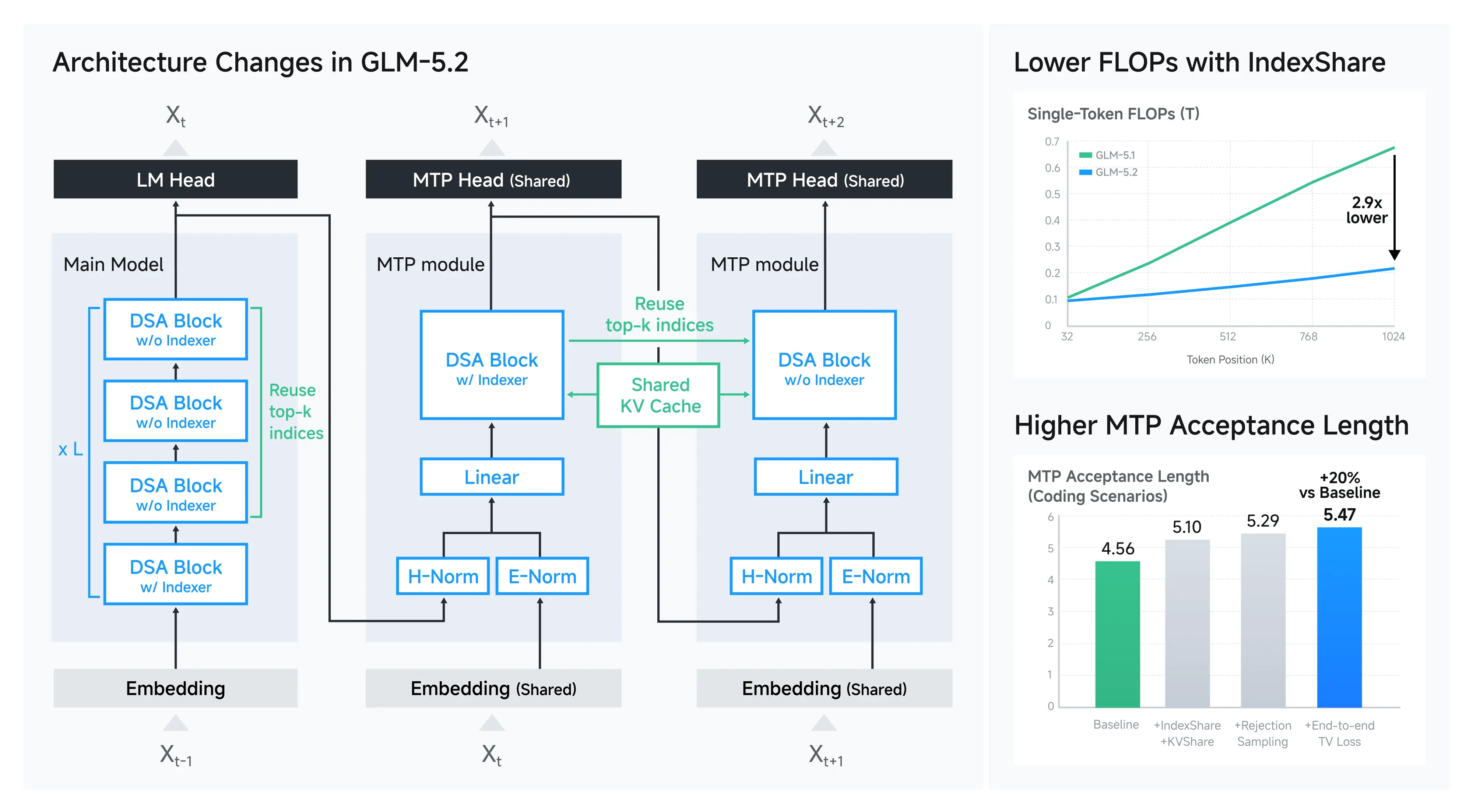
Source: Z.ai
The official release highlights two architecture/serving-oriented innovations aimed at making long-context inference more practical:
- IndexShare: reuses the same indexer across every 4 sparse attention layers, reducing per-token FLOPs (Z.ai reports ~2.9× savings at 1M context).
- Improved MTP layer for speculative decoding: Z.ai reports ~20% higher acceptance length, which can translate into faster generation in practice depending on the serving stack.
GLM-5.2 also exposes multiple “thinking effort” levels for coding tasks, letting teams trade off latency vs. quality for different workflows (interactive IDE copilots vs. batch code refactors, for example).
GLM 5.2 Benchmark Performance
Benchmarks are useful, but two implementation details can materially affect results and cost for large models:
- Long-context evaluation setups
- How many output tokens a model uses to reach an answer. Artificial Analysis notes that GLM-5.2 uses ~43K output tokens per task on average, which can improve long-horizon performance while also increasing inference cost.
.png)
Source: Artificial Analysis
With that caveat, the headline from third-party analysis is clear: GLM-5.2 is currently a leading open-weight model on the Artificial Analysis Intelligence Index.
Key numbers
- Artificial Analysis Intelligence Index v4.1: #1 open-weight, score 51 vs. MiniMax-M3: 44; DeepSeek V4 Pro (max): 44; Kimi K2.6: 43.
.png)
Source: Artificial Analysis
- GDPval-AA v2: 1524 (Artificial Analysis cites this as competitive with a proprietary reference point, GPT-5.5 (xhigh reasoning, 1514)).
- Significant improvement over GLM-5.1 across all 8 benchmarks (including SWE-bench Pro, Humanity’s Last Exam, TerminalBench v2.1, NL2Repo, etc) and is competitive with frontier proprietary models
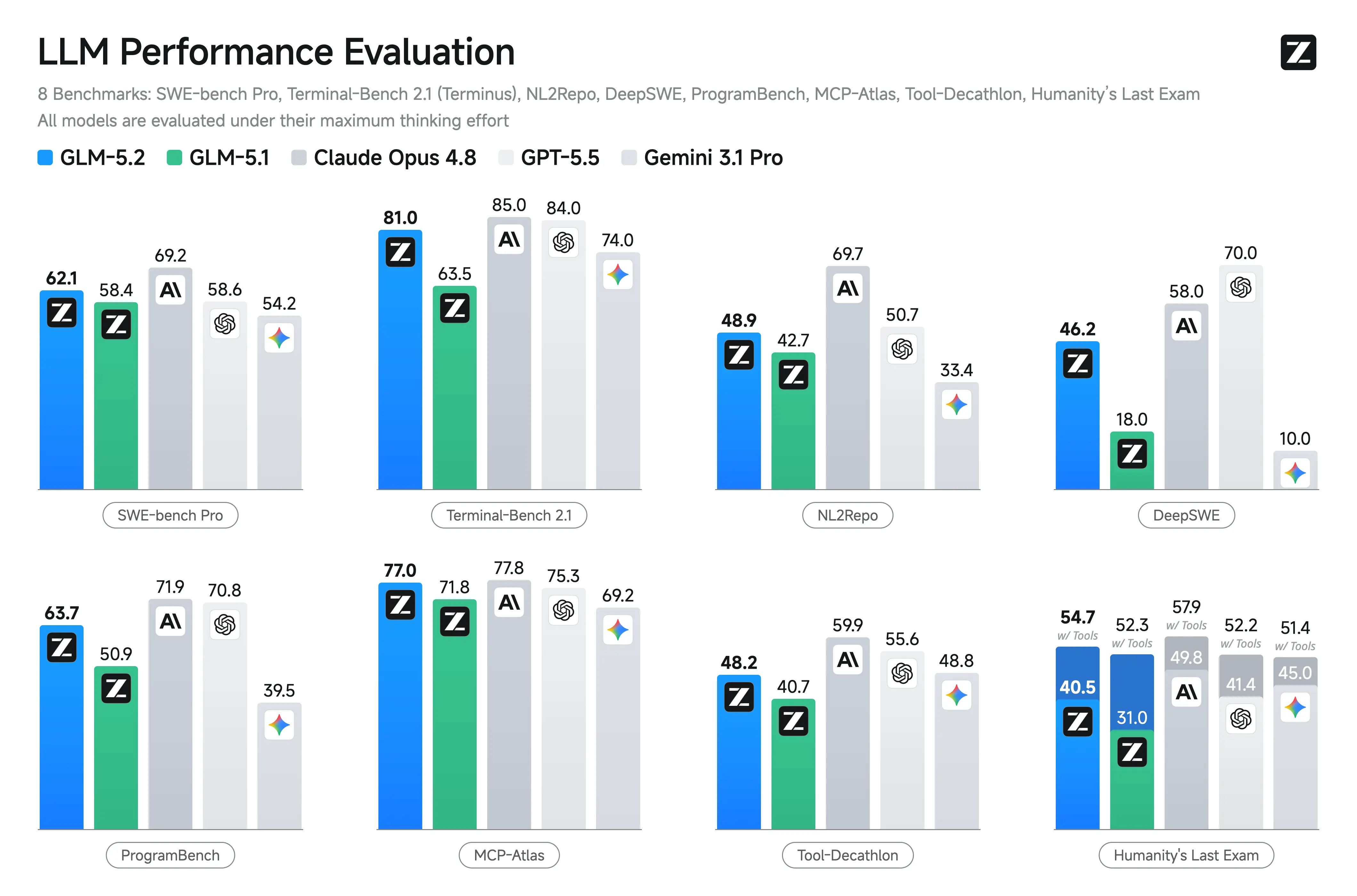
Source: Z.ai
What does it take to deploy GLM 5.2?
Even though GLM-5.2 activates ~40B parameters per token, the total model size still drives substantial memory requirements, especially if you want high throughput, low latency, and long-context support. For many teams, the bigger constraint isn’t raw FLOPs; it’s VRAM (and interconnect), plus KV cache growth as context expands.
Estimated memory requirements
The GLM-5.2 Hugging Face repo distributes the model across 282 safetensors files, totalling 1.51 TB, which tells you the native precision directly:
- At BF16 (2 bytes/param), 753B parameters = ~1,506 GB.
- Quantize to FP8 (1 byte/param) and the weight footprint drops to ~753 GB.
KV cache scaling for 1M context
The 1 million token context window is one of the main reasons people are excited for GLM 5.2, but it comes with a second memory curve: the KV cache. As context length increases, KV cache can add substantial VRAM on top of model weights.:
- BF16 KV cache: ~160 GB additional VRAM at full 1M context
- FP8 KV cache: ~80 GB (the pragmatic default for most production setups)
- Activations + CUDA/runtime overhead: ~30–60 GB
At FP8 weights with FP8 KV cache, the realistic serving footprint at long context lands at ~830–950 GB, meaning you're looking at a minimum of 12× H100 (80 GB) or 8× H200 (141 GB) to serve this with headroom.
Practical deployment considerations
- Multi-node orchestration: at these sizes, you’ll typically rely on tensor/pipeline parallelism and high-bandwidth interconnect to maintain latency.
- Quantization tuning: different quantization schemes can change quality/latency tradeoffs, especially for long-context and tool-use workflows.
- Serving stack: kernels, attention implementations, speculative decoding support, and scheduler behavior can dominate real-world throughput.
- Cost modeling: if a model uses very large output token counts per task, total cost is strongly workload-dependent—benchmark “wins” can be expensive in production without guardrails.
Simplismart: open weight LLM inference without the infrastructure overhead
Running a ~753B parameters MoE model isn’t just “rent GPUs, slap vLLM on it and we’re good.” Between multi-node coordination, quantization choices, KV cache management for long context, and serving latency optimization, the operational load can be significant before you even integrate the model into an application.
That’s where Simplismart comes in. We’re an MLOps platform designed to help teams deploy GenAI models without having to build and maintain the entire serving layer from scratch, whether you use optimized Simplismart infrastructure or bring your own cloud from the hyper-scalers like AWS, Azure, GCP, etc.
GLM 5.2 is currently in closed beta on the Simplismart platform, and will be made GA in the coming days. To get priority access to GLM 5.2, reach out to our team. Moreover, if you’re evaluating GLM-family of models or planning for GLM-5.2–class deployments, you can use Simplismart to productionize similar open-weight workloads and streamline the path from evaluation to reliable inference. Please feel free to check out the model marketplace to try out Simplismart-hosted models endpoints.
Summary
GLM 5.2 is a credible frontier-tier open-weight release: permissive MIT licensing, and native 1M context. The tradeoff is that deployment is hardware and systems-intensive, especially once you account for KV cache at long context and the model’s tendency to produce large outputs in some evaluations. If you want to explore GLM-5.2 in production without taking on the full infrastructure burden, managed inference platforms like Simplismart can be a pragmatic way to ship while keeping operational complexity under control.