
Most TTS systems make you choose: quality or latency, open-weight or production-ready. Qwen 3 TTS doesn't make that trade. It's an open-weight model that supports 10 languages, and a Qwen 3 TTS deployment on Simplismart delivers 90ms TTFB in production, today.
This blog post covers how the architecture achieves that number, what Simplismart's serving stack does on top, and how to go from zero to a working TTS API in under five minutes.
Why Most TTS Pipelines Can't Break 200ms
The problem isn't model size. It's architecture. Traditional TTS stacks combine a language model with a diffusion-based vocoder. The diffusion step alone requires 50–1,000 iterative denoising passes before you get audio. Each pass adds latency. Phoneme duration and pitch predictions from the LM are passed as fixed conditioning inputs to the vocoder, so any misprediction gets baked into every subsequent denoising step with no mechanism for correction. You can optimize the LM all you want and still hit a wall at the vocoder.
The fundamental issue: diffusion is sequential by design. You can't stream audio until the vocoder finishes its denoising loop, which means your TTFB is structurally bounded by the number of denoising steps × per-step latency. Even aggressive distillation leaves you at 150–300ms in practice.
What Qwen 3 TTS Does Differently
Qwen 3 TTS replaces that two-stage pipeline with a discrete multi-codebook language model that predicts audio tokens end-to-end. No separate vocoder. No diffusion loop. No phoneme/duration mis-predictions from the language model cascading into the vocoder as acoustic artifacts in the final audio.

A codebook translates continuous audio signals into discrete tokens, the same way a language model tokenizes text, capturing pronunciation, pitch, and timbre in a unified representation. Because the model outputs audio tokens directly, it can begin emitting the first audio packet after processing a single input character.

Source: Qwen 3 TTS Technical Report
Alibaba calls this a Dual-Track hybrid streaming architecture: one track generates first-layer codebook tokens (the primary acoustic sequence) while a second track simultaneously predicts the remaining codebook layers (the fine-grained timbre and prosody detail). Both run in parallel rather than sequentially, which is what makes streaming onset possible. The theoretical minimum latency from the model card is 97ms. In production on Simplismart's optimized serving stack, it's 90ms TTFB.
The model family ships in five variants across two sizes:
Simplismart's shared endpoint serves Qwen3-TTS-12Hz-1.7B-CustomVoice, the variant that ships with natural language instruction control, 9 built-in speakers, and cross-lingual synthesis enabled out of the box.
How Simplismart Achieves 90ms TTFB on Qwen 3 TTS Deployment
The stock Qwen 3 TTS implementation is fast. The Simplismart serving stack is faster. Here's what's different.
Dual-Worker GPU Architecture
The standard approach is running everything in a single Python process which hits GIL contention under concurrent load. Simplismart splits the workload across dedicated GPU processes:
- Talker Worker: converts text into audio token representations (the LM step)
- Predictor Worker: expands tokens into multi-codebook audio representations (15 codebook tokens per step)
- Decoder: a CPU-bound process that converts audio codes to raw PCM, isolated in its own process so it never blocks the main event loop
Workers communicate via ZMQ zero-copy inter-process messaging, eliminating the serialization overhead that compounds latency in multi-process serving.
Flash Attention 3 + Paged KV Caching
The attention mechanism runs Flash Attention 3 with paged KV caching. Paged attention uses a block-based memory model, analogous to virtual memory in an OS; so the system handles longer sequences without pre-allocating fixed GPU buffers per request. KV cache capacity is set at 4,096 tokens (16 memory blocks), preventing cache overflow and avoiding CUDA graph buffer resize overhead on longer utterances.
CUDA Graphs capture and replay GPU operations at the kernel level, eliminating per-step kernel launch overhead and keeping latency consistent under load rather than spiking on cold paths.
Batched Decode and Streaming Transport
Audio decoding runs through an asynchronous queue system. Instead of requests serializing on a shared decoder lock, they submit to a background worker that batches multiple decode operations together, improving throughput under concurrent load without adding per-request latency.
For streaming delivery, PCM audio is buffered into fixed-size 4KB WebSocket frames. The first few chunks use smaller decode windows to minimize TTFB, then shift to larger windows for throughput. This is production telemetry, not synthetic benchmarks.
What the CustomVoice Variant Gives You
The CustomVoice model ships with 9 built-in speakers, each capable of synthesizing any of the 10 supported languages natively. Cross-lingual synthesis works out of the box: an English-named speaker delivers fluent Japanese with natural prosody, no per-language configuration required.
Beyond speaker selection, the model accepts a natural language instruct field:
- "Speak excitedly": adaptive prosody for enthusiasm
- "Whisper softly": appropriate for ambient or ASMR use cases
- "Speak slowly and clearly": useful for accessibility or language-learning tools
This is meaningfully different from TTS APIs where "emotion control" means picking from a fixed dropdown backed by static speaker embeddings. The model adjusts tone, rhythm, and emotional expression from the instruction at inference time.
Qwen 3 TTS Deployment on Simplismart: Step-by-Step Guide
Step 1: Find the Model in the Marketplace
Go to https://app.simplismart.ai/model-marketplace and search Qwen 3 TTS. The CustomVoice model card shows the 1.7B variant pre-configured for low-latency serving.
Step 2: Deploy
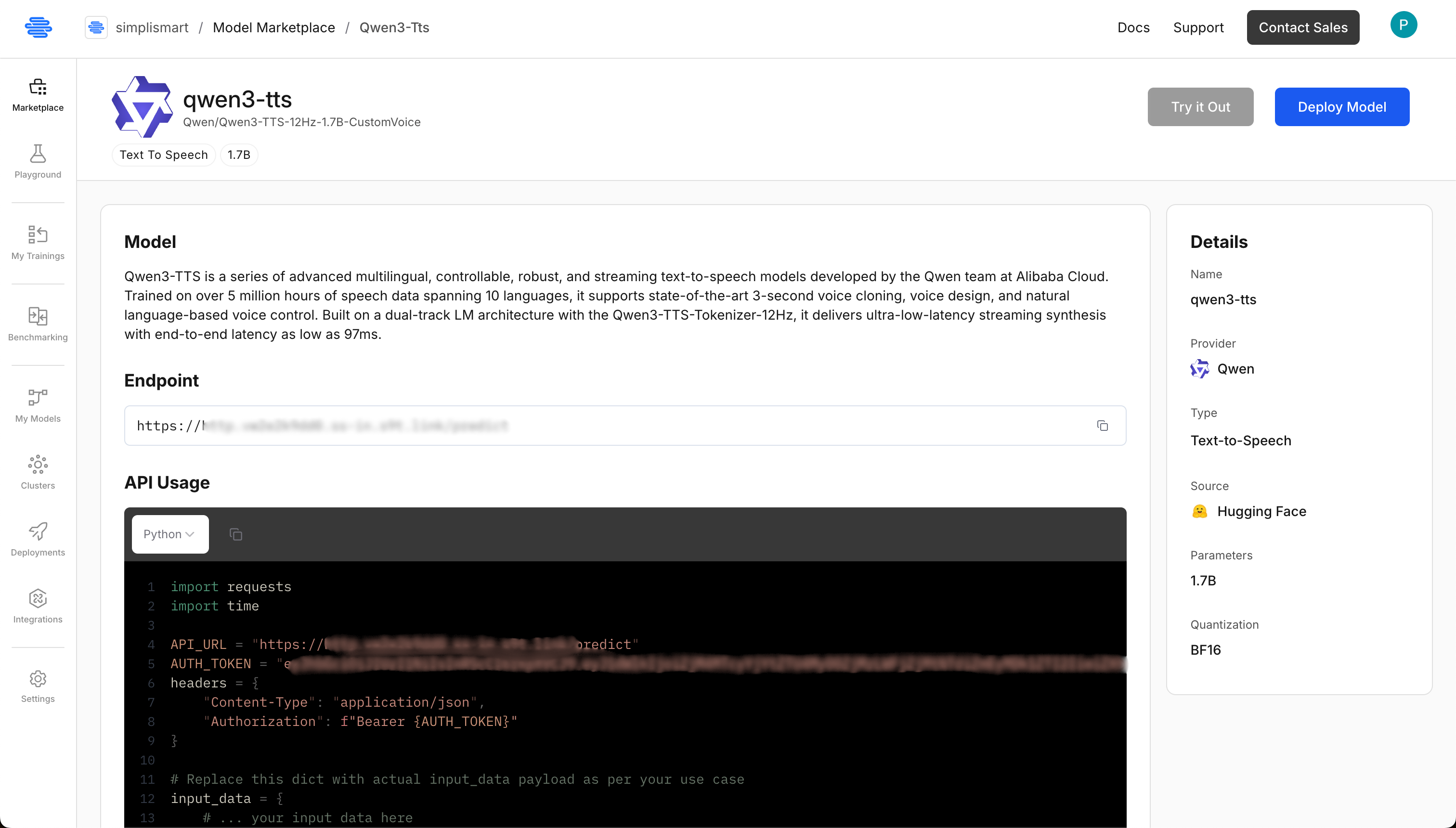
Hit Deploy. Simplismart provisions GPU infrastructure, configures networking, and sets up the serving stack. No Dockerfiles. No Kubernetes configs. No babysitting.
Step 3: Configure the Qwen 3 TTS Deployment

Set the following Qwen 3 tts deployment configuration options:
- Deployment name: Choose any name you'd like
- Model: Qwen3-TTS-12Hz-1.7B-CustomVoice (auto-populated)
- Cloud: Select either Simplismart Cloud or Bring Your Own Cloud
- Accelerator: Pick H100, A10G, L4, or L40S (options depend on your quota)
- Processing Type: Choose SYNC for real-time use cases (recommended), or ASYNC for batch workloads
- Environment: Select Production or Testing (adds tags to your usage dashboards)
Pick SYNC. You're building a real-time voice API, not a batch pipeline. The rest of the defaults work. Hit Deploy and the endpoint goes live in under a few minutes.
Step 4: Call the API
You get an endpoint URL and a Bearer token. Here's a complete working client:
# client.py
from pathlib import Path
import time
import wave

import requests

BASE_URL = "https://YOUR-SIMPLISMART-ENDPOINT"
AUTH_TOKEN = "YOUR-AUTH-TOKEN"

TEXT = "Hello, this is an authenticated HTTP TTS request."
LANGUAGE = "English"
SPEAKER = "Aiden"
LEADING_SILENCE = True
OUTPUT_WAV = "output.wav"

SAMPLE_RATE = 24000
CHANNELS = 1
SAMPLE_WIDTH = 2  # PCM16

url = f"{BASE_URL.rstrip('/')}/v1/audio/speech"
headers = {
    "Authorization": f"Bearer {AUTH_TOKEN}",
    "Accept": "audio/L16",
}
payload = {
    "text": TEXT,
    "language": LANGUAGE,
    "speaker": SPEAKER,
    "leading_silence": LEADING_SILENCE,
    # "instruct": "speak slowly and clearly",
}

t0 = time.perf_counter()
resp = requests.post(url, json=payload, headers=headers, stream=True)
resp.raise_for_status()

chunks = []
first_chunk_s = None
for chunk in resp.iter_content(chunk_size=4096):
    if not chunk:
        continue
    if first_chunk_s is None:
        first_chunk_s = time.perf_counter() - t0
    chunks.append(chunk)

pcm = b"".join(chunks)
out = Path(OUTPUT_WAV)
with wave.open(str(out), "wb") as wav:
    wav.setnchannels(CHANNELS)
    wav.setsampwidth(SAMPLE_WIDTH)
    wav.setframerate(SAMPLE_RATE)
    wav.writeframes(pcm)

dur_s = len(pcm) / (SAMPLE_RATE * SAMPLE_WIDTH)
ttfc_ms = (first_chunk_s or 0.0) * 1000
print(f"Saved {out} | duration={dur_s:.2f}s | ttfc={ttfc_ms:.2f}ms")
The response is PCM16 audio at 24kHz. Streaming is on by default, chunks arrive as they're generated, so your application starts playing audio immediately rather than blocking on the full utterance. More code examples and sample apps are available in the Simplismart cookbook.
Who This Is Built For
Voice agents and IVR systems: Human auditory processing detects gaps above ~200ms. At 90ms TTFB, the delay between a user's question and the spoken response is imperceptible. At 300ms, users notice and disengage. For the developers using agent frameworks, Simplismart integrates with LiveKit and Pipecat to wire the Simplismart-hosted endpoint into a full voice agent pipeline.
Live dubbing and real-time translation: The streaming architecture emits audio alongside ongoing text generation, making it viable for latency-sensitive dubbing pipelines where buffering a full utterance breaks the experience.
Accessibility tools: Natural language instruction control lets you tune speaking pace and clarity per user need, without maintaining separate model checkpoints for each use case.
Multilingual products: One model, one deployment, 10 languages. You don't manage per-language configurations or separate endpoints. Cross-lingual synthesis is a default behavior, not a feature you configure.
What You Actually Get on Simplismart
Your Qwen 3 TTS deployment on Simplismart runs the 1.7B CustomVoice model on production-grade infrastructure with paged attention, CUDA graphs, and batched decode queues; optimized specifically for voice workloads. You don't need to tune any of that. You get an API endpoint that scales up and down automatically under load.
No vendor lock-in. No proprietary audio format. No per-character pricing that makes high-volume use economically inviable. Autoscaling and observability are included, you get dashboards and metrics without configuring a separate monitoring stack.
Conclusion
The latency wall in TTS isn't a hardware constraint, it's an architecture constraint. Diffusion-based vocoders made 90ms TTFB structurally impossible regardless of how much GPU you threw at them. Qwen 3's discrete multi-codebook approach removes that constraint at the model level. Simplismart's serving stack (dual-worker GPU architecture, Flash Attention 3, paged KV caching, and batched async decode) removes what remains at the infrastructure level.
The result is a Qwen 3 TTS deployment that performs at 90ms TTFB in production without requiring you to manage the infrastructure that makes it possible.
If you're building anything that speaks, deploy the shared endpoint today or contact the team for a dedicated deployment tuned to your specific workload.