India has 1.4 billion people and 22 official languages. Yet most AI models treat Indic languages as an afterthought, resulting in poor transcription accuracy, slow translation, and limited language coverage. Open-weight models built specifically for Indic languages are changing this. And the numbers back it up. In this post, we benchmark two open source Indic AI models Indic-Conformer for transcription and Sarvam Translate for translation, against Gemini, and show how to deploy them in production using Simplismart.
The Problem: AI Doesn't Speak India's Languages Well Enough
A significant share of India's population doesn't speak English. For AI to be useful in healthcare, government services, education, and commerce across India, it needs to work reliably in Hindi, Tamil, Bengali, Marathi, Telugu, and dozens of other languages.
Closed-API models like ChatGPT and Gemini offer some Indic language support, but it's inconsistent. Word error rates are higher, translations are slower, and you have zero control over the model, no data privacy guarantees, and unpredictable per-request costs.
Open-weight models trained specifically on Indic data solve these problems. Let's look at the benchmarks.
The Dataset: IndicVoices
We evaluated both models on the IndicVoices dataset by AI4Bharat. It contains natural, multi-speaker Indic speech data across multiple Indian languages, making it a realistic benchmark for both transcription and translation tasks.
Open Source Indic AI models vs Closed Source AI APIs: The Benchmarks
Indic AI Models for Transcription: Indic-Conformer vs Gemini 2.5 Flash
Model: Indic-Conformer 600M, a 600M-parameter multilingual ASR model by AI4Bharat, that is trained on 22 Indic languages.
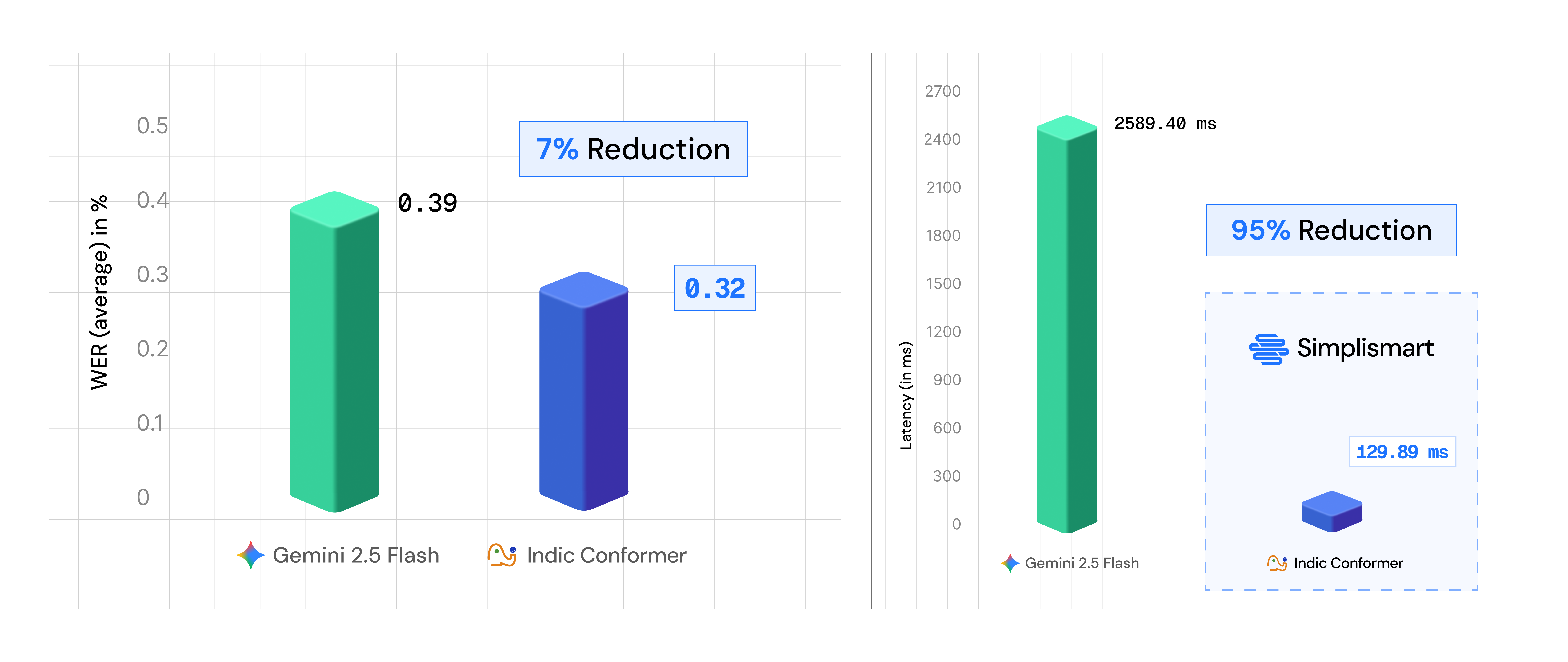
Right: Latency benchmark- Gemini 2.5 vs Indic Conformer on Simplismart.
Result: Indic-Conformer achieves 7.05% lower Word Error Rate (WER) and 94.45% lower latency than Gemini 2.5 Flash on IndicVoices.
WER directly measures how many words the model gets wrong in a transcript. A 7.05% improvement means noticeably fewer errors in every transcribed sentence like names spelled correctly, numbers captured accurately, regional phrases preserved instead of garbled. Combine that with near-instant inference (94.45% latency reduction), and end users get more reliable voice assistants, accurate automated subtitles, and voice-based workflows (healthcare dictation, legal transcription, customer support) that actually work in their native language. And this is coming from a 600M-parameter open-weight model beating a frontier closed API on real Indic speech data.
Indic AI Models for Translation: Sarvam Translate vs Gemini
Model: Sarvam Translate, a Gemma 3 4B model fine-tuned for Indic translation by Sarvam AI.
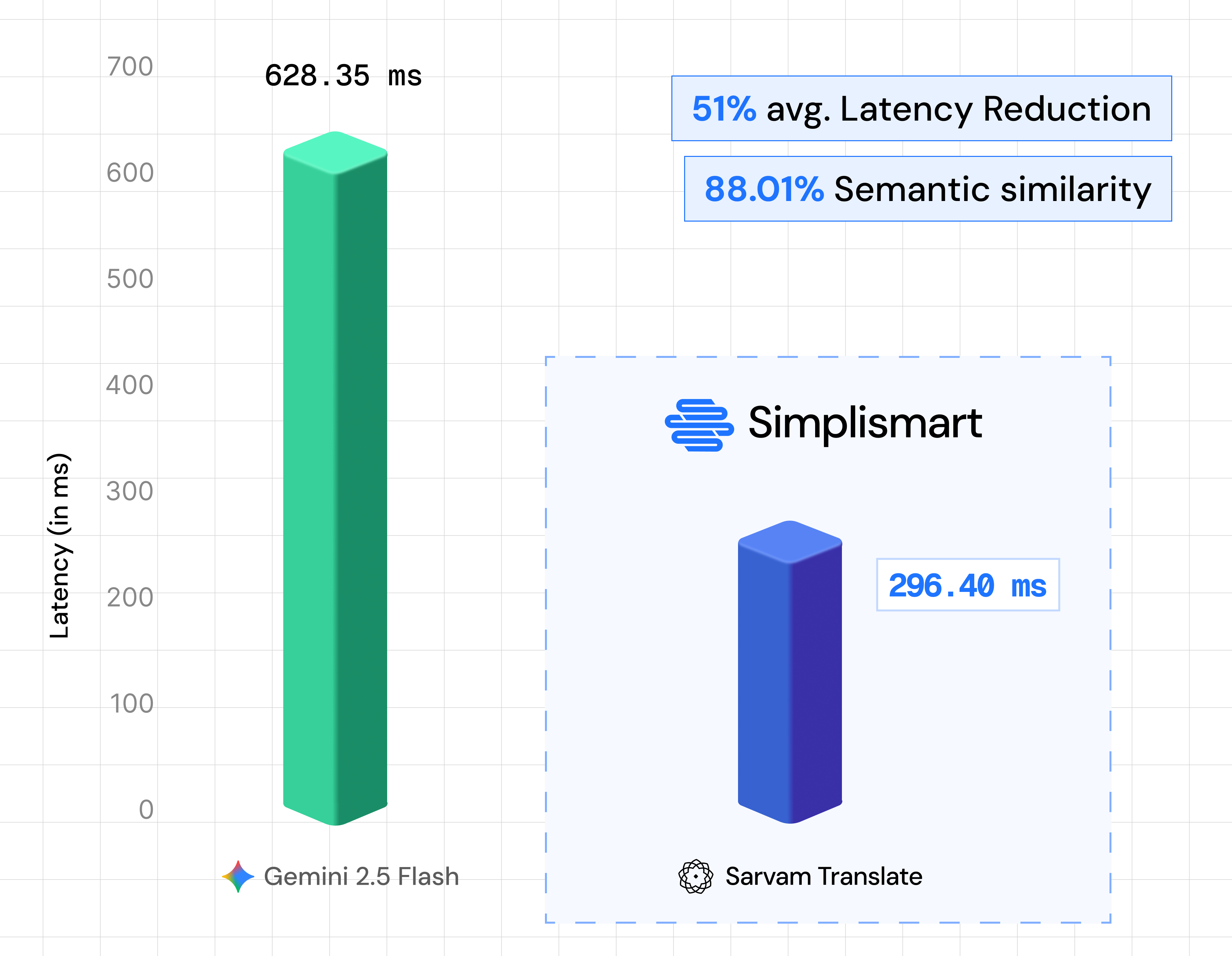
Result: Sarvam Translate delivers 51.22% lower latency than Gemini while maintaining ~88.01% semantic similarity.
A 4B-parameter model cutting latency in half with near-parity translation quality. For user-facing apps (chatbots, real-time translation) and batch pipelines (document translation, content localization), this latency difference is the gap between usable and unusable.
Why These Results Matter
Both benchmarks point to the same conclusion: open-weight models trained on Indic data are matching or beating frontier closed APIs. Beyond raw accuracy and speed, they give you structural advantages:
- Self-hostable: audio and text data never leaves your infrastructure
- Full model control: modify architecture, adjust training data, optimize for your specific domain or dialect without vendor gatekeeping
- Predictable cost: fixed infrastructure spend instead of per-token/per-request pricing that scales unpredictably
- Compliance: full control over data residency and audit trails, critical for regulated industries
Open Source Indic AI Models vs Closed Source AI APIs: The Trade-offs
The trade-off? You need infrastructure to serve, scale, and monitor these models. That's where Simplismart comes in.
Deploy Sarvam Translate on Simplismart
Simplismart is an end to end MLOps platform for optimizing, deploying, serving, and finetuning AI models with GPU-backed inference, auto-scaling, and observability built in. Here's how to get an Indic AI model like Sarvam Translate running in production in minutes.
Step 1: Add the Model from Hugging Face
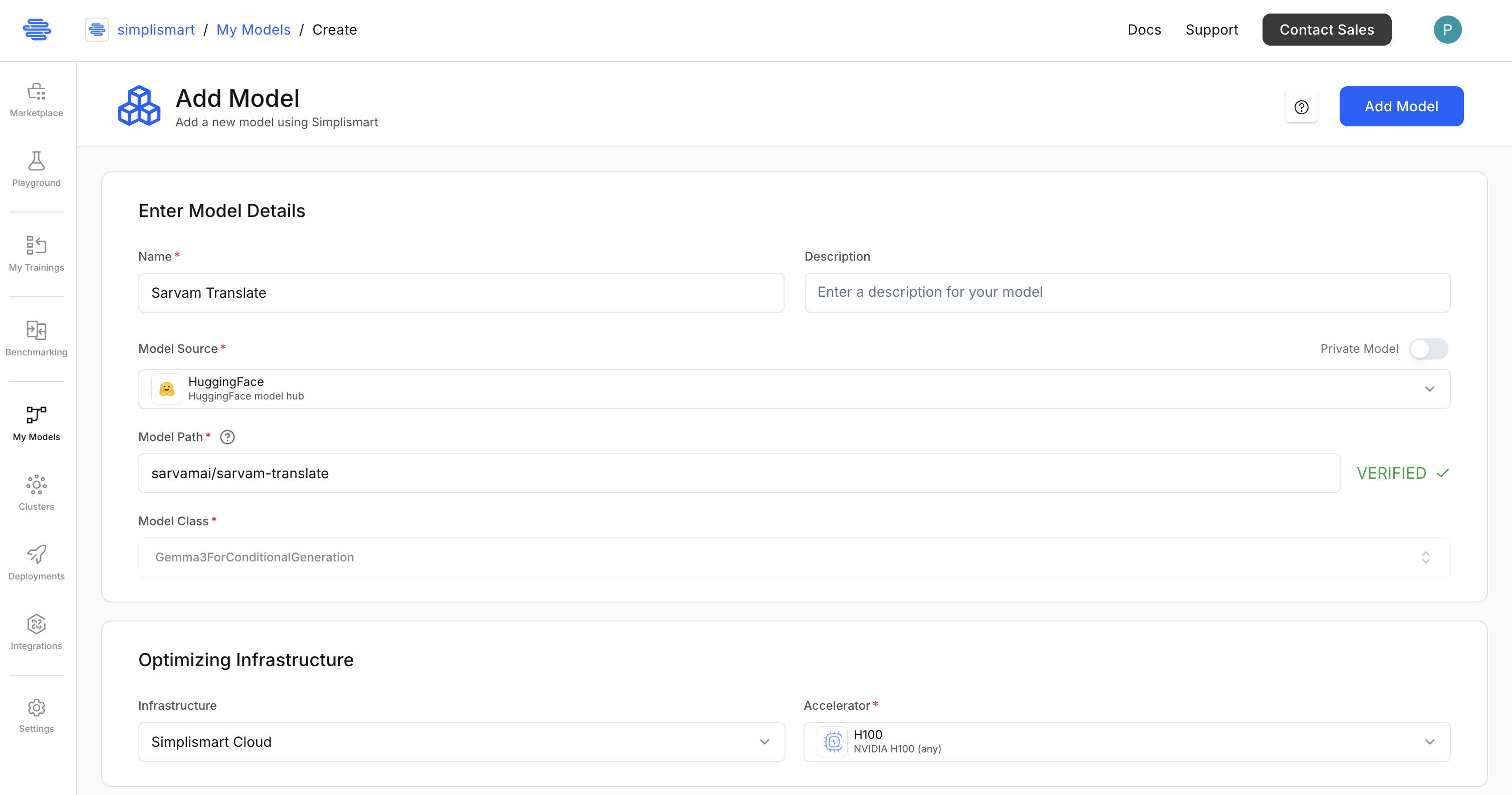
- Go to My Models and click Add a Model.
- Select Hugging Face as the model source.
- Enter the model path: sarvamai/sarvam-translate and click on Verify. It will auto-populate the model optimization details based on the model path.
- Select infrastructure: Simplismart Cloud with a GPU (e.g., H100). If you wish, you can use your own cloud infrastructure as well for model compilation and deployment.
5. Under the backend, keep it Auto. This will automatically select the best backend for your model.
6. Quantization: Keep it FLOAT 16 as Sarvam Translate is a small model and quantization is not required. For other models, you can pick from the following quantizations:
- FP8
- INT8
- INT4
- BFLOAT16
- FLOAT32
- AWQ
- MXFP4
7. For Parallelism, keep the Tensor Parallelism to 1. This will deploy the model on a single GPU. For multi-GPU deployment, you can increase the Tensor Parallelism to the number of GPUs you have. Check out Parallelism documentation for more details.
Keep the Pipeline Task as Chat only and leave Speculative Decoding and LoRA configurations as defaults.
8. Click on Add Model to start compilation.
If your model is not supported yet, you can also bring your own container-based model.
Step 2: Deploy the Model
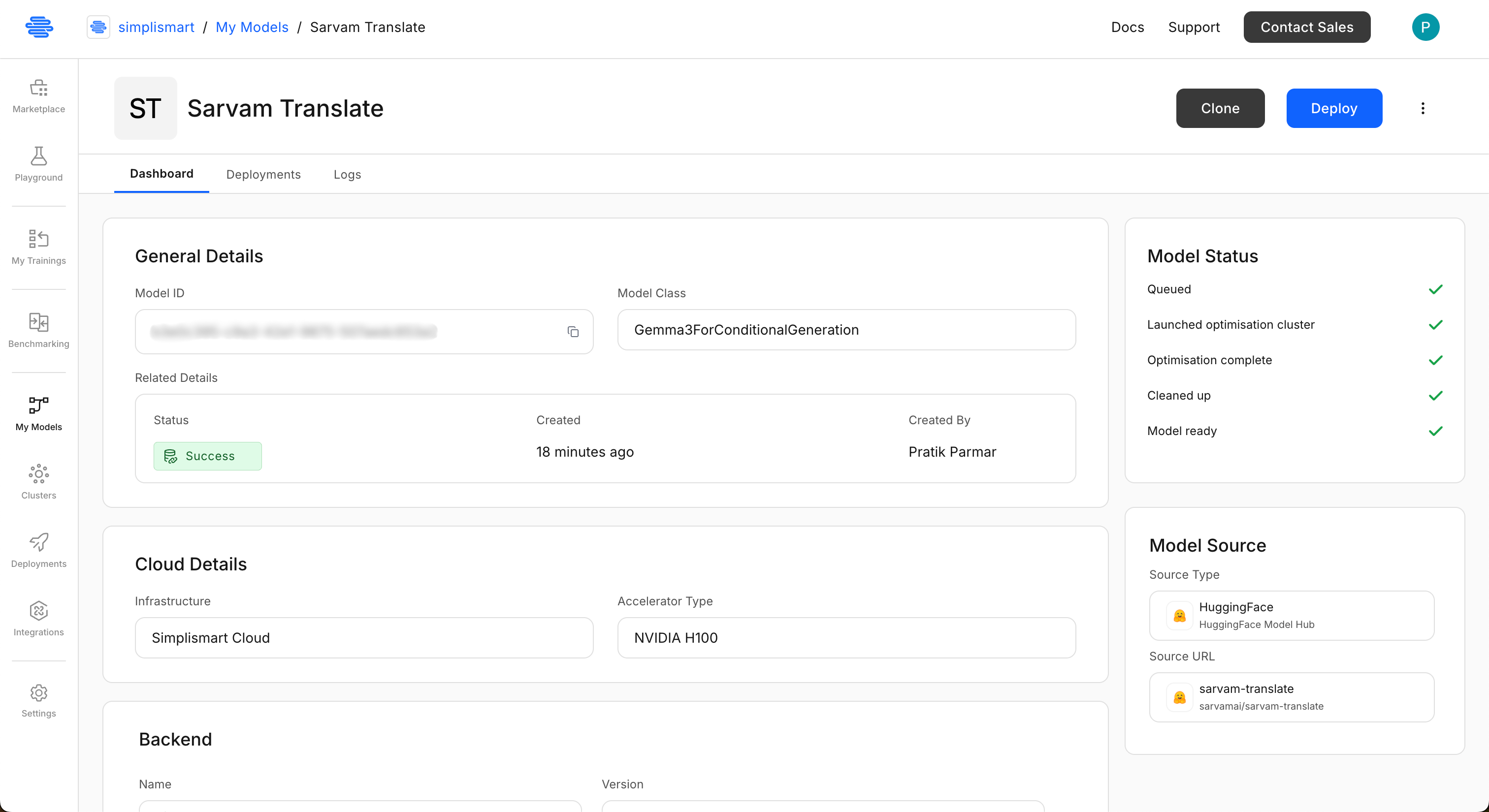
- Once the model is compiled, you will be able to see the model in the My Models page. Open the "Sarvam Translate" model and click on Deploy.
2. Add deployment details:
- Select the Sarvam Translate model you just added.
- Choose Simplismart Cloud, pick your accelerator type (L40S or H100). If you wish, you can use your own cloud infrastructure as well.
- Select "Environment" as "Production" or "Testing". This tag can be used to filter deployments on the deployments page.
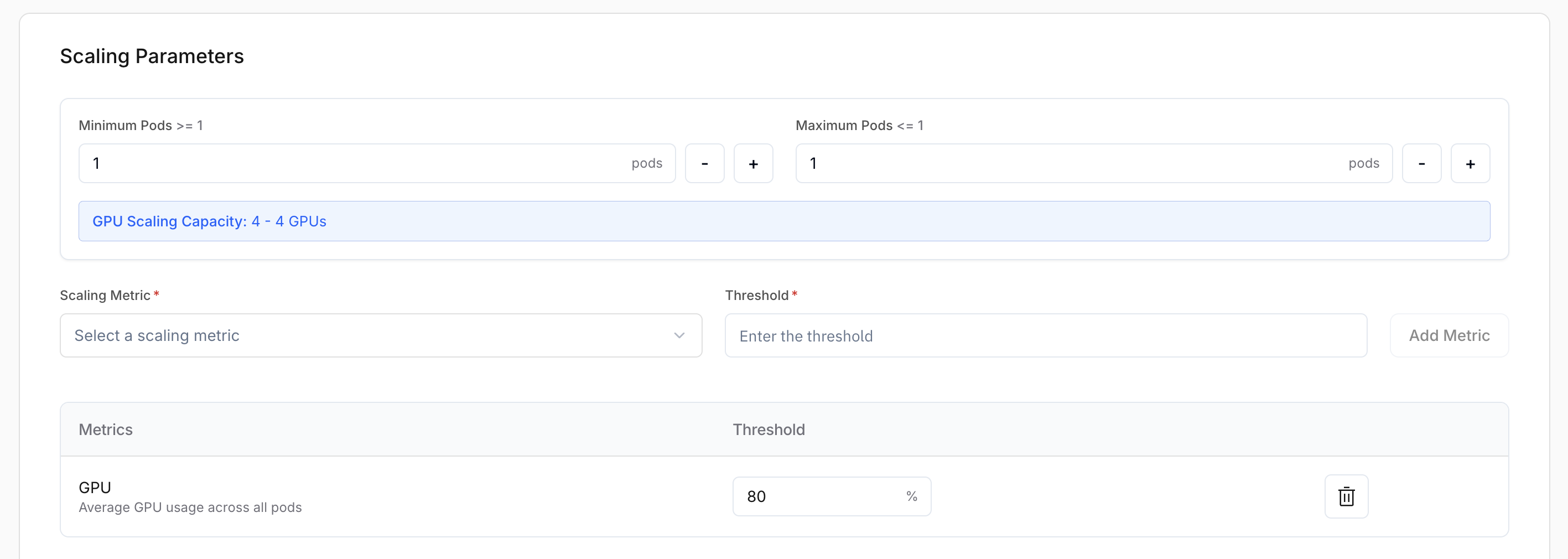
3. Scaling Parameters: Select minimum and maximum number of pods you want to scale the deployment to. Here we will scale to 1 to 8 pods.
Also, select on which basis you want to scale the deployment. You can scale on CPU, GPU utilization, Time to First Token, Latency, Throughput, etc. Here we will scale on GPU utilization at 80%.
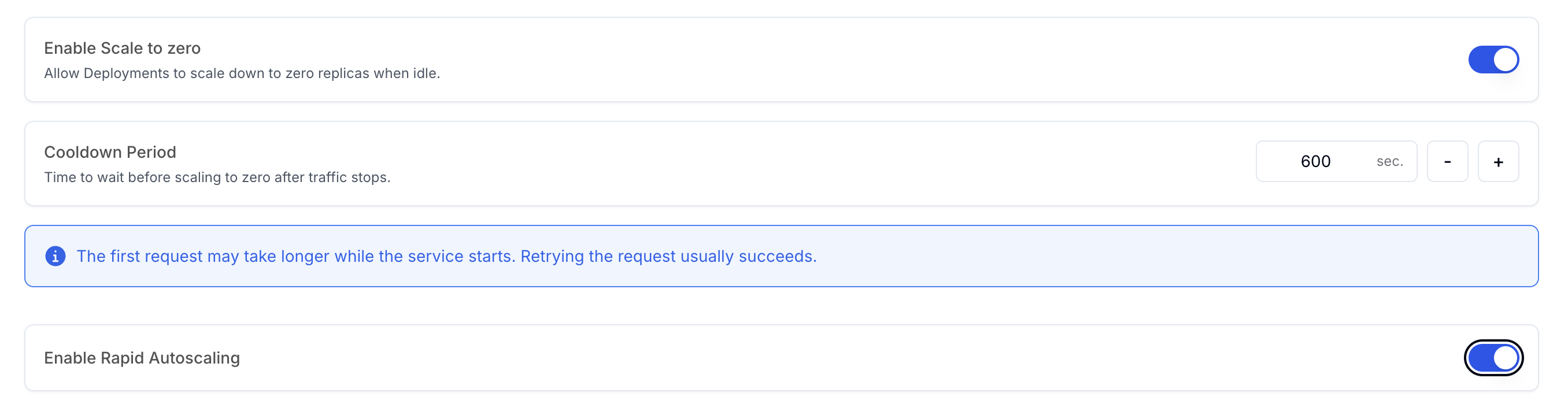
You can also configure if you want to scale down your deployment if there is no traffic for a certain period of time. Here we will scale down if there is no traffic for 600 seconds.
For production deployments, you can also configure Rapid Autoscaling to scale up your deployment quickly if there is a sudden surge in traffic.
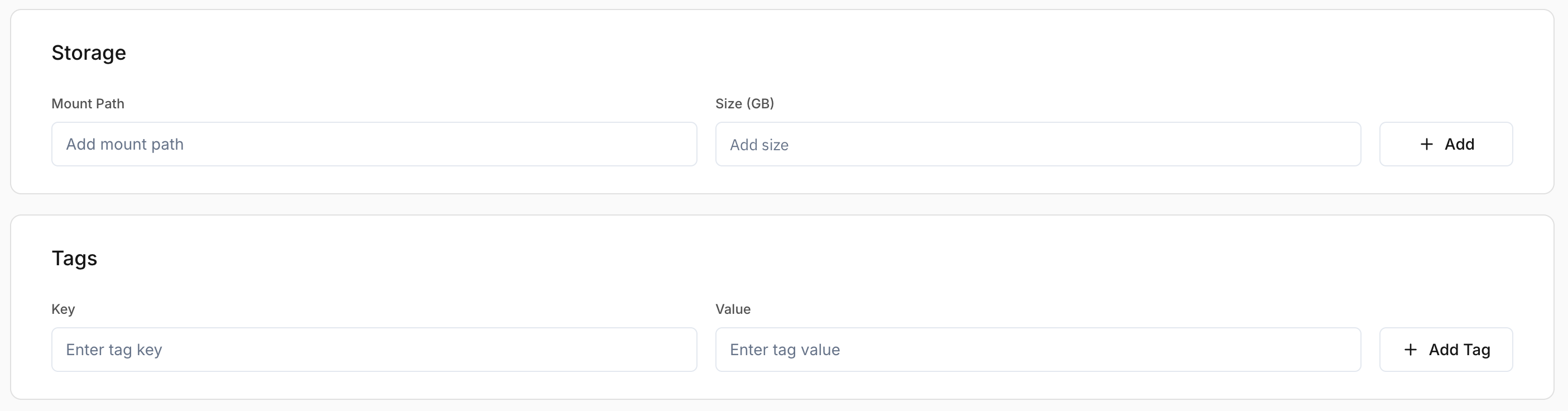
Leave the Storage as it is. Under tags, you can add any tags you want to identify the deployment. This comes handy in the billing and monitoring.
Now, click on "Add Deployment" to deploy the model. It will take a few minutes to deploy. You need to wait till the deployment health status shows "Healthy". Checkout Creating a Deployment for the full guide.
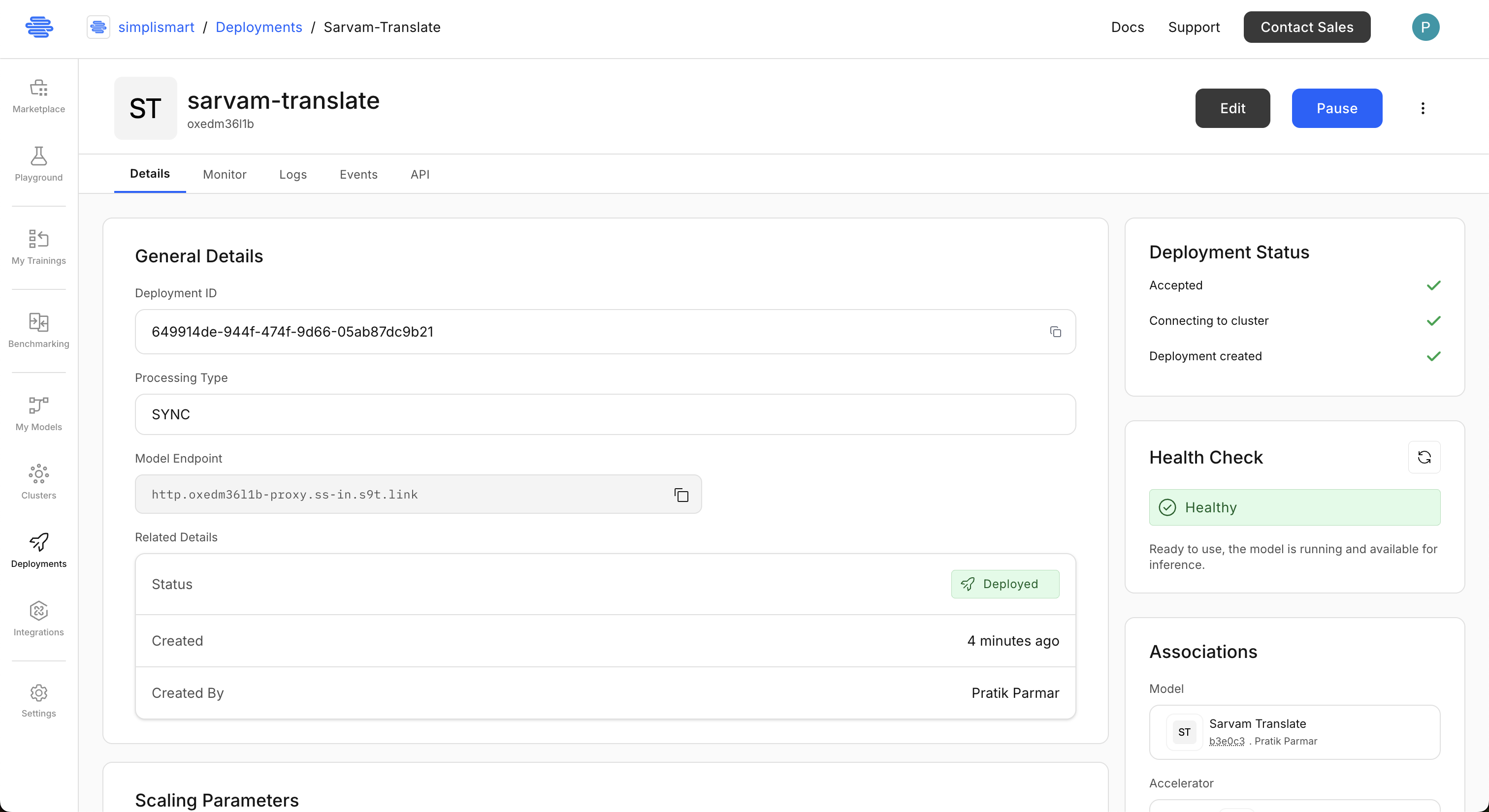
The deployment status will show deployed once the model is ready.
Step 3: Test the Model
Once deployed, Simplismart gives you an API endpoint. This endpoint is OpenAI compatible, so you can call it using any OpenAI-compatible SDK. For example, here's how you can use the Sarvam Translate model to translate English text to Hindi:
from openai import OpenAI

SIMPLISMART_API_KEY = "your-api-key"
SIMPLISMART_BASE_URL = "http://your-endpoint-here"
model="gemma-it" # Sarvam Translate is fine-tuned version of Gemma3-4B-IT, so the model name is gemma-it

client = OpenAI(
   api_key=SIMPLISMART_API_KEY,
   base_url=SIMPLISMART_BASE_URL,
)

tgt_lang = 'Hindi'
input_txt = "AI won't replace humans, but those who use AI will replace those who don't."
messages = [
	{"role": "system", "content": f"Translate the text below to {tgt_lang}."},
	{"role": "user", "content": input_txt}
]

response = client.chat.completions.create(model=model, messages=messages, temperature=0.01)
output_text = response.choices[0].message.content

print("Input:", input_txt)
print("Translation:", output_text)
That's it. A production-grade Sarvam Translate endpoint, running on dedicated GPUs, with auto-scaling and monitoring; no infrastructure wrangling required.
Conclusion
Open source Indic AI models aren't just competitive with frontier closed APIs, they're winning. Indic-Conformer delivers 7.05% lower WER than Gemini 2.5 Flash. Sarvam Translate cuts latency by 51.22% while preserving translation quality. And both are open-weight, fine-tunable, and self-hostable.
The missing piece has always been production infrastructure. Simplismart fills that gap; deploy these models with GPU-backed inference, auto-scaling, and enterprise-grade reliability without the operational overhead.
Ready to deploy open Indic AI models in production? Contact us to tailor the setup to your workload.