

Nemotron 3.5 Transcribe is live on Simplismart from day 0. It is an NVIDIA open model which combines 4 categories in speech: transcription, speaker attribution, translation and word timestamps. It transcribes 40 languages, translates 31 of them to or from English and attributes speakers in 13.
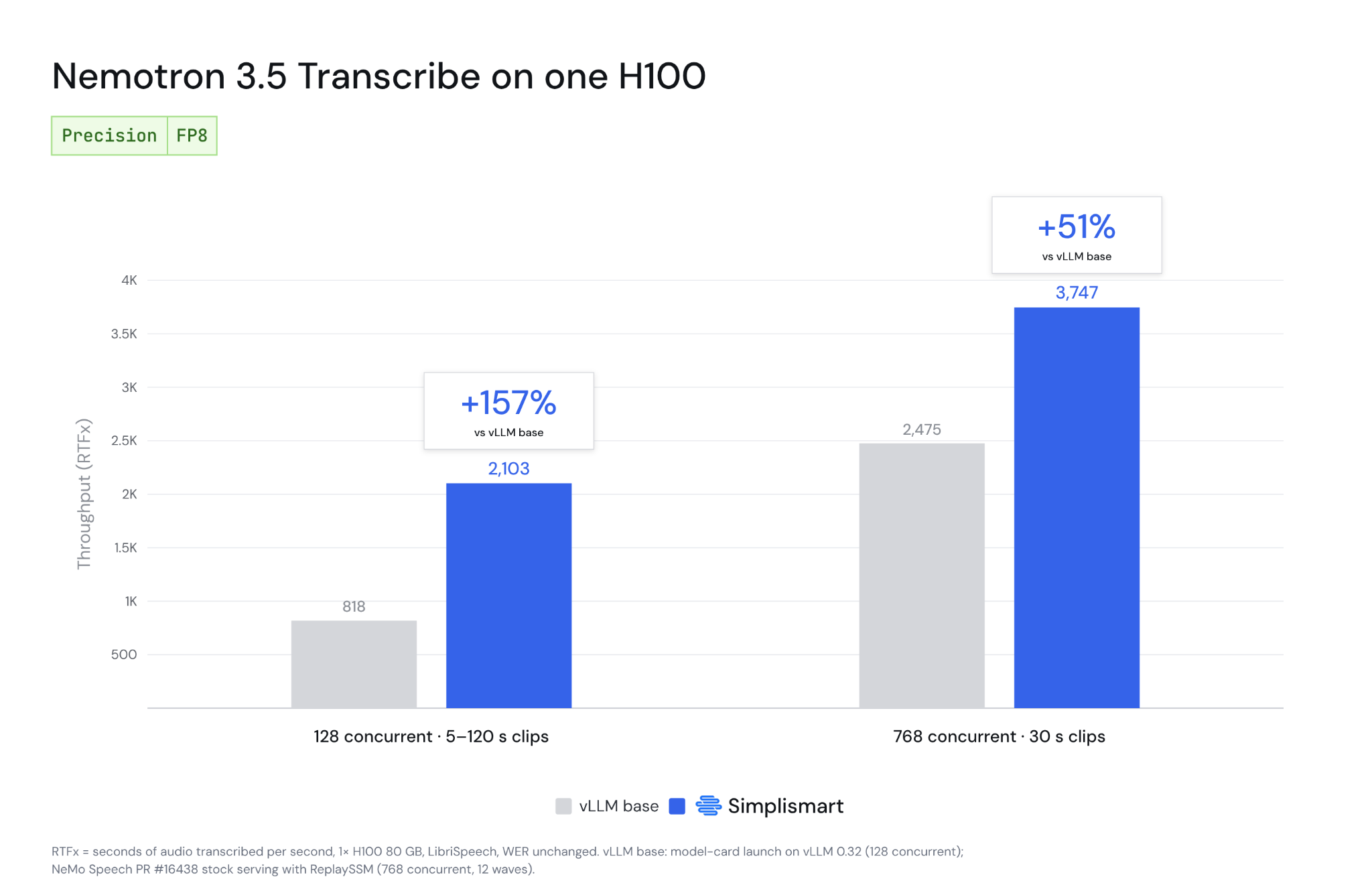
On a single NVIDIA H100 GPU, our inference stack serves it at nearly 3,800× real time (3,747×) with 768 concurrent requests, 1.5× faster than stock serving. At 128 concurrent requests it runs at 2,103×, 2.6× faster than vLLM base on the same engine version. Accuracy does not change.
This is a 34B-parameter speech model that activates about 4.3B parameters per token, built on NVIDIA's Nemotron 3.5 Lightning language model with a dedicated audio encoder in front of it. Nemotron 3.5 Lightning is a customizable open model for always-on agents that complete specialized tasks faster, across local, on-premises and cloud deployments.
We have spent the last few weeks with an early-access build. What we found is that the model is excellent, and the default serving setup leaves most of the GPU idle. This post covers what the model does, how we optimized it to serve it, and the results.
Bringing the full speech pipeline into one Nemotron model
Most batch transcription pipelines today chain several models together: one to transcribe (Whisper or NVIDIA Parakeet), one to tell speakers apart (pyannote or NVIDIA's Nemotron™ 3 Diarization), one to align words to time (a forced aligner such as NVIDIA NeMo™ Forced Aligner), and another to translate (NVIDIA Canary or a separate text model). Each hop adds latency, a deployment to run and a place for errors to compound. Nemotron 3.5 Transcribe does all of this in one model. The instruction in the request decides the output.
Under the hood, an audio encoder turns every second of sound into 12.5 tokens. A hybrid Mamba–Transformer mixture-of-experts model then writes the transcript, and a small timestamp head lines each word up with the audio after decoding.
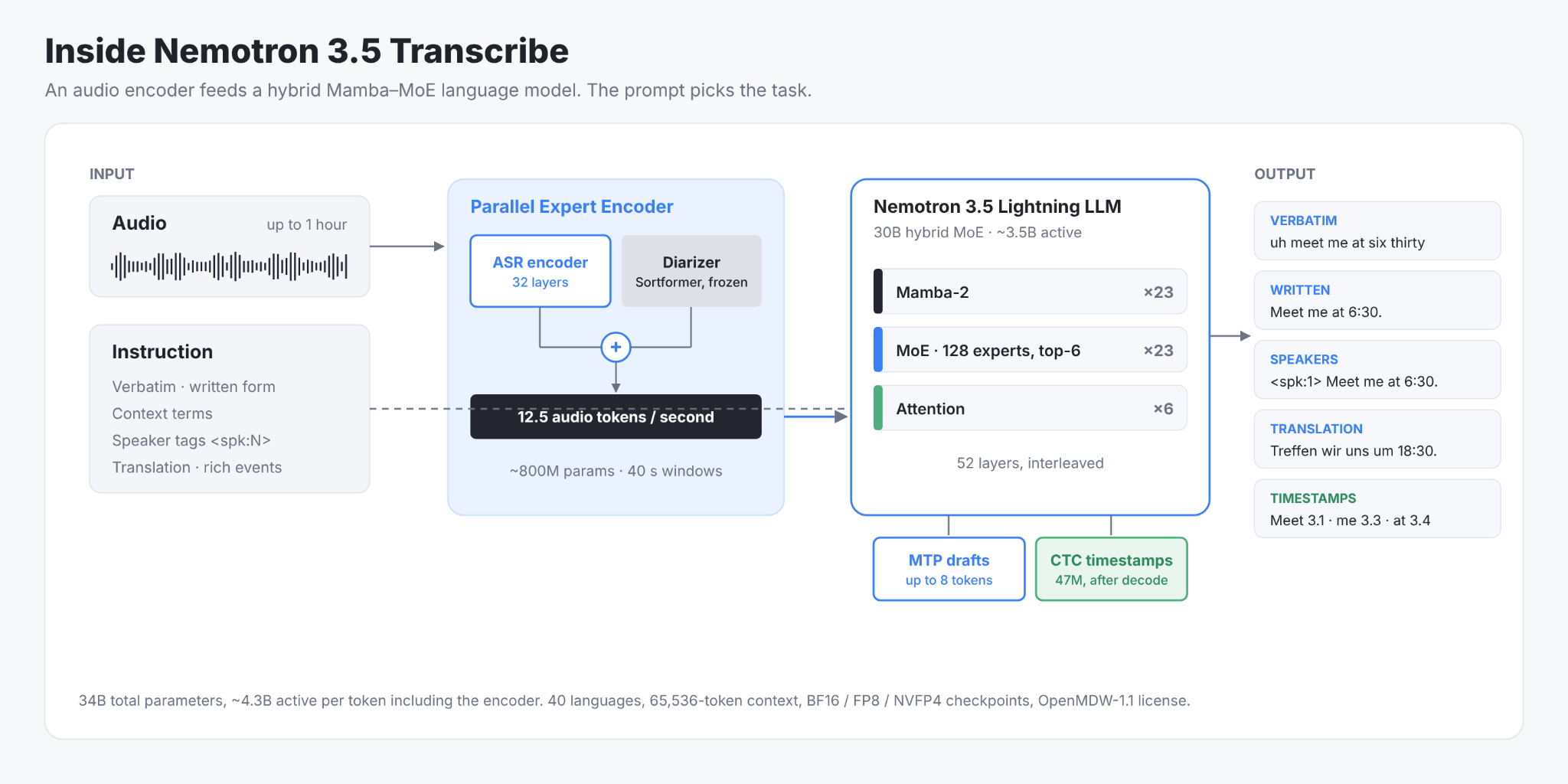
What Nemotron 3.5 Transcribe brings to your application:
- One model for the whole pipeline: transcripts, speaker tags, word timestamps, translation and language ID from a single request.
- Long recordings: up to an hour of audio per request, with a 65K-token context.
- Your vocabulary: pass product names or jargon in the prompt and the model biases toward them.
- Open weights: available in BF16 and FP8 precision under the OpenMDW-1.1 license.
How Accurate Is Nemotron 3.5 Transcribe?
According to NVIDIA's reported evaluations, Nemotron 3.5 Transcribe is the best open-weight model on the Hugging Face Open ASR Leaderboard for English (5.33% average word error rate, vs 5.40% for the next open-weight model). In the Open ASR comparison on NVIDIA's model card, it also posts the lowest error rates among evaluated open-weight models on long-form audio (10.98% vs 13.37%) and on multilingual transcription (4.62% vs 6.49% across seven languages). For speaker attribution, it has the lowest diarization error rate of 14 systems on David AI's 21-language benchmark and ranks first of 14 systems on VoiceArena's English multi-speaker transcription benchmark.
In short, for many workloads, accuracy is no longer the reason to pay for a closed speech API. Cost per hour of audio is often the deciding factor, and that comes down to inference.
How Simplismart Optimized Nemotron 3.5 Transcribe for Throughput
Nemotron 3.5 Transcribe is an offline model that processes recordings like calls, meetings, and podcasts, so what matters is how much audio one GPU transcribes per second. We measure this as RTFx: an RTFx of 1,000 means 1,000 seconds of audio transcribed per second.
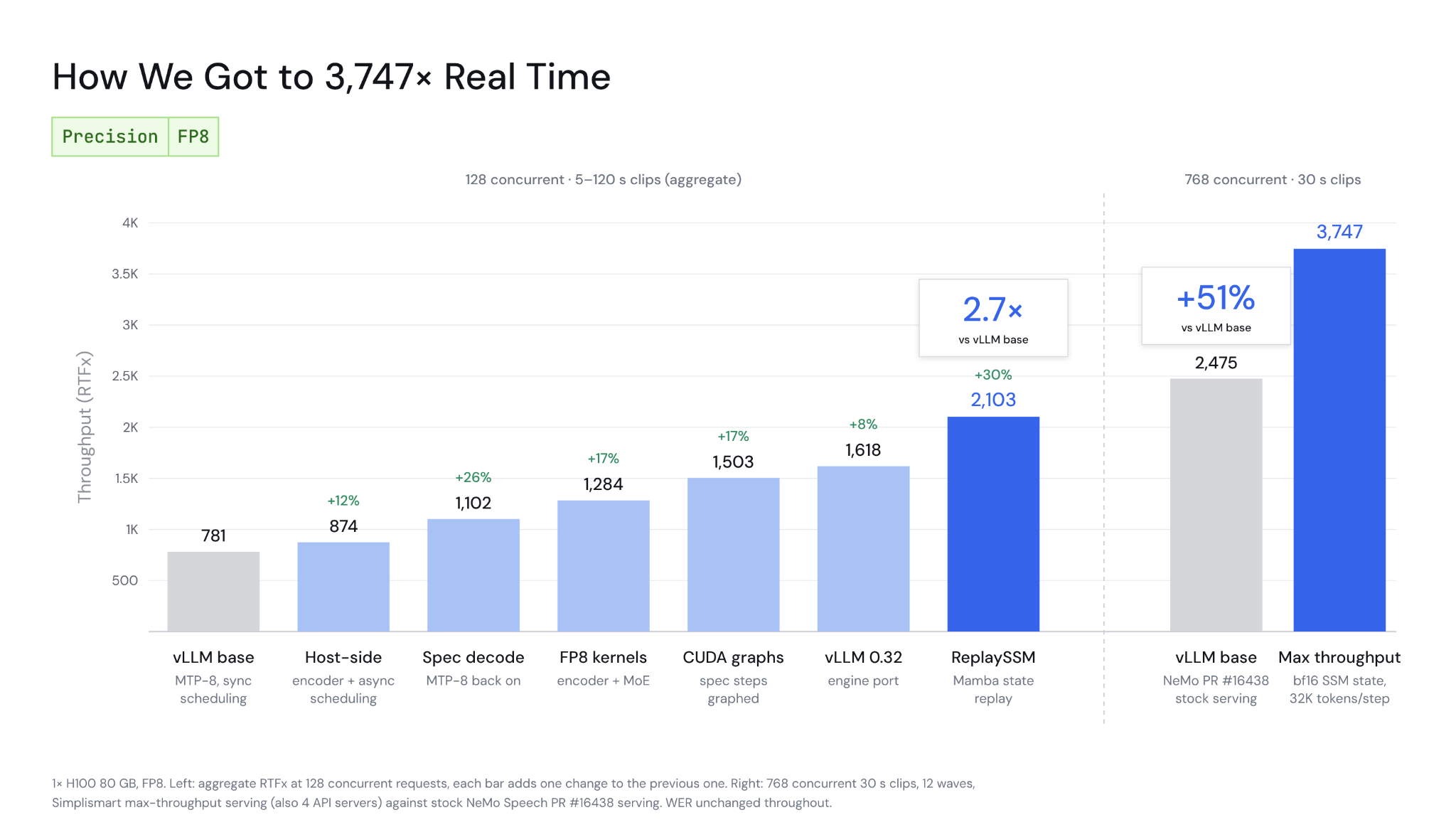
Profiling vLLM showed one CPU core at 100% while the GPU sat idle over half the time. The GPU kernels were already near their limits; the bottleneck was the host thread scheduling work. We optimized it in four layers without touching the model’s weights.
1. The Host-side execution. We rebuilt the audio encoder so the CPU never waits on the GPU and fused its small operations into fewer kernels. For the Mamba and mixture-of-experts layers, we kept NVIDIA’s kernels unchanged but rebuilt the Python launch path, cutting overhead while keeping outputs byte-identical. The scheduler can now prepare the next step while the GPU runs the current one.
2. Speculative decoding. The model’s built-in multi-token prediction head drafts several tokens ahead, but at high concurrency these drafts exceeded vLLM’s default NVIDIA CUDA™ graphs and fell back to slow eager execution. Resizing the graphs and moving encoder and MoE work to FP8 kernels turned speculation into one of our largest gains.
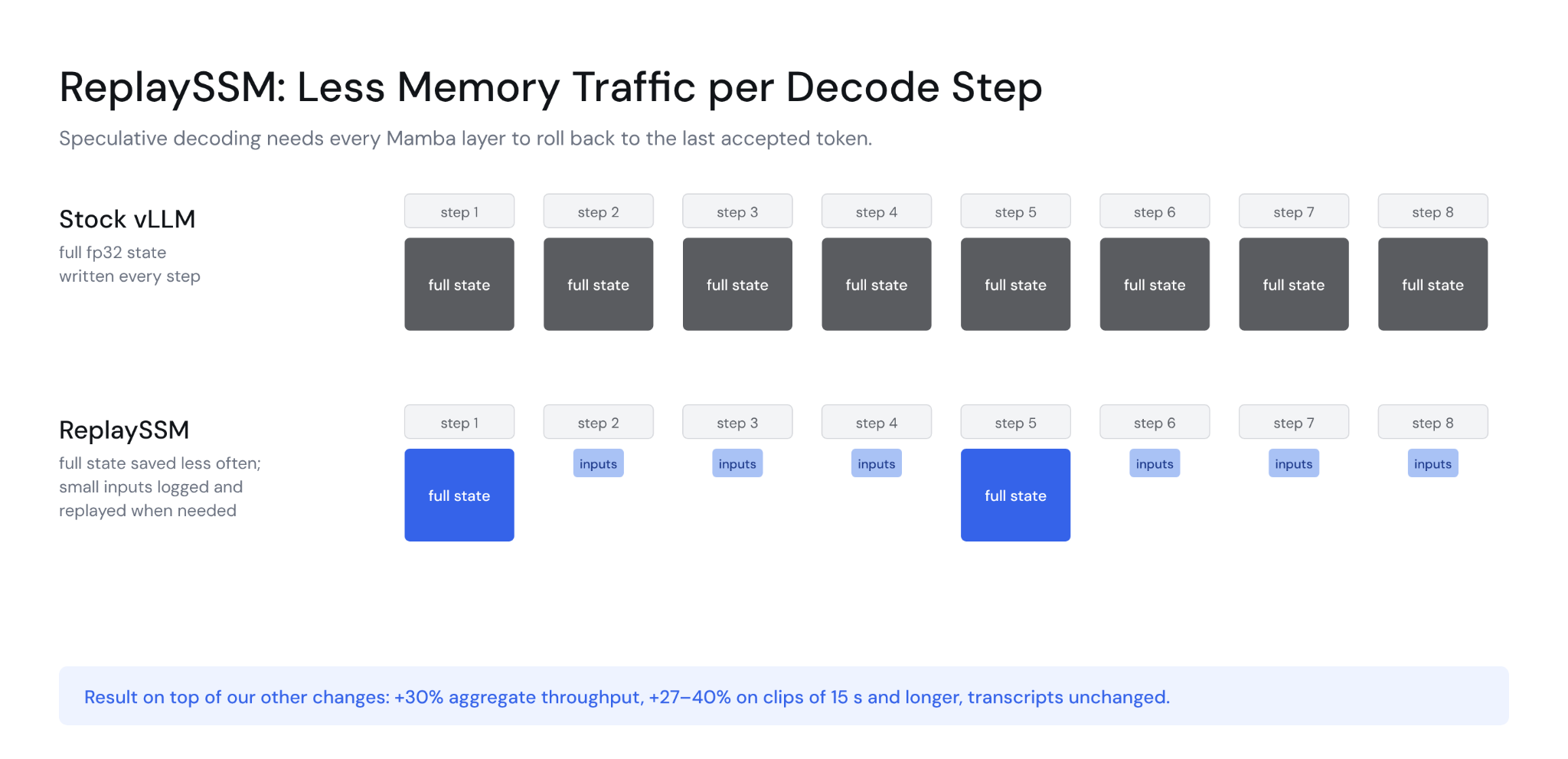
3. Mamba memory traffic. Speculation requires Mamba layers to roll back to the last accepted token, so stock serving writes the full recurrent state every decode step. Upgrading vLLM and enabling ReplaySSM saves state less often and recomputes the few tokens in between. On longer recordings, this was the single biggest improvement.
4. Serving at high concurrency. Past 128 requests the bottleneck moves again: one API process cannot decode incoming audio fast enough to keep the GPU fed. We run four API servers, double the tokens each engine step can take, and keep the Mamba state in BF16 instead of FP32. At 768 concurrent requests this takes throughput from 2,475× with stock serving to 3,747×.
Each step stacked on the last:
Benchmarks: Nemotron 3.5 Transcribe on one H100
We benchmarked on one H100 80 GB with LibriSpeech recordings from 5 seconds to 2 minutes long, at concurrency from 1 to 768 requests.
Throughput keeps climbing with load. At 768 concurrent requests one H100 reaches 3,747× on 30-second clips and peaks at 3,953× on 2-minute clips. Against stock serving with ReplaySSM at the same load, that is 1.5× the throughput with p95 latency down from 12.3 s to 7.9 s.
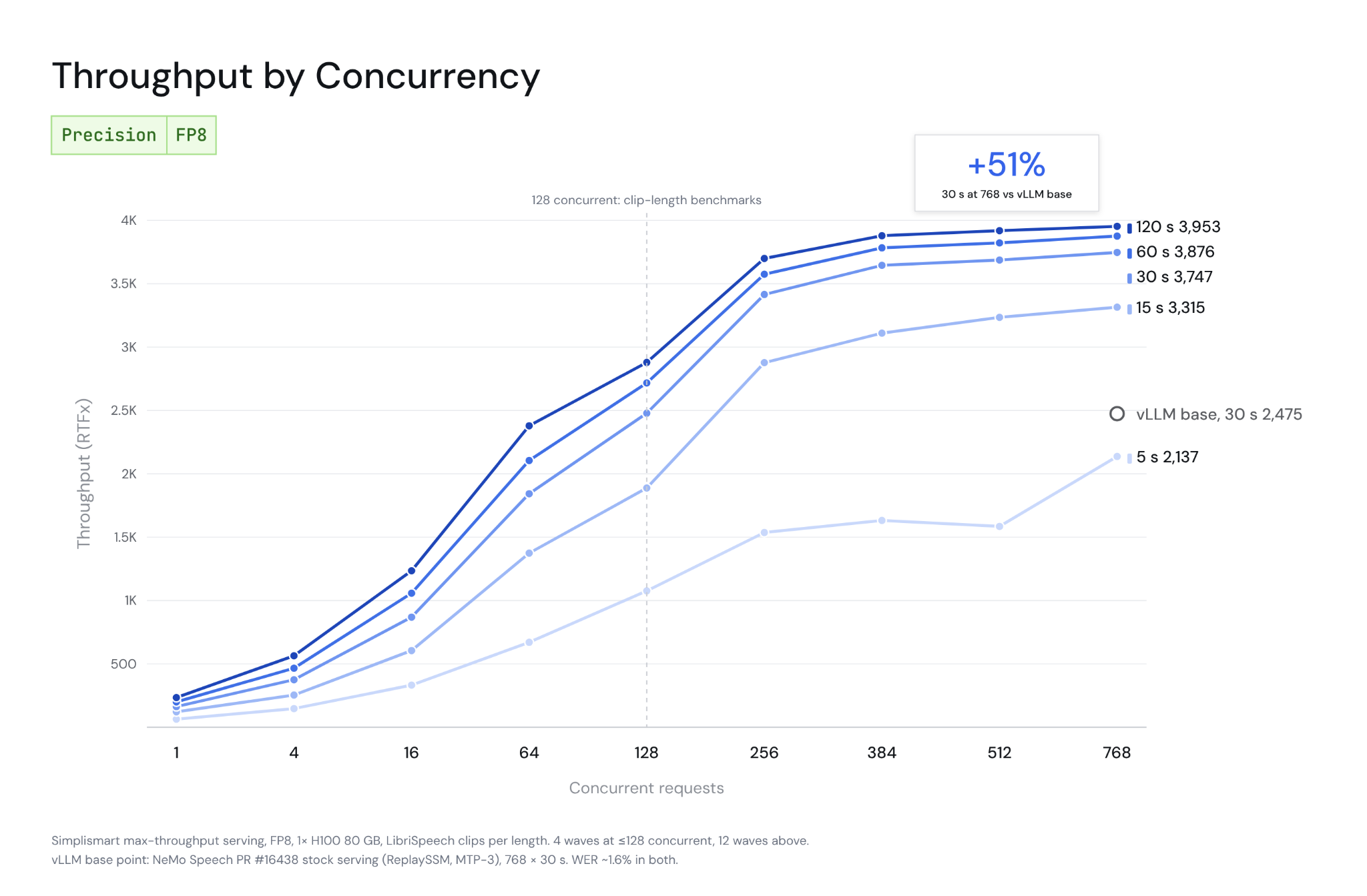
At 3,747×, one H100 transcribes about 62 hours of audio every minute, or roughly 90,000 hours a day.
In FP8, at both loads, each against its baseline:
The gains hold at every clip length and are largest on long recordings.
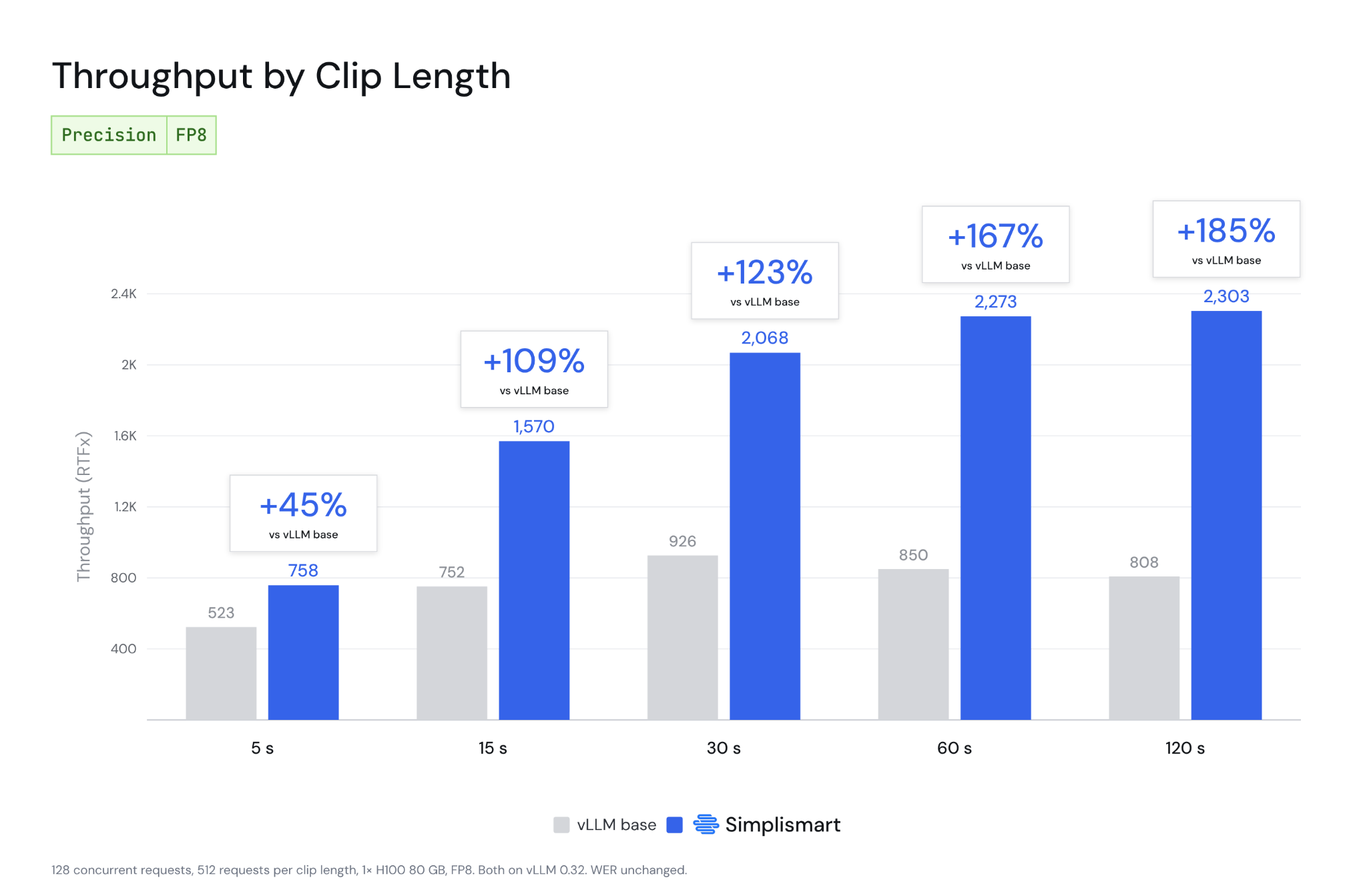
Accuracy did not move. Across 12 transcription test sets and a language ID benchmark, our optimized server matched NVIDIA's launch configuration within run-to-run noise, and most transcripts were character-for-character identical. At 768 concurrent requests, word error rate stayed at about 1.6% for both stock serving and ours.
Build with Nemotron 3.5 Transcribe on Simplismart
A single request returns a speaker-tagged transcript with word timestamps:

Swap the instruction for a clean written transcript, a list of domain terms, or a target language, and the same deployment handles it.
Run Nemotron 3.5 Transcribe on Our Cloud or Yours
Nemotron 3.5 Transcribe is available on Simplismart today. You can run it on our GPUs, inside your own AWS, GCP or Azure account, or on a Kubernetes cluster you already operate, including on-prem hardware. When recordings can’t leave your network, the deployment runs where the audio already is.
We tune each deployment to the job. Batch transcription gets maximum throughput, and near-real-time processing of recorded audio gets lower latency. Transcription traffic tends to arrive in waves, so autoscaling adds replicas when a backlog of uploads builds and scale-to-zero shuts them down when the queue is empty. That way you pay for audio transcribed, not for idle GPUs. Fast cold start is what makes this practical: a new replica is ready in minutes, not most of an hour.
Deploy Nemotron 3.5 Transcribe, or talk to an engineer about benchmarking it on your own audio. For the full engineering story behind these numbers, read our upcoming technical deep-dive.
Frequently Asked Questions
1. How is Nemotron 3.5 Transcribe different from Nemotron 3.5 ASR?
Nemotron 3.5 ASR is a separate, much smaller streaming model for live audio, while Nemotron 3.5 Transcribe works on recorded files. Nemotron 3.5 ASR is a 600M-parameter cache-aware FastConformer-RNNT model with chunk sizes from 80 ms to 1.12 s across 40 language-locales. Transcribe adds speaker tags, translation and timestamps. Pick ASR for voice agents and Transcribe for batch work.
2. Is Nemotron 3.5 Transcribe open source?
Nemotron 3.5 Transcribe is an open-weight model released under the OpenMDW-1.1 license, so you can download the weights and run them on your own infrastructure. "Open-weight" is the more precise term, because the license, not an open-source definition, sets what you can do with the model. NVIDIA also released Granary v2, the open data pipeline used to prepare its training data, along with NeMo Speech fine-tuning recipes. Read the terms on NVIDIA's model card before you ship it in a product.
3. Can Nemotron 3.5 Transcribe process audio longer than an hour?
Not in a single request: the model accepts up to one hour of audio per call. For longer recordings, split the file into segments under an hour, ideally at pauses so no word is cut, then join the transcripts. Speaker tags are assigned within each request, so map speakers across segments before you merge them.
4. What does "3,800× real time" mean, and how should you compare it?
An inverse real-time factor (RTFx) of 3,800× means one second of GPU time transcribes 3,800 seconds of audio. Figures like this are only comparable when the model, GPU, precision, clip lengths and concurrency match. Ours is Nemotron 3.5 Transcribe in FP8 on one H100 80GB at 768 concurrent requests with 30seconds per clip, so we’ve set it against numbers measured the same way.