
Prompting and RAG get most LLM projects surprisingly far. Then they hit a wall: the model keeps breaking a strict output format, ignores a domain convention, or needs a 3,000-token system prompt on every call to behave. That is usually the point where fine-tuning an LLM starts to make sense.
Fine-tuning LLM weights on your own examples teaches the model a behavior once, instead of explaining it in every request. Done well, it gives you a smaller, cheaper model that beats a larger general one on your task. Done badly, it gives you a model that scores well on its training data and fails in production.
This guide walks through the full workflow in 8 steps: deciding whether to fine-tune, preparing data, choosing a method (LoRA, QLoRA, full fine-tuning, DPO), sizing GPU memory, training, evaluating, and deploying the fine-tuned model to production. It is written for ML and AI engineers moving from closed APIs to open-weight models.
What Is LLM Fine-Tuning?
LLM fine-tuning, most commonly executed via Supervised Fine-Tuning (SFT), is the process of continuing to train a pretrained large language model on a smaller, curated dataset of prompt-response pairs. Unlike prompting or RAG, which only guide the model at runtime, SFT directly updates the model's underlying weights so it reliably adopts your required format, tone, or domain-specific behavior.
Under the hood, fine-tuning uses the exact same objective as pretraining: predicting the next token. The core difference lies in the training data. While pretraining runs over trillions of tokens of broad, general text, fine-tuning runs over a curated set of specific examples. Because the model learns to produce your desired responses for your specific inputs, the loss is typically computed only on the response tokens.
KEY DEFINITION: Supervised Fine-Tuning (SFT)
SFT optimizes a pretrained base model using prompt-response pairs, computing loss only on output tokens to align the model with target task behaviors.
Three terms get mixed up often in the broader AI lifecycle. To understand exactly where fine-tuning fits, it helps to clarify these three distinct phases:
Most teams never pretrain. They pick an open-weight model, fine-tune it, and spend the rest of their effort on inference.
Fine-Tuning vs RAG vs Prompt Engineering: Which Should You Use?
A useful rule: RAG mostly changes what the model knows; fine-tuning mostly changes how it behaves. Try prompting first, because it is the cheapest to change and fully reversible. Reach for RAG or fine-tuning only when prompting stops improving results.
WARNING: Do Not Fine-Tune for Facts
Fine-tuning is a poor way to inject new facts. A 2024 study found that LLMs learn new knowledge through fine-tuning very slowly, and forcing them to do so actually increases their tendency to hallucinate. Always keep fast-changing knowledge in a retrieval system.
The Production Standard: A Hybrid Approach
In reality, the strongest enterprise production systems use a hybrid architecture that combines both: they use RAG to fetch real-time, dynamic facts, and a fine-tuned model to efficiently synthesize and format that data according to strict domain conventions.
Which LLM Fine-Tuning Method Should You Choose?
Two separate choices sit inside "which method": how many weights you update (full vs parameter-efficient), and what training signal you use (examples, preferences, or rewards). Most production projects combine them, for example, SFT with LoRA, or DPO with LoRA.
Full fine-tuning
Every weight in the model is updated. This gives the most room to change behavior, but it needs the most memory and carries the highest risk of catastrophic forgetting, where the model loses general abilities it had before. Research comparing the two found that full fine-tuning learns more than LoRA on hard domains like code and math, while LoRA forgets less of the base model's abilities.
Parameter-efficient fine-tuning (PEFT): LoRA and QLoRA
PEFT methods freeze the base model and train a small number of new parameters. LoRA (Low-Rank Adaptation) adds two small matrices beside selected weight matrices and trains only those. On GPT-3 175B, the authors cut trainable parameters by 10,000 times and GPU memory by 3 times compared with full fine-tuning.
QLoRA goes further: it stores the frozen base model in 4-bit NormalFloat (NF4) precision and trains LoRA adapters on top. The paper fine-tuned a 65B model on a single 48 GB GPU while matching 16-bit fine-tuning performance on its benchmarks. The trade-off is slower training, because weights are dequantized on the fly.
Two practical advantages of adapters: they are small (megabytes to a few hundred megabytes), and you can keep several task-specific adapters against one shared base model.
Supervised fine-tuning (SFT) and instruction tuning
SFT trains the model on prompt and ideal-response pairs. Instruction tuning is SFT on a broad mix of instructions, which is how base models become chat models. For your own project, SFT is the starting point in most cases: show the model a few thousand examples of exactly what good output looks like.
Preference tuning with DPO
Direct Preference Optimization trains on pairs of responses to the same prompt: one preferred, one rejected. It optimizes the model toward the preferred answers directly, without training a separate reward model as classic RLHF does. Use it after SFT when "correct" is a matter of judgment, such as tone or helpfulness.
Reinforcement fine-tuning and GRPO
When you can score an answer automatically (a unit test passes, a JSON schema validates, a math answer matches), reinforcement learning can push the model further than examples alone. GRPO (Group Relative Policy Optimization), introduced with DeepSeekMath, samples several answers per prompt and rewards the ones that score above the group average. It needs no separate critic model, which makes it cheaper than PPO.
Continued pretraining
If your domain uses vocabulary the base model has barely seen (specialist medical, legal, or internal jargon), you can first continue next-token training on raw domain text, then run SFT. This needs far more data than SFT and is rarely the first thing to try.
How to Fine-Tune an LLM in 8 steps?
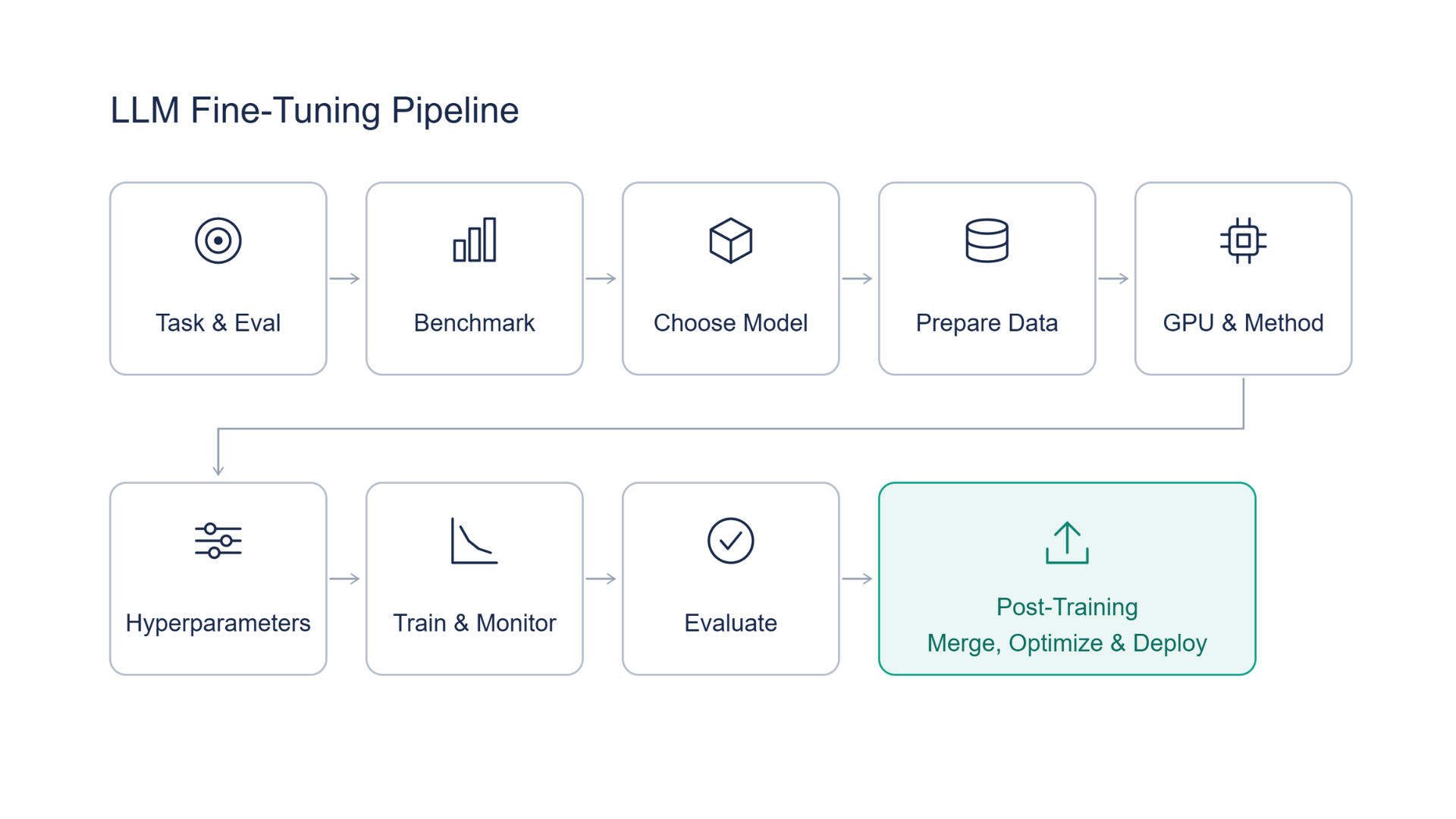
Throughout the following steps, we highlight a real-world case study from Tata 1mg, the Tata Group’s online pharmacy, to show how these principles apply in practice.
The journey from raw data to a production-ready model requires a strict, systematic pipeline. Here is the exact eight-step process to follow to ensure you don't waste time or compute budget:
1. Define the Task and Build Your Eval Set First
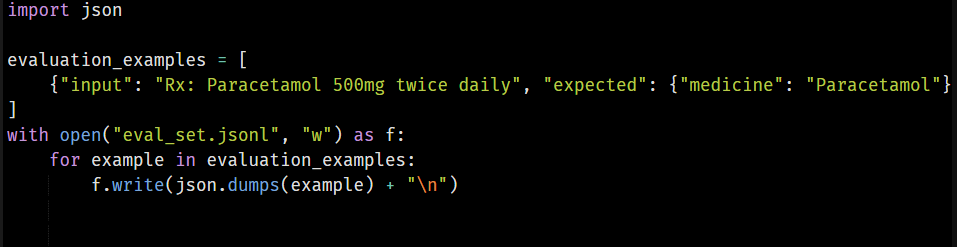
Never start training without a deterministic way to measure success. Define the exact behavioral delta you want to achieve.
- Establish Metrics: Move beyond outdated metrics like BLEU. Use exact-match for JSON schemas, ROUGE-L for summarization, or LLM-as-a-judge (using GPT-4o or Claude 3.5 Sonnet) for tone and reasoning.
- Isolate the Test Set: Carve out a held-out evaluation set of 100–500 examples that the model will never see during training. This is your ground truth.
Tata 1mg Case Study: The team defined exact field-extraction accuracy across unstructured medical prescriptions as their core metric, locking in a test benchmark before any compute was spent.
2. Benchmark the Base Model With Prompting

Push standard prompting to its absolute limit before investing in fine-tuning.
- Run your eval set through 2 to 3 candidate base models using n-shot prompting and Chain-of-Thought (CoT).
- Calculate the baseline performance gap. If prompting hits 95%, optimize your prompt and stop. If it peaks at 60–80%, you have a statistically significant delta to justify fine-tuning.
Tata 1mg Case Study: Benchmarking off-the-shelf vision-language models (VLMs) via few-shot prompting peaked at ~80% accuracy on complex prescription parsing, establishing a clear 15% performance gap to close via fine-tuning.
3. Choose the Starting Model

Your base model architecture dictates your downstream deployment infrastructure (like vLLM or TensorRT-LLM compatibility). Consider:
- Size vs. Latency: An 8B model (like Llama-3.1-8B or Qwen-2.5-7B) is significantly cheaper and faster to serve via KV-cache optimization than a 70B model.
- Base vs. Instruct: Use a base model for continued pretraining on domain vocabulary. Use an Instruct-tuned model for SFT, chat formatting, or JSON extraction.
- Context Window: Verify the model's RoPE (Rotary Position Embedding) scaling supports your required input token length natively.
4. Prepare the Dataset
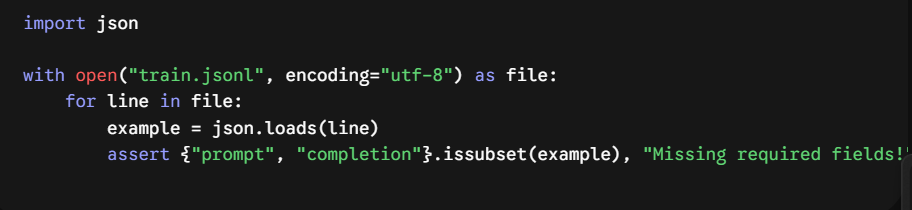
Data quality dictates model quality. As proven by Meta’s LIMA study, 1,000 highly curated, diverse examples will consistently outperform 50,000 noisy ones.
- Format matching: Ensure your JSONL training data perfectly matches the exact Jinja chat template of your chosen base model (e.g., <|im_start|> for ChatML or <|start_header_id|> for Llama 3). Mismatched tokens destroy performance.
- Data Hygiene: Deduplicate entries, rigorously strip out PII, and artificially oversample edge cases (e.g., corrupted inputs or negative examples) so the model learns how to fail gracefully.
PRO TIP: Quality Over Quantity
Focus on dataset cleanliness and diversity rather than volume. High-quality instruction data drastically reduces needed training steps and prevents overfitting.
5. Pick a Method and Size Your GPU Memory
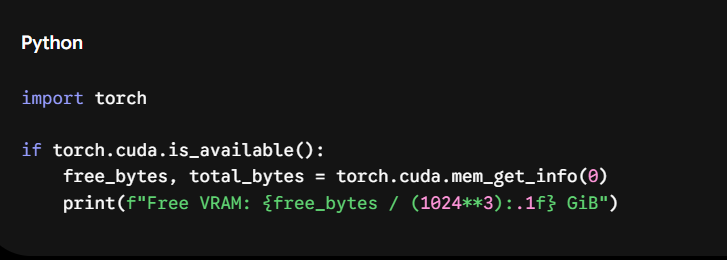
Memory constraints are the primary bottleneck in fine-tuning. For full fine-tuning with an AdamW optimizer, you need ~16 bytes per parameter.
- PEFT (LoRA/QLoRA): QLoRA shrinks the base model memory to ~0.5 bytes per parameter by quantizing weights to 4-bit Normal Float (NF4), making it possible to train an 8B model on a single 24GB consumer GPU.
- Memory Optimizations: Always enable gradient checkpointing to trade compute for VRAM, and utilize FlashAttention-2 to scale attention memory linearly rather than quadratically.
6. Set Hyperparameters
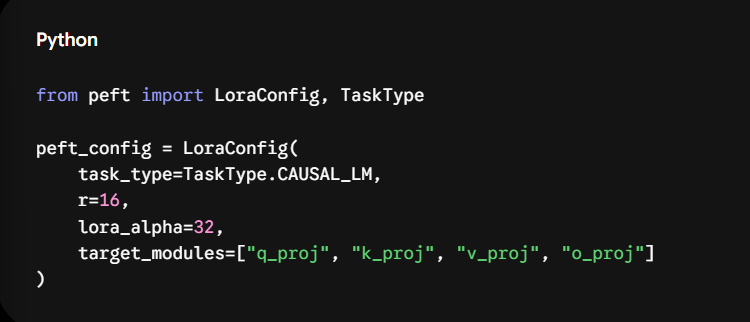
Hyperparameters control optimization stability. Default library values are rarely optimal for specific datasets.
7. Train and Monitor
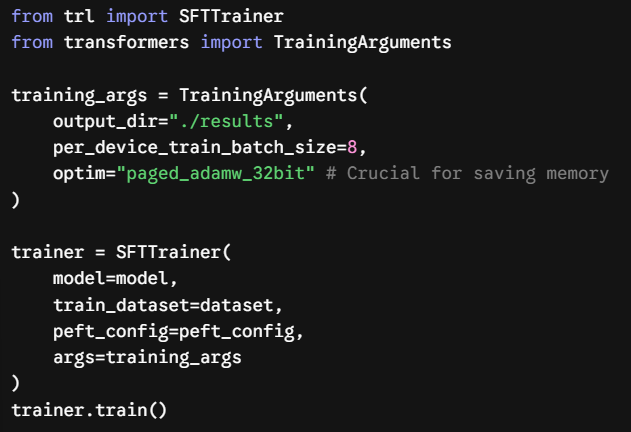
Launch the training job using an optimized backend (like Unsloth for single-node or DeepSpeed ZeRO-3 for multi-GPU distributed training).
- Log Everything: Pipe your metrics into Weights & Biases (WandB) or TensorBoard.
WARNING: Overfitting Risk
Always monitor validation loss alongside training loss. If validation loss begins to increase while training loss decreases, stop training immediately to avoid catastrophic forgetting.
Tata 1mg Case Study: Utilizing Simplismart's distributed training backend (DeepSpeed ZeRO), the team cut multi-GPU training time from 3 days to ~1.5 hours while monitoring loss curves in real time.
8. Evaluate the Fine-Tuned Model
Training loss is a debugging metric; your held-out test set is the success metric.
- Run the Benchmark: Pass your evaluation set (from Step 1) through the newly trained model using the same script from Step 2.
- Check Generalization: Run a regression check to ensure the model hasn't suffered catastrophic forgetting (e.g., forgetting how to speak normal English because it was over-indexed on JSON generation).
- Deploy: Once validated, merge the LoRA adapters into the base weights and deploy to a high-throughput inference engine (like vLLM) with continuous batching enabled.
Tata 1mg Case Study: Final evaluation confirmed the fine-tuned VLM boosted prescription parsing accuracy to ~95% and delivered 5x faster inference in production by eliminating API latency.
How Do You Deploy a Fine-Tuned LLM?
Training is only half the battle; the main differentiator for successful AI products is how they are served.
- Merging: If you trained using LoRA, you now have a base model and a separate adapter file. You can permanently merge these weights into a single standalone model for faster serving, or keep them separate if you plan to do multi-LoRA serving (routing different users to different adapters on the same loaded base model).
- Optimization: Apply quantization (like AWQ or GPTQ) for inference to drastically reduce serving costs and VRAM requirements, achieving high performance with minimal accuracy loss when validated on your eval set (for instance, Sanas maintained 99.99% accuracy retention after INT4 quantization).
- Infrastructure: Define your throughput and latency targets. Implement autoscaling and scale-to-zero infrastructure so you aren't paying for expensive idle GPUs during low-traffic periods.
- Monitoring: Set up observability for data drift and establish a retraining cadence to keep the model updated.
See our documentation for deploying fine-tuned models, dynamic LoRA compilation guides, and autoscaling setups.
How Do You Fine-Tune and Deploy LLMs on Simplismart?
Moving from an experimental Jupyter notebook to a scalable production pipeline is notoriously difficult. Simplismart’s managed training suite and deployment infrastructure handle the heavy lifting, allowing your team to focus on data quality and product behavior rather than writing DeepSpeed configurations.
The Simplismart Training Suite:
We support SFT, DPO, GRPO, and continued pretraining, each with full fine-tuning, LoRA, or QLoRA. You can securely pull base models directly from Hugging Face and stream your JSONL training data securely from S3, GCS, or Hugging Face datasets (where each line holds a prompt/response, messages array, or DPO prompt/chosen/rejected structure). Simply select your desired GPU type and count; Simplismart automatically handles the distributed orchestration (DDP or DeepSpeed ZeRO) under the hood using our highly optimized tuner backend. Metrics and model checkpoints are continuously saved and easily accessible.
Deploying with Simplismart
Once your model hits the target metrics, Simplismart’s "Compile" feature seamlessly merges your LoRA adapters into the base model and optimizes it for maximum inference speed. You can deploy this optimized model directly to our dedicated GPUs, or securely deploy it to your own AWS, GCP, Azure account, or on-prem environment. You maintain complete control over your IP, and training is transparently billed per GPU-hour.
Proof in Production: Tata 1mg
India’s leading digital health platform, Tata 1mg, utilized Simplismart to fine-tune open-source Vision-Language Models (VLMs), replacing expensive closed-source APIs for prescription processing.
- Prescription-parsing accuracy jumped from ~80% to ~95%.
- Model training times dropped from 3 days to roughly 1.5 hours.
- Delivered ~5x faster inference in production.
- Because training and inference ran within their own VPC using Simplismart, sensitive patient data stayed entirely in-house during both model development and deployment.
What Are the Most Common LLM Fine-Tuning Mistakes?
- Chat template mismatch: Training on a standard user: and assistant: format but evaluating using the model's native <|im_start|> tags destroys performance. Always use the exact chat template the base model expects.
- Train and test leakage: Accidentally including test set questions in your training data creates artificially high accuracy scores that plummet in production.
- Picking checkpoints by loss alone: The checkpoint with the lowest training loss is frequently overfit. Pick the checkpoint that scores highest on your actual business metric.
- A learning rate that’s too high: If your model starts outputting gibberish or the loss curve hits NaN, your learning rate is likely too high.
- Overfitting small datasets: If you only have 500 examples, training for 10 epochs will cause the model to memorize the data. Stick to 1-3 epochs.
- Ignoring serving cost: Fine-tuning a 70B model only to realize you can't afford to host it. A 70B model’s bf16 weights alone take about 140 GB, so serving it needs at least two 80 GB GPUs unless you quantize. Prototype on an 8B model first.
- Fine-tuning to inject fast-changing facts: Fine-tuning to teach a model current stock prices will be obsolete tomorrow. Use RAG for facts.
Ready to Move from Jupyter Notebooks to Production?
Training is only half the battle. With Simplismart, you can seamlessly train custom models and use our "Compile" feature to optimize them for maximum inference speed. Securely deploy to your own AWS, GCP, or Azure account to maintain complete control over your IP and data.
Deploy Your First Custom LLM Today at Simplismart
Frequently Asked Questions (FAQ)
How does LLM fine-tuning work?
Fine-tuning takes a pretrained base model and trains it further on a curated dataset to specialize its behavior for specific tasks. It adjusts the model's weights using next-token prediction, so it learns to follow complex formats, adopt specific tones, or master niche domains without requiring massive pretraining clusters.
When should you fine-tune an LLM instead of using RAG?
Use fine-tuning when you need to teach the model a strict output format, a specialized domain behavior, or a specific brand voice. Conversely, use RAG when you simply need the model to fetch and synthesize dynamic, external knowledge that changes frequently.
What are the main LLM fine-tuning methods?
The main weight update strategies are Full Fine-Tuning, LoRA, and QLoRA. Training objectives include Supervised Fine-Tuning (SFT), Direct Preference Optimization (DPO), Group Relative Policy Optimization (GRPO) for reinforcement tuning, and continued pretraining for raw domain vocabulary.
How much data do you need to fine-tune an LLM?
You only need a few hundred to a few thousand highly curated examples for task-specific fine-tuning. As highlighted in the LIMA study, focusing on dataset cleanliness and diversity yields better performance than collecting tens of thousands of mediocre examples.
Can you fine-tune an LLM on a single GPU?
Yes, you can fine-tune an 8B parameter model on a single 24 GB consumer GPU by using QLoRA. This approach quantizes the base model down to 4-bit precision, reducing VRAM usage to roughly 8–12 GB depending on your batch size and sequence length.
What is the difference between LoRA and QLoRA?
LoRA freezes base weights in 16-bit precision and trains small adapter modules, whereas QLoRA compresses the base model to 4-bit precision to slash memory requirements. However, QLoRA's downside is that dequantizing weights on-the-fly makes training slightly slower and can occasionally introduce a minor drop in accuracy.
How do you deploy a fine-tuned LLM?
You deploy a fine-tuned model by merging your LoRA adapters back into the base model or serving them dynamically. Next, apply inference optimizations like AWQ, GPTQ, or TensorRT-LLM, and host the optimized model behind an API endpoint on cloud or on-prem GPUs with autoscaling configured.
How much does it cost to fine-tune an LLM?
Fine-tuning costs range from a few dollars for an 8B model using QLoRA on a single consumer GPU to hundreds or thousands of dollars for distributed full fine-tuning of 70B+ models. Costs depend primarily on model size, dataset token count, and the number of GPU hours required.
How long does fine-tuning take?
Fine-tuning typically takes anywhere from 30 minutes to a few hours for smaller models (like an 8B model trained with LoRA on a single GPU). Larger models, distributed multi-GPU runs, or full fine-tuning pipelines can take several hours to a few days depending on hardware scale.