
Black Forest Labs' FLUX.2 [klein] family delivers the fastest image models in the FLUX lineup, unifying text-to-image and multi-reference editing in a single compact architecture. With FLUX.2 [klein] 9B Base now available through Simplismart's optimized shared endpoint, you get state-of-the-art quality with ~1.3 second inference, which is 8.92× faster than the original unoptimized model.
This guide shows you how to use the Flux 2 Klein API for both generation and editing, with ready-to-run code. Whether you're building real-time image generation and editing tools, creative apps, or use cases that need high throughput without sacrificing quality, the Flux 2 Klein API delivers exceptional performance.
What Makes FLUX 2 Klein Special?
FLUX.2 [klein] 9B is a 9 billion parameter rectified flow transformer that combines generation and editing in one model. Three aspects stand out for production use.
Blazing Fast Inference
The 9B Base model is an undistilled foundation model, providing maximum flexibility and control. Through Simplismart's optimized inference stack with, the shared endpoint delivers production-ready images in ~1.3 seconds, which is 8.92× faster than the original unoptimized model and blazing fast speed for creative tools, interactive applications, and batch workflows.
Text-to-Image and Multi-Reference Editing in One Model
A single pipeline handles both text-to-image and image-to-image multi-reference editing. No need to switch models or endpoints when you move from “generate from scratch” to “edit with one or more reference images.” Character consistency, style transfer, and composed scenes are all supported in one API.
Quality That Matches Larger Models
FLUX.2 [klein] 9B Base is built to match or exceed models several times its size on text-to-image, single-reference editing, and multi-reference generation. You get a compact model without trading off quality, ideal for cost-effective and fast deployment.
The Model Architecture
Rectified Flow Transformer
FLUX.2 [klein] uses a rectified flow formulation: a 9B parameter transformer that learns deterministic mappings for efficient sampling. Fewer steps and a streamlined design keep latency low while preserving semantic fidelity and prompt adherence.
8B Qwen3 Text Encoder
The model uses an 8B Qwen3 text encoder for strong prompt understanding. That helps with complex descriptions, style cues, and multi-reference instructions so your generations and edits stay on target.
Unified Generation and Editing
Unlike pipelines that use separate models for generation (text-to-image) and editing (image-to-image), FLUX.2 [klein] unifies both in one architecture. The same checkpoint and API support prompts-only (text-to-image) and prompts plus reference images (image-to-image), simplifying integration and operations.
For full technical details see the FLUX.2-klein-base-9B model card on Hugging Face.
Benchmarks (FLUX.2 Klein 9B)
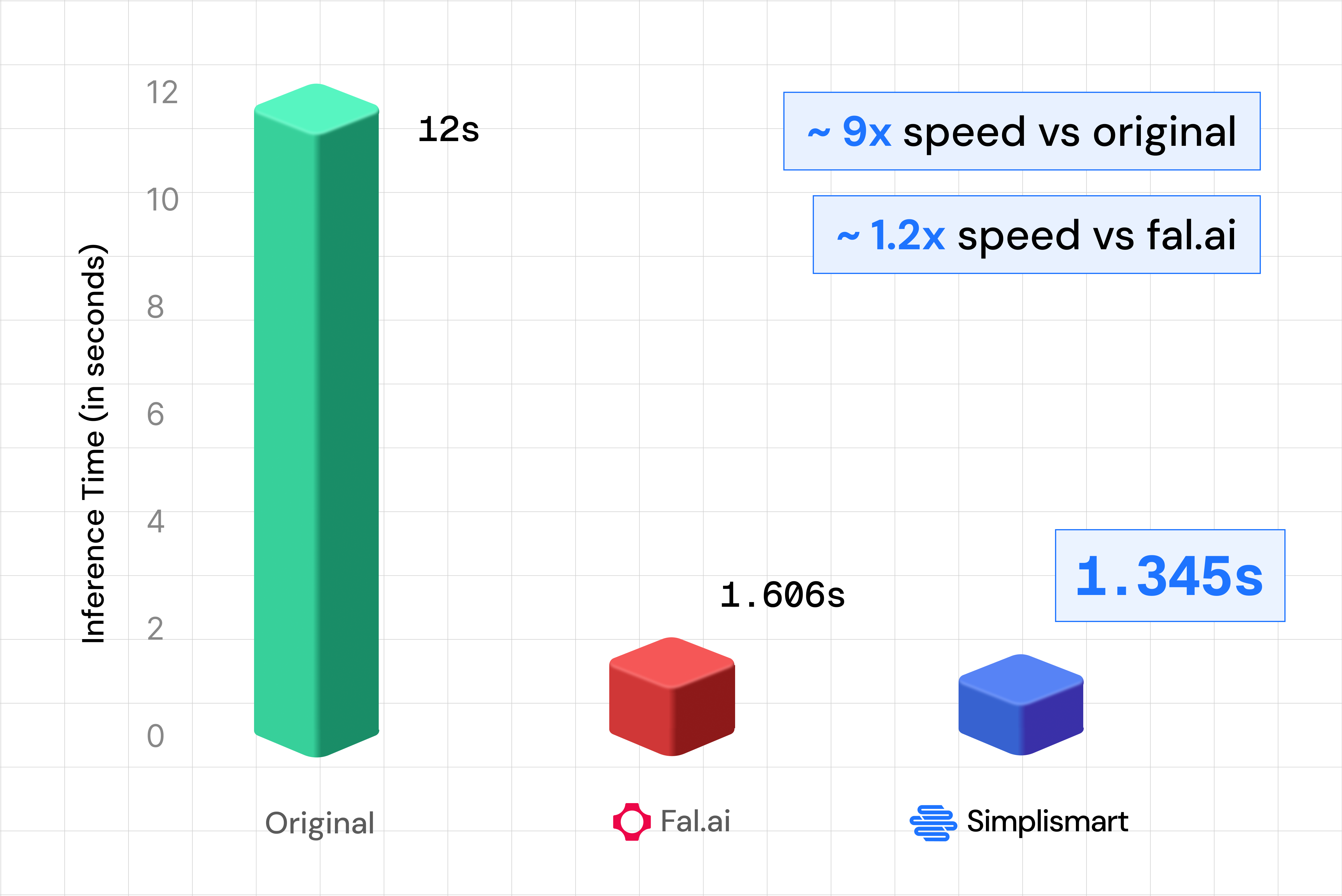
So the same model that used to take 12 seconds per image now runs in about 1.3 seconds on Simplismart, fast enough for interactive and near real-time use cases.
Performance Optimizations for the Flux 2 Klein API
Under the hood, several techniques work together to reach that ~1.3s inference time. Here’s what they do in simple terms.
1. FP8 linear layers
The model’s heaviest math operations like matrix multiplication is done in 8-bit floating point (FP8) instead of 16-bit. Think of it as using a lighter backpack: the GPU moves less data and does each multiplication with hardware that’s built for this smaller format, so you get about 2× more throughput for those layers with no meaningful loss in image quality. The model ships with pre-calibrated scales so we don’t pay extra cost for “figuring out” the scaling on every request.
2. TeaCache
Image generation runs over many “denoising” steps. In the middle of the process, consecutive steps often change the image very little. TeaCache (Timestep Embedding Aware Cache) checks how much the internal representation actually changed. If it’s below a threshold, we reuse the previous step’s result instead of running the full transformer again. So we might run only ~14 full steps out of 28, giving roughly 1.8× speedup on the denoising loop while keeping quality high. First and last steps always run so the result stays correct.
3. torch.compile
Each transformer block is a long chain of small operations (normalizations, scales, adds). Without optimization, each of these can trigger a separate GPU kernel and extra round-trips. torch.compile fuses many of these into single kernels per block (e.g. one kernel for “normalize, scale, and add” instead of three). The GPU does fewer, larger chunks of work, so less time is lost to launch overhead. The same idea is applied to the VAE decoder: dozens of layers are compiled and replayed as one CUDA graph, cutting dispatch overhead there too.
4. Quantized Attention
Attention is where the model compares each part of the image (and text) with every other part. Doing that in full 16-bit precision is costly. Quantized attention uses custom kernels that run the attention computation itself in INT8 for queries and keys and FP8 for values, smaller formats that the GPU can process much faster on modern hardware (e.g. H100). A small adjustment like subtracting the mean of the keys before quantizing (“Smooth-K”) keeps quality high by reducing the impact of outliers. The result is significantly faster attention with no visible loss in output quality.
5. JPEG output encoding
After the model produces the image, we have to encode it (e.g. to base64) before sending it back. PNG encoding was taking hundreds of milliseconds per image. Switching to JPEG at quality 95 with no chroma subsampling gives nearly the same visual quality for typical diffusion outputs but encodes in ~30–40 ms instead of ~450 ms, so you get a snappier response without sacrificing how the image looks.
Together, these optimizations are why the Flux 2 Klein API on Simplismart reaches ~1.35 s end-to-end inference while staying ahead of other hosted options on both speed and quality.
Getting Started with Flux 2 Klein API on Simplismart
Simplismart gives you three ways to use FLUX.2 [klein]:
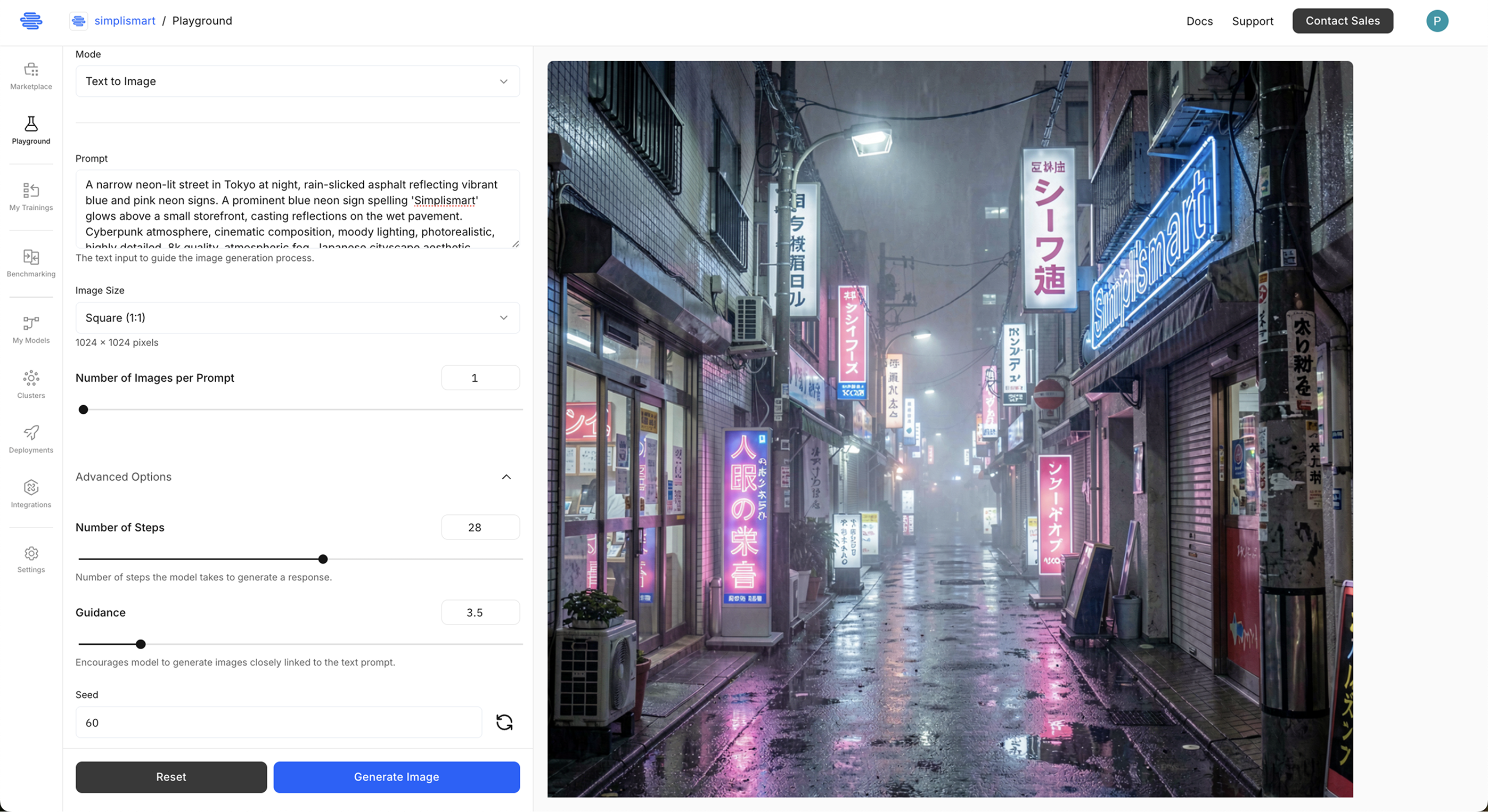
1. Simplismart Playground
Try FLUX.2 [klein] in the Simplismart Playground, no code or setup. Ideal for prompt testing and quick demos.
2. Flux 2 Klein API (Shared Endpoint)
For apps and automation, use the Flux 2 Klein API via Simplismart’s pay-as-you-go shared endpoint. You get a single REST API for text-to-image and image-to-image with reference images, without managing infrastructure. See Simplismart pricing for usage-based details.
3. Flux 2 Klein API (Dedicated Endpoint)
For production use, use the Flux 2 Klein API via Simplismart’s dedicated endpoint. Check out the Simplismart documentation to learn how to optimize and deploy Flux 2 Klein model for the production use cases with inbuilt rapid-auto scaling. You get a single REST API for text-to-image and image-to-image with reference images, without managing infrastructure. See Simplismart pricing for usage-based details.
Using the Flux 2 Klein API: A Practical Guide
Installation and Setup
Install dependencies:
pip install requests python-dotenv
Set your API token in the environment:
# .env
SIMPLISMART_API_TOKEN=your_api_token_here
To generate an API token, refer to the Simplismart documentation.
Text-to-Image with the Flux 2 Klein API
For text-only generation, omit input_images (or pass an empty list). The example below uses the shared endpoint.
import os
import json
import requests
from dotenv import load_dotenv
load_dotenv()
# Replace with your Simplismart Flux 2 Klein endpoint URL and endpoint name
API_URL = "https://FLUX2_KLEIN_API_ENDPOINT/subscribe"
ENDPOINT_NAME = "flux-2-klein-9b-d6d713d6-497a-4341-8d3c-8cf0e1db5733"
API_TOKEN = os.getenv("SIMPLISMART_API_TOKEN")
HEADERS = {
"Content-Type": "application/json",
"Authorization": f"Bearer {API_TOKEN}",
}
def generate_image(
prompt,
request_id=None,
num_images=1,
width=1024,
height=1024,
num_steps=4, guidance=3.5,
seed=42,
negative_prompt=None,
):
"""
Generate images from text using the Flux 2 Klein API.
Args:
prompt (str): Text description of the image to generate.
request_id: Optional request identifier (default: auto-generated).
num_images (int): Number of images to generate per request.
width, height (int): Output resolution (e.g. 1024).
num_steps (int): Inference steps (default 4 for Klein).
guidance (float): Guidance scale for prompt adherence.
seed (int): Random seed for reproducibility.
negative_prompt (str): Optional negative prompt.
Returns:
dict: API response containing base64 images and metadata.
"""
import uuid
if request_id is None:
request_id = uuid.uuid4().hex
payload = {
"name": ENDPOINT_NAME,
"input_data": {
"request_id": request_id,
"prompt": prompt,
"negative_prompt": negative_prompt or "blurry, low quality",
"width": width,
"height": height,
"num_steps": num_steps,
"guidance": guidance,
"seed": seed,
"num_images_per_prompt": num_images,
"input_images": [], # Empty for text-to-image
"output_type": "base64",
},
}
response = requests.post(API_URL, headers=HEADERS, json=payload)
if response.status_code == 200:
result = response.json()
print("✓ Request successful!")
return result
else:
print(f"✗ Request failed: {response.status_code}")
return None
# Example: text-to-image
result = generate_image(
prompt="A humanoid robot or cyborg set against a bold red background",
width=1024,
height=1024,
num_steps=4,
guidance=4.0,
seed=42,
)
Image-to-Image and Multi-Reference Editing
To edit or compose from reference images, pass image URLs (or base64 data per your endpoint’s contract) in input_images. The Flux 2 Klein API supports multi-reference editing in a single request.
def edit_image(
prompt,
input_images,
request_id=None,
num_images=1,
width=1024,
height=1024,
num_steps=4,
guidance=3.5,
seed=42,
negative_prompt=None,
):
"""
Edit or generate from one or more reference images using the Flux 2 Klein API.
Args:
prompt (str): Instruction describing how to use the reference image(s).
input_images (list): URLs or base64 strings of reference images (e.g. 1–10).
request_id: Optional request identifier.
num_images (int): Number of output images per request.
width, height (int): Output resolution.
num_steps (int): Inference steps (default 4).
guidance (float): Guidance scale.
seed (int): Random seed.
negative_prompt (str): Optional negative prompt.
Returns:
dict: API response with base64 images and metadata.
"""
import uuid
if request_id is None:
request_id = uuid.uuid4().hex
payload = {
"name": ENDPOINT_NAME,
"input_data": {
"request_id": request_id,
"prompt": prompt,
"negative_prompt": negative_prompt or "blurry, low quality",
"width": width,
"height": height,
"num_steps": num_steps,
"guidance": guidance,
"seed": seed,
"num_images_per_prompt": num_images,
"input_images": input_images,
"output_type": "base64",
},
}
response = requests.post(API_URL, headers=HEADERS, json=payload)
if response.status_code == 200:
result = response.json()
print("✓ Image editing successful!")
print(f" Used {len(input_images)} reference image(s)")
return result
else:
print(f"✗ Request failed: {response.status_code}")
return None
# Example: style transfer / edit with one reference image
result = edit_image(
prompt="Make this like a 90s anime character",
input_images=[
"https://INPUT_IMAGE_URL/input_image.png"
],
width=1024,
height=1024,
num_steps=4,
guidance=3.5,
seed=42,
negative_prompt="blurry, low quality",
)
Real-World Use Cases for the Flux 2 Klein API
- Real-time creative tools: Fast ~1.3 second latency enables live previews, interactive editing, and responsive user experiences in creative applications.
- Batch asset generation: High throughput inference with optimized inference stack, reduceing cost and time for large-scale image creation.
- Multi-reference campaigns: One API for text-to-image and multi-reference editing simplifies marketing and e-commerce workflows.
- Prototyping and demos: Fast iteration and consistent quality make FLUX.2 [klein] suitable for MVPs and client demos.
Conclusion
FLUX.2 [klein] 9B brings sub-second, high-quality image generation and multi-reference editing to a single model. Simplismart’s Flux 2 Klein API makes it easy to use in production without managing infrastructure, whether you need text-to-image, image-to-image, or multi-reference workflows.
Use the code snippets above to integrate the Flux 2 Klein API into your app, or run the same model locally with Diffusers. For more examples and updates, check the Simplismart Cookbook and documentation.
Ready to Get Started?
- Try it now: Use the Simplismart Playground for instant access FLUX.2 [klein].
- Build with the Flux 2 Klein API: Sign up at Simplismart.ai and get your API keys.
- Explore examples: Use the Cookbook repo for Flux 2 Klein code examples.
Additional Resources
- FLUX.2-klein-base-9B on Hugging Face: Model card and usage
- Simplismart Documentation: API reference and integration guides