The landscape of AI image generation has witnessed a transformative leap with the release of Black Forest Labs' FLUX.2 [dev] in November 2025. This groundbreaking model is now available through Simplismart's Flux 2 API, making it incredibly simple to harness its powerful capabilities in your applications.
If you've been following the evolution of open-weight image generation models, you'll appreciate that FLUX.2 isn't just an incremental update. It's a complete architectural reimagining that brings production-grade capabilities to developers worldwide.
What Makes FLUX.2 Dev Special?
FLUX.2 [dev] is a 32 billion parameter model that brings three production-critical capabilities to the forefront: multi-reference consistency, high-resolution output, and accurate text rendering.
Multi-Reference Image Input
One of the most powerful features of the Flux 2 API is its ability to accept up to 10 reference images simultaneously. This isn't just about combining images; it's about maintaining character consistency, style transfer, and brand identity across generated outputs.
Imagine building a fashion e-commerce platform where you need to show the same model wearing different outfits, or creating marketing materials where your product needs to appear in various scenes without losing its distinctive features. FLUX.2 solves the "stochastic drift" problem that has plagued generative AI, ensuring that your subject stays consistent across generations.
High-Resolution Output up to 4 Megapixels
On the technical side, FLUX.2 generates images up to 4 megapixels (2048x2048 or equivalent aspect ratios). This makes it viable for print-ready marketing materials, high-resolution product photography, and large-format displays without requiring upscaling post-processing.
World-Class Typography and Text Rendering
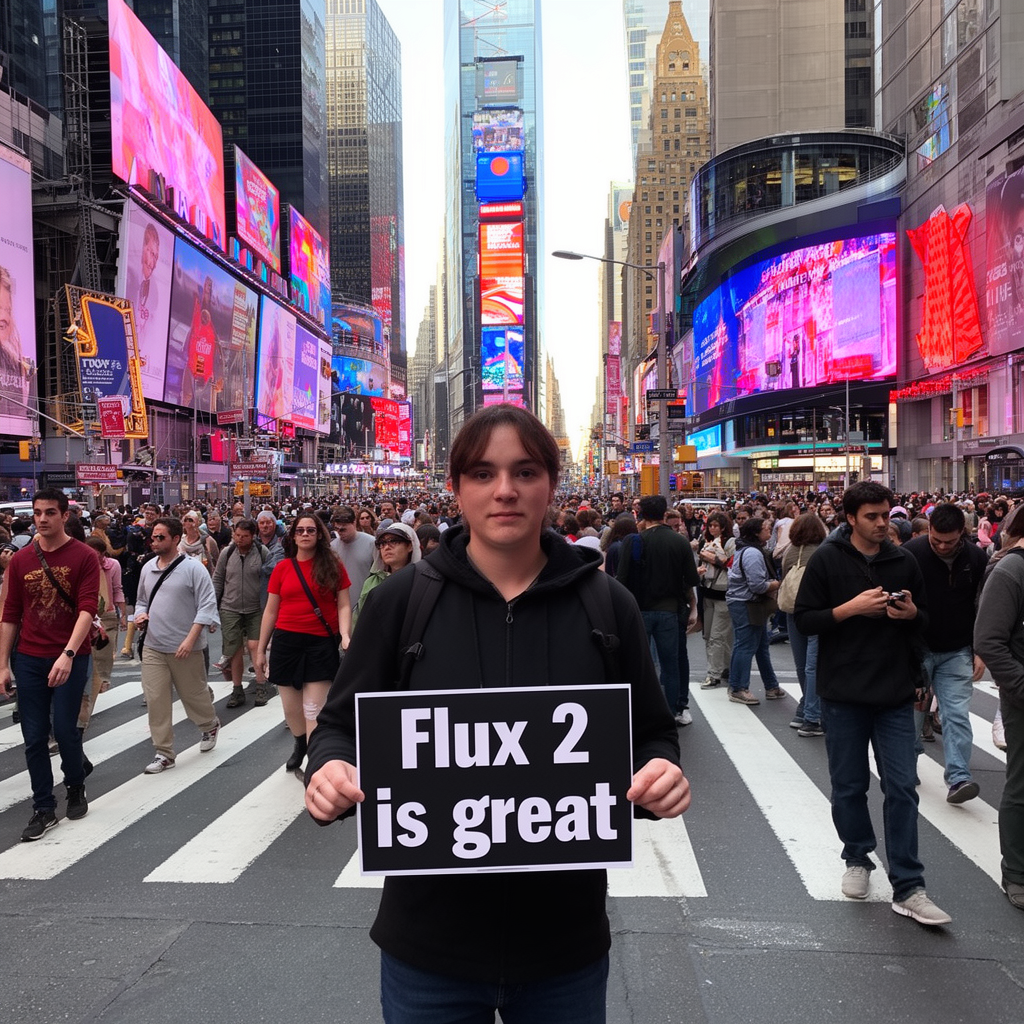
Perhaps most impressive for practical applications is the dramatically improved typography. FLUX.2 can accurately render text on signs, products, logos, infographics, and UI mockups, a capability that earlier models consistently struggled with. This opens up entirely new use cases in areas like advertising design, UI/UX prototyping, and branded content creation.
The Model Architecture
Latent Flow Matching Architecture
FLUX.2 represents a departure from traditional diffusion-based approaches, employing a latent flow matching framework. Instead of gradually denoising images, flow matching learns deterministic mappings between noise and data distributions. This architectural choice enables more efficient sampling with fewer steps, better semantic fidelity, improved prompt adherence, and faster inference times compared to conventional diffusion models.
Mistral Small 3.2 Vision-Language Encoder
At the heart of FLUX.2's understanding capabilities lies a 24 billion parameter Mistral-3 vision-language model. This encoder brings real-world knowledge to the generation process, helping understand physical properties, materials, and how objects interact in space. It grasps the semantic meaning of complex prompts and can analyze and intelligently combine concepts from multiple reference images, enabling the sophisticated multi-reference capabilities that set FLUX.2 apart.
Rectified Flow Transformer
The core generation engine is a rectified flow transformer with 32 billion parameters organized in transformer-style blocks. This design captures intricate spatial relationships, understands material properties, and renders compositional logic that earlier architectures struggled with, all while maintaining consistency across complex scenes with multiple elements.
FLUX.2 VAE: The Quality Foundation
Perhaps one of the most significant innovations is the completely retrained Variational Autoencoder (VAE) released under the Apache 2.0 license. Black Forest Labs solved the notoriously difficult Learnability-Quality-Compression trilemma by:
- Re-training the latent space from scratch for better learnability
- Achieving higher image quality at the same compression rate
- Balancing reconstruction fidelity with computational efficiency
This VAE is available on Hugging Face and serves as the foundation for all FLUX.2 model variants.
Getting Started with Simplismart Platform
Simplismart offers two ways to access the FLUX.2 dev model, designed to fit different use cases and development workflows:
1. Simplismart Playground
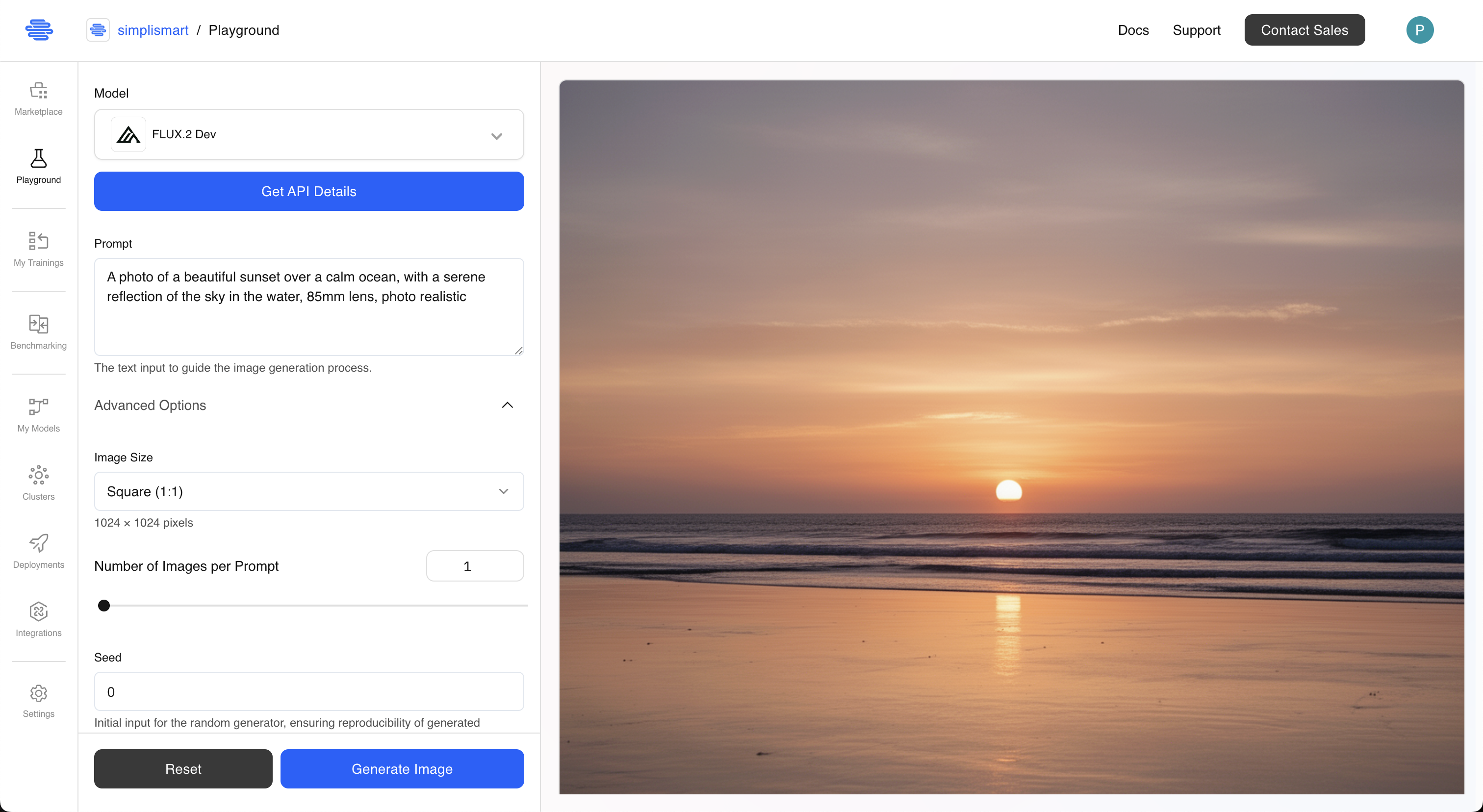
The fastest way to experience FLUX.2 is through the Simplismart Playground, a web-based interface where you can test the model immediately without any installation or coding.
2. Shared Endpoint API
For developers building applications, Simplismart provides a pay-as-you-go shared endpoint that makes integrating FLUX.2 into your stack incredibly simple. This FLUX 2 API is perfect for experimentation, variable workloads, and production applications that need flexible scaling without infrastructure management.
Using the Flux 2 API: A Practical Guide
Now let's dive into the practical side and explore how to use the Flux 2 API through Simplismart's shared endpoint.
Installation and Setup
First, install the required dependencies:
pip install requests pillow python-dotenv
Set up your environment variables:
# .env file
SIMPLISMART_API_TOKEN=your_api_token_here
To learn how to generate an API token on Simplismart platform, check out this documentation.
Text-to-Image Generation
Let's start with the most common use case: generating images from text descriptions.
import os
import base64
import uuid
import requests
from dotenv import load_dotenv
from pathlib import Path
from datetime import datetime
from io import BytesIO
from PIL import Image
load_dotenv()
API_URL = "https://http.kjae1q8i60.ss-in.s9t.link/predict"
API_TOKEN = os.getenv("SIMPLISMART_API_TOKEN")
HEADERS = {
    'Content-Type': 'application/json',
    'Authorization': f"Bearer {API_TOKEN}"
}
def generate_image( prompt, request_id=None, num_images=1, steps=28, guidance_scale=1.0,height=1024, width=1024, seed=0, acceleration="fast"):
    """
    Generate images from text prompts using Flux 2 Dev model.

    Args:
        prompt (str): Text description of the image to generate
        num_images (int): Number of images to generate
        steps (int): Number of inference steps (default: 28)
        guidance_scale (float): How closely to follow the prompt
        height (int): Image height in pixels (up to 2048)
        width (int): Image width in pixels (up to 2048)
        seed (int): Random seed for reproducibility (0 for random)
        acceleration (str): Speed mode - "fast", "slow" or "regular"

    Returns:
        tuple: (response_json, list_of_saved_file_paths)
    """
    if request_id is None:
        request_id = str(uuid.uuid4())

    payload = {
        "request_id": request_id,
        "request_type": "txt2img",
        "prompt": prompt,
        "num_images_per_prompt": num_images,
        "num_inference_steps": steps,
        "guidance_scale": guidance_scale,
        "height": height,
        "width": width,
        "seed": seed,
        "acceleration": acceleration,
        "safety_tolerance": 2
    }

    response = requests.post(API_URL, headers=HEADERS, json=payload)

    if response.status_code == 200:
        result = response.json()
        print(f"✓ Request successful!")
        print(f"  Inference time: {result.get('model_inference_time', 'N/A')}s")
        print(f"  Resolution: {result.get('mega_pixel', 'N/A')} MP")
        # Save generated images
        if 'images' in result and result['images']:
            saved_files = save_base64_images(result['images'], request_id, "txt2img")
            return result, saved_files
        else:
            print("✗ No images in response")
            return result, []
    else:
        print(f"✗ Request failed: {response.status_code}")
        return None
result = generate_image(
    prompt="A photo of a beautiful sunset over a calm ocean, with a serene reflection of the sky in the water, 85mm lens, photo realistic",
    num_images=1,
    steps=30,
    height=1080,
    width=1920,
    acceleration="slow"
)
Output

Multi-Reference Image Editing
Here's where FLUX.2 truly shines. The ability to use multiple reference images enables unprecedented control over your outputs. In this code snippet below, it takes 1 input image as well as a reference image and generates an image where subject from image 1 is in the setting from image 2.
from PIL import Image
from io import BytesIO
from uuid import uuid4
from pathlib import Path
from datetime import datetime
from io import BytesIO
from PIL import Image
import os
import base64
import requests
from dotenv import load_dotenv
load_dotenv()
API_URL = "https://http.kjae1q8i60.ss-in.s9t.link/predict"
API_TOKEN = os.getenv("SIMPLISMART_API_TOKEN")
HEADERS = {
    'Content-Type': 'application/json',
    'Authorization': f"Bearer {API_TOKEN}"
}
def edit_image(
    prompt,
    input_image,
    request_id=None,
    num_images=1,
    steps=28,
    guidance_scale=1.0,
    height=1024,
    width=1024,
    seed=-1,
    acceleration="fast",
    reference_images=None
):
    """
    Edit or modify images using multiple references.

    Supports both URLs and local file paths. Use reference_images
    to provide up to 9 additional reference images alongside the main input.

    Args:
        prompt (str): Text description of how to edit the image
        input_image (str): URL or local file path to the main input image
        reference_images (list): Additional reference images (URLs or paths)
        ... (other parameters same as generate_image)

    Returns:
        tuple: (response_json, list_of_saved_file_paths)
    """
    if request_id is None:
        request_id = str(uuid4())

    # Process main input image
    if input_image.startswith(('http://', 'https://')):
        processed_image = input_image
    else:
        processed_image = convert_image_to_base64(input_image)

    # Build images array
    images_array = [processed_image]

    # Add reference images (up to 9 more for total of 10)
    if reference_images:
        for ref_img in reference_images[:9]:  # Limit to 9 additional
            if ref_img.startswith(('http://', 'https://')):
                images_array.append(ref_img)
            else:
                images_array.append(convert_image_to_base64(ref_img))

    payload = {
        "request_id": request_id,
        "request_type": "image_edit",
        "prompt": prompt,
        "images": images_array,
        "num_images_per_prompt": num_images,
        "num_inference_steps": steps,
        "guidance_scale": guidance_scale,
        "height": height,
        "width": width,
        "seed": seed,
        "acceleration": acceleration
    }

    response = requests.post(API_URL, headers=HEADERS, json=payload)

    if response.status_code == 200:
        result = response.json()
        print(f"✓ Image editing successful!")
        print(f"  Used {len(images_array)} reference image(s)")
        # Save edited images
        if 'images' in result and result['images']:
            saved_files = save_base64_images(result['images'], request_id, "image_edit")
            return result, saved_files
        else:
            print("✗ No images in response")
            return result, []

    else:
        print(f"✗ Request failed: {response.status_code}")
        return None
result = edit_image(
    prompt="Use the character from Image 1 as the subject, preserving facial features, body proportions, and clothing details. Place this character into the environment from Image 2. Render the final image in a highly photo-realistic style with natural lighting, accurate shadows, realistic textures, and consistent perspective.",
    input_image="samples/elon-musk.jpg",
    reference_images=["samples/golden-gate.jpg"],
    num_images=1,
    steps=30,
    guidance_scale=3.5
)
Output

Advanced Techniques: JSON Prompting
FLUX.2 supports structured JSON prompts for granular control:
json_prompt = """{
  "scene": "A three-quarter angle studio product shot of a premium sneaker, isolated on a neutral light-gray background",
  "subjects": [
    {
      "type": "Upper Mesh",
      "description": "Breathable engineered mesh forming the main body of the sneaker, strictly in color #F5F5F5 off-white",
      "position": "upper body",
      "color_match": "exact"
    },
    {
      "type": "Toe Cap Overlay",
      "description": "Reinforced protective overlay covering the toe area, strictly in color #1C1C1C matte black",
      "position": "front toe",
      "color_match": "exact"
    },
    {
      "type": "Midsole",
      "description": "Cushioned foam midsole with a smooth sculpted profile, strictly in color #FF6A00 bright orange",
      "position": "midsole",
      "color_match": "exact"
    },
    {
      "type": "Outsole",
      "description": "Durable rubber outsole with visible traction pattern, strictly in color #2E2E2E dark charcoal",
      "position": "sole bottom",
      "color_match": "exact"
    },
    {
      "type": "Brand Mark",
      "description": "SimpliSneaker brand wordmark printed near the heel counter, strictly in color #1C1C1C black",
      "position": "lateral heel",
      "detail_preservation": "high"
    },
    {
      "type": "Laces and Eyelets",
      "description": "Flat woven laces and reinforced eyelets, strictly in color #F5F5F5 off-white",
      "position": "upper center",
      "color_match": "exact"
    },
    {
      "type": "Background",
      "description": "A smooth, seamless studio background in light gray, evenly lit with no shadows",
      "position": "background",
      "color_match": "exact"
    }
  ],
  "color_palette": [
    "#F5F5F5",
    "#1C1C1C",
    "#FF6A00",
    "#2E2E2E"
  ]
}"""
result = generate_image(
    prompt=json_prompt,
    num_images=1,
    steps=30,
    height=1024,
    width=1024,
    acceleration="slow",
    guidance_scale=3.5
)
json_prompt_text
Collap
Output

Real-World Applications of FLUX 2 API
FLUX.2's capabilities unlock practical use cases across industries:
E-Commerce: Generate consistent product photography across different environments and lighting conditions while maintaining brand aesthetic. Create high-resolution lifestyle shots at 4MP for print catalogs.
Fashion & Design: Maintain character consistency across entire fashion catalogs. Show the same model in multiple outfits and settings without expensive photoshoots.
Marketing & Advertising: Create ad variations with consistent brand identity. Generate campaign assets at scale while ensuring logo placement and text rendering remain perfect.
UI/UX Prototyping: Design high-fidelity interface mockups with readable text and accurate typography, perfect for client presentations and user testing.
Understanding the FLUX 2 API Response
The Flux 2 API returns a JSON response with comprehensive metadata:
{
"request_id": 1245,
"request_type": "txt2img", # or "image_edit"
"images": ["base64_encoded_image"],
"model_inference_time": 2.34,
"mega_pixel": "1.05",
"fast": "true"
}
The response includes generation time (model_inference_time), resolution (mega_pixel), acceleration mode used (fast), and base64-encoded PNG images ready for processing or storage. You can decode and save the images using Python's base64 module.
Performance Optimization Tips for FLUX 2 API
1. Choose the Right Acceleration Mode
FLUX.2 offers three acceleration modes to balance speed and quality. Use "fast" mode with 12-20 steps for rapid previews and iteration cycles. For production work where you need balanced quality and speed, "regular" mode with 28-35 steps is ideal. When maximum quality is essential for final deliverables, "slow" mode with 40-50 steps extracts the best possible results from the model.
2. Batch Processing for Efficiency
# Process multiple prompts efficiently
prompts = [
"Product shot style 1",
"Product shot style 2",
"Product shot style 3"
]
results = []
for prompt in prompts:
result = generate_image(
prompt=prompt,
num_images=2, # Generate 2 variations per prompt
acceleration="fast" # Use fast mode for batch jobs
)
results.append(result)
Performance Benchmarks
FLUX.2 significantly outperforms its predecessors:
![A bar chart comparing win rates across Text to Image, Single Reference, and Multi Reference tasks, showing FLUX2 [dev] leading all categories with win rates of 66.6%, 59.8%, and 63.6% respectively.](https://cdn.prod.website-files.com/68bef0e5591639e4517b1f24/69429e12e758334ca2907772_image%20(6).png)
Source: https://bfl.ai/blog/flux-2[[Image]]
The FLUX.2 model family provides state-of-the-art image generation quality at highly competitive pricing, delivering exceptional value across all performance tiers.
Among open-weight image models, FLUX.2 [dev] establishes a new benchmark, leading in text-to-image generation as well as single- and multi-reference editing, and outperforming other open-weight alternatives by a wide margin.
Conclusion
FLUX.2 [dev] represents a significant leap forward in production-ready image generation. With its multi-reference capabilities, 4-megapixel outputs, improved typography, and innovative architecture, it's positioned to become the go-to model for developers building serious image generation applications.
The combination of the Apache 2.0 licensed VAE, open-weight model access, and Simplismart's easy-to-use Flux 2 API makes it accessible for both experimentation and production deployment.
Whether you're building an e-commerce platform, creating marketing materials, designing user interfaces, or exploring creative applications, FLUX.2 through Simplismart's API provides the tools you need to bring your vision to life.
Ready to Get Started?
- Try it now: Visit the Simplismart Playground for instant access
- Build with code: Sign up at simplismart.ai to get your API key
- Explore examples: Check out the Cookbook repository for ready-to-use code snippets
Start generating production-quality images today with Simplismart's Flux 2 API!
Additional Resources
Ready to start building with FLUX.2? Here are essential resources to help you get started:
- Simplismart Cookbook - FLUX.2 Examples - Complete code snippets and examples from this blog
- Simplismart Documentation - Comprehensive integration guides and API reference
- FLUX.2 Model Card on Hugging Face - Technical details and model architecture
Ready to scale? Schedule a call with us to discuss how we can help solve your GenAI inference bottlenecks and optimize your production deployments.