


Over the past two years, AI adoption has followed a predictable path.
Teams start with APIs.
They move fast. They ship prototypes. They validate use cases.
And then something breaks.
Not the models.
The economics and infrastructure assumptions underneath them.
This is the point where most teams discover a hard truth:
API-first AI infrastructure does not scale operationally, economically, or architecturally.
This is where Bring Your Own Compute (BYOC) stops being an optimisation and becomes a necessity.
As GenAI adoption scales, more organisations want their workloads to run inside their own cloud environments due to the following reason:
- Sensitive customer data must remain inside controlled infrastructure due to compliance
- Organisations typically secure GPU capacity through long-term enterprise agreements or reserved capacity commitments with cloud providers
- Infrastructure teams require visibility into compute usage and cost
But while running workloads in your existing cloud accounts gives you control, it also comes with a hidden cost: you own the entire infrastructure problem.
A production-ready environment requires much more than spinning up a few machines. Teams must configure Kubernetes clusters, orchestrate GPU nodes, manage networking and VPCs, build model deployment pipelines, implement autoscaling policies, and maintain monitoring systems.
In practice, this turns into 4-6 weeks of engineering effort before a single model reaches production.
Simplismart’s Bring Your Own Cloud (BYOC) AI infrastructure addresses this problem directly through automation of the underlying infrastructure layer. The platform allows organisations to run GenAI workloads inside their own cloud accounts while removing the operational burden of managing them. This lets you retain infrastructure ownership without taking on infrastructure complexity.
The result is a more efficient path to production: faster deployment in hours instead of weeks without internal tooling, lower operational overhead, better cost efficiency with scale-to-zero, and optimised performance via built-in model compilation.
In this post, we’ll walk through how the BYOC system works, from connecting a cloud account to compiling and deploying optimised models.
Overview of the Simplismart BYOC AI Infrastructure Workflow
At a high level, Simplismart enables BYOC AI infrastructure through two fundamentally different approaches:
1. Fully Managed Infrastructure (Recommended)
Simplismart provisions and manages the entire infrastructure stack (cluster) inside your cloud account.
- You provide access to your virtual private cloud (VPC) account (AWS, GCP, Azure)
- Simplismart handles cluster provisioning, node groups, scaling, infra-level and model-level optimisations
- You focus only on model deployment and usage
This is the recommended approach for most teams, as it significantly reduces DevOps overhead and enables deeper infrastructure optimisations.
2. Bring Your Own Kubernetes Cluster (Import Cluster)
Infrastructure ownership remains with your team, while Simplismart manages the AI workload layer
- Your team provisions and manages Kubernetes clusters independently (cloud or on-premises)
- You import the cluster into Simplismart using kubeconfig
- Simplismart orchestrates optimised deployment artifacts, model and cluster monitoring, and autoscaling at the workload level.
- Simplismart supports model optimisation in this setup. However, it does not support BYOC-based optimisation where compilation and optimisation run within your cloud account, since the platform does not have access to your cloud infrastructure.
Teams typically use this approach when:
- Strict security constraints prevent providing cloud account access
- Workloads run on non-hyperscaler environments (on-premises, neoclouds, etc.)
- A mature DevOps team is already in place to manage infrastructure
Key Trade-off
- Managed mode → minimal operational overhead, deeper infra optimisations
- Import mode → maximum control, but you manage the cluster infrastructure i.e. provisioning and node-level scaling via cluster autoscaler
In both cases, Simplismart’s BYOC AI infrastructure layer standardises:
- Model orchestration
- Deployment workflows
- Monitoring and observability
- Autoscaling at the workload level
From here, the workflow follows these stages:
- Connect a cloud account to the platform
- Cluster Setup: Two Possible Paths
- Configure GPU Compute Infrastructure with Node Groups
- Prepare Models with the Compilation Pipeline
- Deploy Models to the Cluster
- Observability of cluster and workload health through the platform
Each step removes operational friction while preserving infrastructure ownership.
Connecting Your Cloud Account
The first step depends on the approach you choose.
For fully managed deployments, users link their cloud account to Simplismart by providing restricted credentials. This allows the platform to provision and manage infrastructure resources directly within that account.
During setup, users configure the following parameters:
- Cloud provider account (AWS, Azure, or GCP)
- Region where infrastructure will run
- DNS configuration for cluster access (optional; a hosted zone can also be provided)
- Credential secrets for authentication
Once connected, Simplismart can orchestrate infrastructure components directly inside that cloud account.
Imported clusters do not require this step. Instead of providing cloud credentials, users only need to provide access to their Kubernetes cluster via kubeconfig.
Cluster Setup: Two Possible Paths
Once users choose a setup path, they proceed with one of the following:
Creating a New Cluster (Fully Managed)
For teams that want Simplismart to handle infrastructure provisioning, clusters can be created directly from the platform.

Through the Create Cluster interface, users specify:
- Cloud account
- Deployment region
- Hosted Zone (Defines the DNS configuration for the cluster. The cluster exposes all deployed services as subdomains of this base domain.)
- Environment
- Cluster tooling
Tooling selection is granular and built around production infrastructure needs. Users can choose from pre-integrated components across categories like observability, scaling, async systems and training.
- Observability stack comes pre-wired with tools like Prometheus, Grafana, Loki, and Mimir, along with exporters and agents (including DCGM for GPU metrics and Simplismart Agent for proactive alerts)
- Scaling layer includes components such as Kubernetes Cluster Autoscaler, KEDA, Prometheus Adapter, and GPU schedulers to enable dynamic workload management
- The platform supports async systems like Redis and RabbitMQ for handling queue-based and distributed workloads.
- Training stack includes components like KubeRay Operator and Ray Job Manager to enable distributed training and job execution
Mandatory components are automatically enforced to ensure baseline cluster functionality, while optional tools can be selectively enabled based on workload requirements
The detailed documentation of creating a cluster is available here.
After submission, the platform orchestrates the entire cluster setup process. Networking, Kubernetes configuration, and deployment controllers are installed automatically. The environment is typically operational within approximately 30 minutes.
Importing an Existing Kubernetes Cluster
For teams that prefer to manage infrastructure themselves, Simplismart supports importing any Kubernetes cluster.


The process begins by securely connecting your cluster to Simplismart. This is done by creating a Kubernetes secret within the platform that stores your cluster credentials and configuration.
Once the secret is created, you can import the cluster by providing:
- Cluster name
- Cloud provider and particular cloud region
- Hosted Zone
- Associated Kubernetes secret
- Deployment environment (e.g., production, development)
After submission, the cluster is registered within Simplismart and becomes available for orchestration.
As part of the import flow, you can configure cluster tooling based on your requirements. The selection process remains consistent with cluster creation, allowing you to enable components across training, observability, async systems, and scaling, without manual installation.
Once imported, the platform installs its operational components into the cluster. These components enable model deployment workflows, monitoring, and infrastructure management from within the Simplismart interface.
This BYOC AI Infrastructure approach is cloud-agnostic and works across any Kubernetes-based environment, including hyperscalers, neo-cloud providers, and on-premises clusters.
The detailed documentation of importing a cluster is available here.
Configuring GPU Compute Infrastructure with Node Groups
Clusters provide the control plane, but workloads run on compute nodes.
Simplismart organizes these compute resources using node groups, which define the GPU infrastructure available to the cluster.
The way node groups are handled depends on the setup approach:
- Fully Managed (Create Cluster): Node groups are provisioned directly through Simplismart. The platform handles infrastructure creation and lifecycle management.
- Import Cluster: Node groups already exist within your Kubernetes cluster. In this case, you simply map and define them within Simplismart for workload scheduling (as shown in the above section)

When configuring node groups, users specify:
- Accelerator
- Capacity type (reserved / on-demand)
- Accelerator count
- Node Count
- Storage capacity
- Scaling behavior
For example, a node group might consist of NVIDIA A100 GPUs with a 200 GB disk size and a specific node count.
In the fully managed setup (creating a new cluster setup), Simplismart executes an infrastructure pipeline (based on Terraform modules) to provision these resources inside your cloud account. In imported setups, these configurations ensure that workloads are scheduled correctly on existing compute.
This abstraction allows consistent deployment behaviuor across both managed and self-managed infrastructure.
The detailed documentation of creating a node group is available here.
Preparing Models with the Compilation Pipeline
Before deployment, models must be packaged and optismized for efficient inference.
Simplismart provides a built-in compilation workflow accessible from the Add Model interface.

During this process, users specify:
- Deployment mode (BYOC)
- Cloud account and region
- GPU accelerator type and count
- Number of accelerators required
Models can be sourced from multiple locations, including Hugging Face repositories, cloud storage buckets (AWS S3, GCP GCS), or public URLs.
Once the configuration is submitted, the platform launches a temporary Ray-based compilation environment. This environment retrieves the model, installs the required dependencies, and runs optimisation steps.
The resulting artifacts are packaged into container images and pushed to a container registry for deployment.
This workflow ensures models are prepared for production workloads before being scheduled onto cluster resources.
The detailed documentation of creating a node group is available here
Deploying Models to the Cluster
With compiled artifacts available, models can be deployed to the cluster’s node groups.
Users select the target cluster and configure scaling parameters for the deployment.
Depending on workload requirements, deployments can enable features such as dynamic scaling and fast scale-up behaviour. Fast scale-up is currently supported for AWS and Azure environments.
Once deployed, inference services run directly on the GPU nodes defined in the cluster.
The detailed documentation of deploying models to the cluster is available here.
Observability and Operational Visibility
Operating AI workloads in production requires detailed insight into infrastructure behaviour.
Simplismart installs monitoring components within the cluster that track metrics such as:
- Node availability
- Resource consumption
- GPU utilisation
- Running workloads
These metrics are surfaced through the platform interface, allowing teams to inspect cluster health and understand how resources are being used.
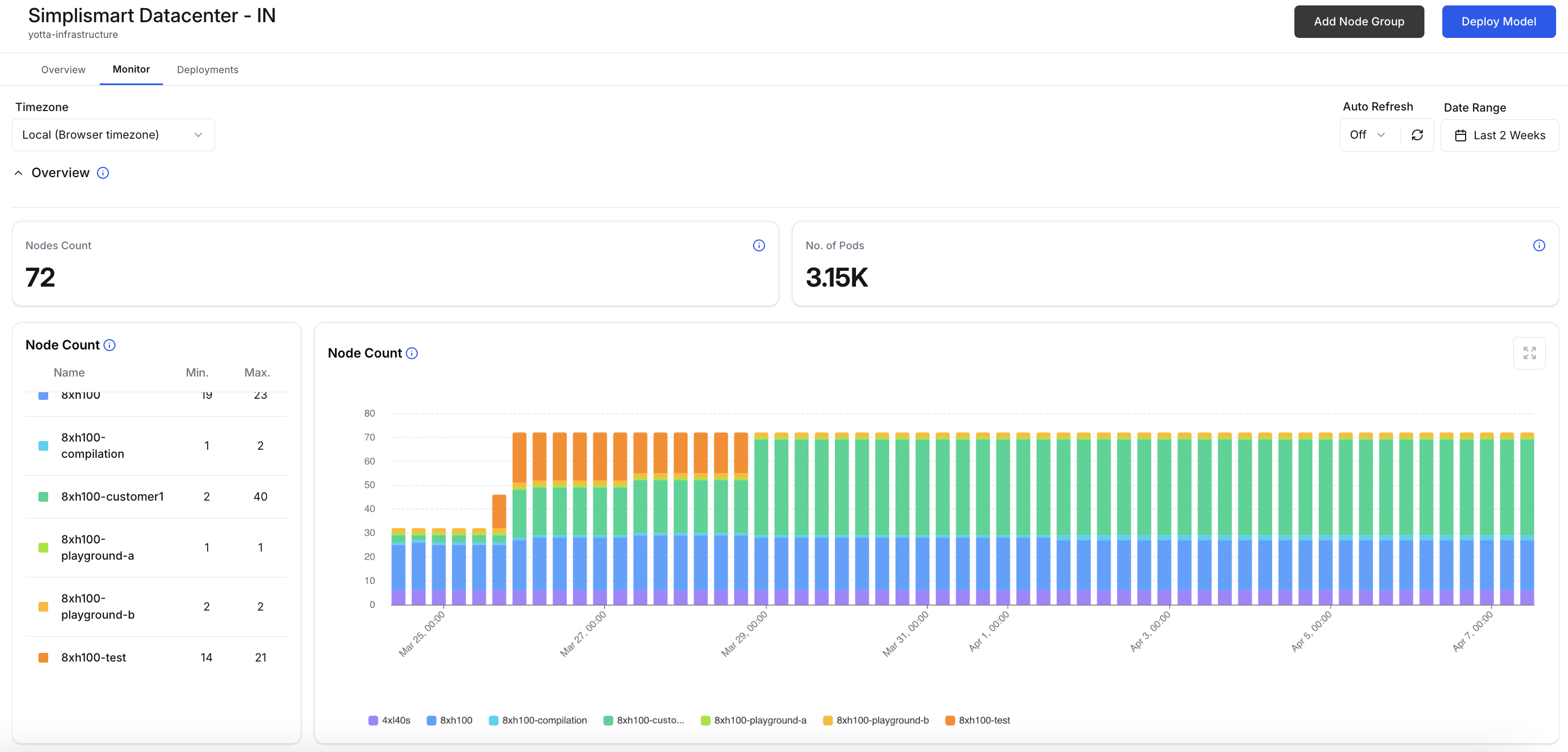


Alongside monitoring dashboards, Simplismart deploys a cluster operator known as the Simplismart Agent.
This agent continuously monitors system conditions and generates alerts when anomalies occur. Events such as resource exhaustion, node instability, or deployment issues can trigger notifications that help teams address problems quickly.
By embedding monitoring directly into the cluster, the platform ensures operational signals remain visible without requiring additional setup.
Conclusion
Running GenAI in your own cloud requires building and maintaining a complex infrastructure stack, spanning cluster provisioning, deployment pipelines, scaling systems, and observability.
Simplismart’s Bring Your Own Cloud (BYOC) AI infrastructure abstracts this operational layer without taking away infrastructure ownership.
Whether you choose a fully managed setup or import your existing Kubernetes cluster, the platform standardises how models are compiled, deployed, scaled, and monitored directly within your environment.
The outcome is a clear shift in how teams approach production AI:
- Faster time to production: move from setup to deployment in hours instead of weeks, without requiring internal tooling
- Reduced operational overhead: eliminate the need to manage infra-level complexity manually
- Cost efficiency: scale-to-zero and usage-based billing prevent idle GPU spend
- Performance optimisation: built-in compilation pipeline ensures efficient model execution
Instead of investing weeks building internal systems, teams can focus directly on shipping AI applications.
Your cloud.
Your GPUs.
A simpler way to run GenAI in production.
Contact us to get a tailor-made BYOC setup with custom inference pipelines for your workloads.